Product Compare0
Server Fan or Blower
Stock: In Stock
Stock: In Stock
- Brand: Dell
- Connector Type: 4-pin
- Speed: 8000 RPM
- Airflow: 56 CFM
- Noise Level: 40 DBA
Stock: In Stock
Stock: In Stock
- Power Connector Type: 4-pin
- Noise Level: 30 dBA
- Dimensions: 4.5 x 4.5 x 1.5 inches
- Weight: 0.5 lbs
Stock: In Stock
Stock: In Stock
- Airflow Rate: High Airflow
- Dimensions: Compact Design
- Installation Type: Plug-and-play
- Weight: Lightweight
Stock: In Stock
Stock: In Stock
- Voltage: 12V
- Size: 92mm x 92mm
- Lifespan: Up to 50,000 hours
- Connector Type: 4-pin PWM connector
Stock: In Stock
Stock: In Stock
- Number of Fans: 2
- Fan Dimensions: 80mm x 80mm x 25mm
- Fan Speed: 6000 RPM
- Weight: 1.5 lbs
Stock: In Stock
Stock: In Stock
- Fan Count: 6
- Power Efficiency: High
- Noise Level: Low
- Installation Ease: Quick Setup
Stock: In Stock
Stock: In Stock
- Fan Type: Internal server cooling fan
- Compatibility: Fits 1U rack servers
- Connector Type: 4-pin PWM power connector
- Cooling Method: High-speed airflow for thermal control
- Mounting: Tool-less snap-in installation
Stock: In Stock
Stock: In Stock
- Voltage: 12V
- Noise Level: Low noise operation
- Material: Durable plastic construction
- Installation: Easy plug-and-play
Stock: In Stock
Stock: In Stock
- Fan Count: 3 high-performance fans
- Installation: Plug-and-play for easy setup
- Noise Level: Low-noise operation, suitable for office use
- Airflow Efficiency: Designed for optimal air circulation
Stock: In Stock
Stock: In Stock
- Fan Count: Includes 4 high-efficiency fans
- Cooling Type: Active forced-air cooling system
- Noise Level: Operates with minimal noise
- Installation: Easy plug-and-play setup
Stock: In Stock
Stock: In Stock
- Fan Speed: 7500 RPM
- Airflow: 80 CFM
- Noise Level: 25 dBA
- Power Connector: 4-Pin PWM
Stock: In Stock
Stock: In Stock
- Airflow Rate: High airflow
- Noise Level: Low noise
- Dimensions: Compact
- Weight: Lightweight
Stock: In Stock
Stock: In Stock
- Voltage: 12V
- Dimensions: 92x92 mm
- Noise Level: Low noise
- Airflow: High airflow
Stock: In Stock
Stock: In Stock
- Voltage: 12V
- Size: 40mm x 40mm x 20mm
- Connector Type: 4-Pin Connector
- Noise Level: Low Noise
Stock: In Stock
Stock: In Stock
- Voltage: 12V
- Fan Speed: 6000 RPM
- Airflow: 50 CFM
- Noise Level: 25 dBA
- Connector Type: 4-Pin PWM
Stock: In Stock
Stock: In Stock
- Voltage: 12V
- Fan Speed: 6000 RPM
- Airflow: 40 CFM
- Noise Level: 32 dBA
- Connector Type: 4-Pin PWM
Stock: In Stock
Stock: In Stock
- Fan Speed: Up to 6000 RPM
- Dimension: 92mm x 92mm
- Weight: 300 grams
- Connector Type: 4-pin
Stock: In Stock
Stock: In Stock
- Voltage: 12V
- Size: 60mm
- Speed: High airflow
- Connector Type: 4-pin
Stock: In Stock
Stock: In Stock
- Voltage: 12V
- Fan Size: Standard 10-bay dimensions
- Airflow: High-performance
- Noise Level: Low noise operation
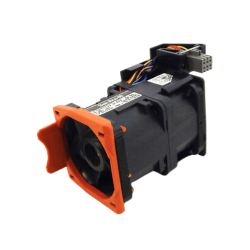
Stock: In Stock
Stock: In Stock
- Operating Voltage: 12V
- Speed: 4000 RPM
- Noise Level: Low (under 30 dBA)
- Weight: 0.5 lbs (approx.)
Dell Server Fan or Blower Price in Bangladesh
Dell Server fan price depnd on the fan quality and category. We offer a wide range of server fan and blower at the best price in Bangladesh.What is a Server Fan or Blower?
A server fan or blower is an essential component designed to regulate the temperature within a server by ensuring proper airflow and cooling. Servers generate a significant amount of heat due to the continuous operation of high-performance processors, memory, and other components. Dell server fans and blowers help dissipate this heat, maintaining optimal operating temperatures.How to Use a Dell Server Fan or Blower
Using and managing a Dell server fan or blower involves understanding its installation, configuration, and maintenance to ensure effective cooling:- Installation:
- Identify the Fan/Blower Slots: Servers typically have designated slots or bays for fans and blowers. Refer to your server's manual to locate these.
- Install the Fan/Blower: Align the fan or blower with the designated slot and securely attach it using the provided screws or clips. Ensure that the airflow direction matches the server’s cooling design, typically drawing cool air in and expelling hot air out.
- Connecting the Fan/Blower:
- Power Connection: Connect the fan or blower to the appropriate power source on the server’s motherboard. Most fans have a 3-pin or 4-pin connector that provides both power and control signals.
- Fan Control: Some Dell servers allow for advanced fan control through the BIOS/UEFI settings. Adjust these settings to optimize cooling performance based on your specific needs.
- Monitoring Fan/Blower Performance:
- Server Management Tools: Dell provides server management tools like iDRAC (Integrated Dell Remote Access Controller) that allow you to monitor fan speeds, temperatures, and overall system health.
- Set Alerts: Configure alerts for fan failures or abnormal temperature rises. This proactive monitoring helps prevent overheating and potential damage to server components.
- Maintenance:
- Regular Cleaning: Dust and debris can accumulate on fans and blowers over time, reducing their efficiency. Regularly clean these components using compressed air or a soft brush to maintain optimal airflow.
- Check for Wear: Periodically check the fans for signs of wear, such as unusual noises or reduced speed. Replace any failing fans promptly to ensure continuous cooling.
Benefits of Using Dell Server Fans or Blowers
- Efficient Cooling: Dell server fans and blowers are engineered to provide efficient cooling by ensuring consistent airflow across all critical components.
- Improved Server Performance: Keeping your server components cool allows them to operate at their maximum efficiency.
- Enhanced reliability: Regular and effective cooling reduces the risk of thermal shutdowns and hardware failures.
- Energy Efficiency: Dell server fans and blowers are designed to be energy-efficient, providing powerful cooling with minimal energy consumption.
- Quiet Operation: Advanced Dell server fans and blowers are built with noise reduction technologies, ensuring they operate quietly .
Available Dell Server Fans or Blowers at Crystal Vision Solutions
At Crystal Vision Solutions, we offer a wide range of Dell server fans and blowers to meet the cooling needs of various server configurations:- Standard Server Fans
- High-Performance Blowers
- Custom Cooling Solutions
What is the Price of Dell Server Fans in Bangladesh?
The price of Dell server fans in Bangladesh varies depending on the model, size, and cooling capacity. Here’s a general overview:- Standard Server Fans: Prices typically range from BDT 2,000 to BDT 8,000, depending on the size and features of the fan.
- High-Performance Blowers: These are usually priced between BDT 10,000 and BDT 25,000, reflecting their advanced cooling capabilities and higher airflow capacity.