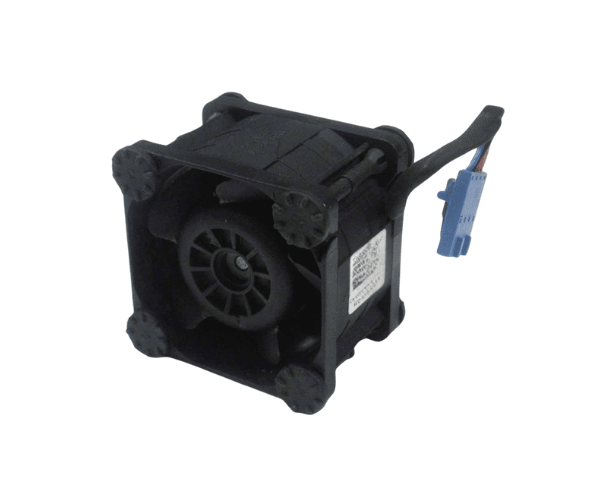
Introduction of Dell CMG7V Fan Assembly for PowerEdge R230 & R330
The
Dell CMG7V Fan Assembly for PowerEdge R230 & R330 is vital for cooling and airflow in these servers. It keeps your server at the right temperature, which is essential for its longevity and performance. This fan assembly effectively dissipates heat, helping to prevent overheating. By upgrading or replacing the fan assembly with this high-quality component, you ensure that your server runs smoothly and efficiently.
Why Choose Dell CMG7V Fan Assembly for PowerEdge R230 & R330?
Choosing the
Dell CMG7V Fan Assembly means investing in reliable cooling solutions for your PowerEdge R230 servers. This product is specifically designed to fit perfectly within these server models, ensuring seamless integration and optimal airflow. When you select the Dell CMG7V Fan Assembly, you choose enhanced performance, lower operational temperatures, and improved server reliability.
User Experience
Users appreciate the
Dell CMG7V Fan Assembly for its effective cooling capabilities and ease of installation. Many report noticeable improvements in server performance and a significant reduction in overheating issues. The low noise levels during operation contribute to a quieter working environment, making it an ideal choice for businesses where sound levels matter.
Detailed Breakdown of Features
- High-Performance Cooling: Designed to efficiently dissipate heat, maintaining optimal temperatures.
- Easy Installation: Plug-and-play setup allows for quick and straightforward installation.
- Low Noise Operation: Operates quietly, ensuring a comfortable working environment.
- Robust Build: Crafted from premium materials, this assembly is designed to endure prolonged usage.
- Compatible Design: Specifically engineered for PowerEdge R230 and R330 models.
- Optimized Airflow: Enhances airflow, promoting better overall system performance.
- Cost-Effective Solution: A budget-friendly option for maintaining server health and performance.
- Manufacturer Support: Comes with Dell's reliable customer support for peace of mind.
Installation Steps
- Power Down the Server: Always turn off the server and disconnect it from the power source to ensure safety during installation.
- Access the Server Chassis: Open the server chassis by following the manufacturer's guidelines, ensuring that you have full access to the internal components.
- Locate the Fan Assembly Slot: Identify the existing fan assembly location within the server chassis.
- Remove the Old Fan Assembly: Carefully detach the old fan assembly from its slot, taking care to avoid damaging any surrounding components.
- Insert the New Fan Assembly: Align the Dell Fan Assembly with the designated slots and gently push it into place until it securely fits.
- Reconnect Any Cables: Ensure all necessary cables are connected properly to the new fan assembly.
- Close the Chassis: Replace the server chassis cover securely and ensure all screws are tightened.
- Reconnect Power: Plug the server back into the power source and turn it on.
- Check Functionality: Verify that the new fan assembly is operational by monitoring server performance and listening for the normal operational sound of the fan.
Where It Can Be Used?
The
Dell Fan Assembly is ideal for use in data centers, server rooms, and other environments where PowerEdge R230 and R330 servers are operational. Its efficient cooling capabilities make it suitable for high-performance applications, virtualization, and cloud computing environments.