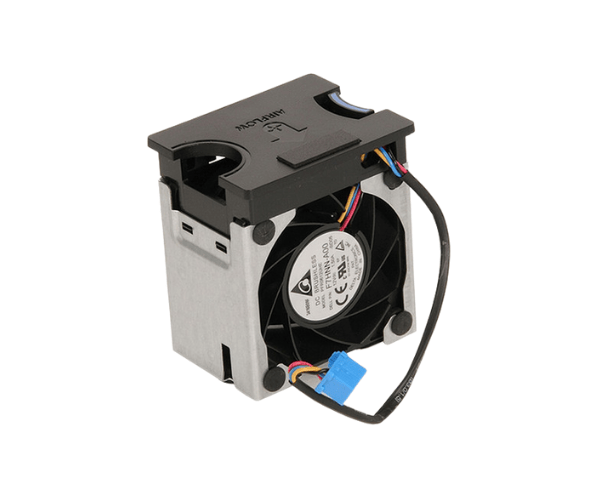
Introduction of Dell 1KVPX System Fan Assembly for PowerEdge R520
The Dell 1KVPX System Fan Assembly for PowerEdge R520 actively delivers efficient cooling and ensures optimal performance for the Dell PowerEdge R520 server. This system fan assembly ensures that your server remains cool during intense workloads, preventing overheating and extending its lifespan. With a reliable cooling solution, it enhances performance by maintaining stable temperatures even under pressure. This product is essential for any PowerEdge R520 user seeking to maintain their server's reliability and efficiency.
Why Choose Dell 1KVPX System Fan Assembly for PowerEdge R520?
Choosing the
Dell 1KVPX System Fan for your PowerEdge R520 ensures efficient cooling and uninterrupted performance. This fan assembly perfectly fits the Dell PowerEdge R520 and operates seamlessly with your server. It reduces the risk of overheating, ensuring longer system lifespan and preventing costly downtimes. The fan’s low noise and high airflow also contribute to a better working environment, ensuring that your system operates smoothly during demanding tasks. By opting for the Dell System Fan Assembly, you invest in a reliable and long-term solution for your server.
User Experience
Users have consistently praised the
Dell 1KVPX System Fan for its effectiveness in maintaining stable temperatures during heavy operations. It operates quietly and reliably, offering a hassle-free installation and seamless performance. The fan assembly’s ability to handle high workloads without producing excessive noise enhances the overall user experience, making it an essential component for server reliability.
Detailed Breakdown of Features
- Efficient Cooling: Designed for high airflow, it ensures the server remains cool even under heavy workloads.
- Optimized Fan Speed: Automatically adjusts to provide optimal cooling at all times.
- Low-Noise Operation: Operates quietly, minimizing disturbances in a work environment.
- Durable Construction: Crafted from premium materials to ensure long-lasting performance.
- Perfect Fit: Specifically engineered to fit the Dell PowerEdge R520.
- Easy Installation: Comes with a 4-pin connector for simple and secure attachment.
- Lightweight Design: Easy to handle and install within the server.
- Server Compatibility: Fully compatible with Dell PowerEdge R520 systems.
- Stable Performance: Helps maintain consistent server operation without overheating.
-
Energy-Efficient: Optimizes power consumption from the server’s power source.
Installation Steps
- Turn Off and Unplug the Server: Ensure the server is powered off and disconnected from any power source.
- Open the Server Case: Follow your PowerEdge R520 manual to safely access the internal components.
- Remove the Old Fan Assembly: Carefully detach the existing fan assembly by disconnecting its 4-pin connector.
- Install the New Fan: Place the Dell System Fan into the appropriate slot and connect the 4-pin connector to the motherboard.
- Close the Server Case: Ensure the case is securely closed after the installation.
- Reconnect Power and Test: Plug the server back in and power it on to ensure the fan is functioning correctly.
Where It Can Be Used?
The
Dell System Fan Assembly is ideal for data centers, IT environments, and businesses that rely on the Dell PowerEdge R520. Its reliable performance makes it suitable for intensive computing environments where servers handle critical tasks. Additionally, it can be used in office settings or server rooms to ensure the system remains operational under heavy loads.