Product Compare0
Server Expansion
Stock: In Stock
Stock: In Stock
- Drive Slots: 5
- Maintenance: Concurrent (Hot-swap)
- Weight: 4.00 lbs
- FRU Part Number: 91H3906
- Interface: SCSI backplane
Stock: In Stock
Stock: In Stock
- Device Type: DASD Expansion Unit with Cables
- Storage Expansion: Multiple disk storage capability
- Included Components: Cables included for easy installation
- Power Requirement: Compatible with standard IBM power supply
Stock: In Stock
Stock: In Stock
- Device Type: PCI Express GEN II Expansion Module
- Compatibility: IBM BladeCenter systems
- Expansion Slots: Adds additional PCIe slots for BladeCenter
- Data Transfer Rate: High-speed data transfer
Stock: In Stock
Stock: In Stock
- Brand: IBM
- Model: IBM 46M6140
- Adapter Type: Emulex 8GB Fibre Channel CIOv Dual Port
- Ports: 2 x 8GB Fibre Channel Ports
- Compatibility: IBM systems with CIOv expansion capabilities
- Data Transfer Rate: 8GB per port
Stock: In Stock
Stock: In Stock
- Disk Capacity: Supports up to 30 disks
- Disk Types Supported: SAS, SATA, or SSDs
- Storage Expansion Type: Rack-mounted 3U form factor
- Drive Bays: 30 x 2.5” or 3.5” drive bays
Stock: In Stock
Stock: In Stock
- Disk Drive Bays: 24
- Storage Capacity: Up to 24 HDDs (configured as per user choice)
- Form Factor: 3U Rack-Mountable
- Power Supply: Dual Redundant Power Supply
Stock: In Stock
Stock: In Stock
- Supported Drive Types: SAS, SATA
- Form Factor: Rack-mounted (3U)
- Cooling Method: Active cooling with redundant fans
- Dimensions: 5.2” H x 17.5” W x 27.5” D
Stock: In Stock
Stock: In Stock
- Product Type: RIO Card Assembly Bus Expansion
- Compatible Systems: IBM Servers and Expansion CEC modules
- Dimensions: Standard PCI format
- Connectivity: High-speed interconnects
Stock: In Stock
Stock: In Stock
- Compatible Systems: IBM server systems
- Dimensions: Standard PCI format
- Data Transfer Rate: Supports fast data flow
- Maximum Power Usage: 5W
Stock: In Stock
Stock: In Stock
- Drive Bays: Supports multiple hard drives
- Storage Capacity: Configurable per requirements
- Data Transfer Rate: High-speed transfer
- Cooling: Active cooling with redundant fans
Stock: In Stock
Stock: In Stock
- Supported Interface: Ultra SCSI
- Compatibility: IBM Power Systems and AS/400
- Drive Support: SCSI drives
- Data Transfer Rate: Up to 80 MB/s
Stock: In Stock
Stock: In Stock
- Product Type: Fibre Channel Expansion Card
- Data Transfer Rate: 4Gbps
- Compatibility: IBM servers with PCIe slots
- Operating Temperature: 0°C to 55°C
Stock: In Stock
Stock: In Stock
- Product Type: Fibre Channel Expansion Card (CIOv)
- Compatibility: IBM servers with CIOv expansion
- Operating Temperature: 0°C to 55°C
- Storage Temperature: -20°C to 65°C
Stock: In Stock
Stock: In Stock
- Product Type: DS6000 Expansion Enclosure
- Maximum Storage Capacity: Up to 60TB (with supported drives)
- Drive Bays: 14 x 3.5” SAS/SATA drives
- Power Supply: Dual Redundant Power Supplies
Stock: In Stock
Stock: In Stock
- Product Type: DS6000 Expansion Enclosure
- Maximum Storage Capacity: Up to 60TB (with supported drives)
- Drive Bays: 14 x 3.5” SAS/SATA drives
- Data Transfer Rate: High-speed 4Gbps per port
Stock: In Stock
Stock: In Stock
- Compatibility: IBM server systems
- Expansion Slots: Multiple PCI expansion slots
- Form Factor: 2U Rack-Mountable
- Dimensions: 3.5” H x 17.5” W x 27.5” D
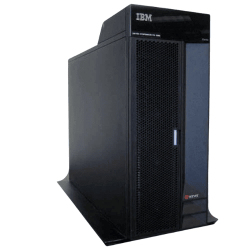
Stock: In Stock
Stock: In Stock
- Product Type: PCI-X Expansion Tower Deskside
- Compatibility: IBM servers and systems
- Power Supply: Standard system power requirements
- Cooling: Active cooling with internal fans
Showing 1 to 17 of 17 (1 Pages)
IBM Server Expansion Price in Bangladesh
At Crystal Vision Solutions, we offer a wide collection of IBM Server Expansion at the best price in Bangladesh. Order the best quality server expansion now.
What is a Server Expansion?
A server expansion refers to the process of adding extra hardware components to a server to increase its capacity, functionality, or performance. Server expansions can include additional storage, memory, processing power, or networking capabilities. These expansions enable servers to handle more extensive workloads, manage higher traffic, and store larger volumes of data. For businesses and data centers, server expansions are crucial to ensuring that servers can scale with growing demands without needing to replace the entire system.Where IBM Server Expansions Can Be Used
IBM server expansions are versatile and can be used in various environments that require enhanced server performance and scalability:- Data Centers: IBM server expansions allow data centers to increase their processing power, storage capacity, and network connectivity without replacing their current infrastructure, ensuring smooth operation as demand grows.
- Enterprise Environments: Large enterprises often need additional memory or storage to support growing business applications, such as databases, ERP systems, and large-scale CRM platforms. IBM server expansions make it easy to add capacity as needed.
- Cloud Computing: Cloud service providers rely on server expansions to scale their infrastructure and accommodate more clients or higher traffic without performance degradation.
- Virtualization: Virtualized environments can benefit significantly from server expansions, allowing more virtual machines (VMs) to run on a single physical server.
- High-Performance Computing (HPC): Expanding server memory, storage, and processing power is essential in HPC environments, where large datasets are analyzed and processed at high speeds.
How to Use IBM Server Expansions
Utilizing an IBM server expansion involves several key steps:- Identify the Expansion Needs: Assess your current server’s limitations. Do you need more memory, additional storage, or higher network bandwidth? This will help determine the type of expansion required.
- Choose the Appropriate Expansion Module: Based on your needs, select the appropriate IBM expansion module, whether it’s additional storage drives, memory modules, or network interface cards (NICs).
- Install the Expansion: Depending on the type of expansion, installation may involve physically inserting new hardware components, such as RAM modules or storage drives, into the server’s available slots. For network expansions, Ethernet cards or additional NICs are installed.
- Configure the Server: After installing the expansion hardware, the server needs to be configured to recognize the new components. This may involve updating firmware, configuring network settings, or partitioning new storage drives.
- Test the Expanded Server: Once the expansion is complete, perform system tests to ensure the server is operating optimally with the new components and handling the increased workload efficiently.
Available IBM Server Expansions at Crystal Vision Solutions
At Crystal Vision Solutions, we offer a wide range of IBM server expansions tailored to meet the growing needs of businesses in Bangladesh. Some of our key IBM expansion products include:- IBM Storage Expansion Units: These units allow for the addition of extra hard drives or SSDs to your server, significantly increasing storage capacity while maintaining high-speed data access.
- IBM Memory Expansion Modules: Add additional RAM to your servers with IBM’s high-performance memory expansion modules. Ideal for businesses running large-scale applications or virtualized environments that require substantial memory resources.
- IBM Network Expansion Cards: Expand your server’s networking capabilities with IBM network interface cards (NICs), offering speeds from 10 Gbps to 100 Gbps. These are perfect for enhancing data center or cloud server connectivity.
- IBM Processor Expansion Modules: Scale up your server’s processing power by adding extra CPU cores or new processor modules, ensuring faster computation for high-demand applications like data analysis, artificial intelligence (AI), or cloud services.
- IBM RAID Controllers: These expansions improve data redundancy and performance, helping you manage multiple storage devices more effectively while ensuring data integrity in case of a drive failure.
How Many Types of Server Expansions Are Available in Bangladesh?
In Bangladesh, there are several types of server expansions available, depending on the server's requirements and the type of workload it needs to handle:- Storage Expansions: These include the addition of SSDs, hard drives, or RAID controllers, increasing storage capacity while improving data redundancy and performance.
- Memory Expansions: Businesses can expand server memory by adding additional RAM modules, increasing the system's capacity to run larger applications and handle more concurrent processes.
- Processor Expansions: Adding extra CPUs or upgrading existing processors allows servers to handle higher processing loads, making them ideal for computationally heavy tasks like big data processing and virtualization.
- Network Expansions: Network interface cards (NICs) can be added to servers to increase network bandwidth and improve data transfer rates, especially important in high-performance environments like data centers or cloud infrastructure.
- Power Expansions: Power supplies can be upgraded or expanded to ensure that servers with added components continue to receive adequate power, reducing the risk of failure or downtime.