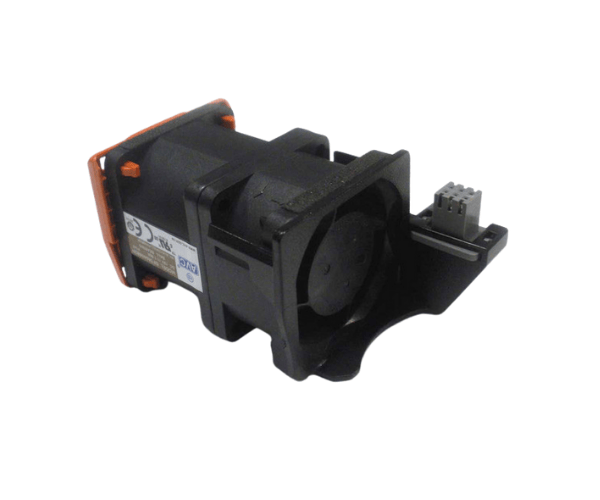
The Dell 89M11 Fan Dual Rotor AVC for PowerEdge R630 ensures optimal cooling for your Dell server. This fan assembly delivers efficient airflow to maintain the ideal temperature within your PowerEdge R630. It effectively dissipates heat, enhancing your server's longevity and performance. Whether in a busy data center or a compact server room, this fan is a vital investment for reliable operation.
Why Choose the Dell 89M11 Fan Dual Rotor AVC for PowerEdge R630?
Opting for the Dell 89M11 Fan Dual Rotor AVC ensures you get a reliable cooling solution designed specifically for your server requirements. This fan assembly provides outstanding airflow and operates quietly, making it suitable for environments where noise control is important. Furthermore, the dual rotor design enhances efficiency and increases the lifespan of the fan. This design helps prevent overheating and minimizes the risk of server downtime. With straightforward installation and compatibility with the PowerEdge R630, the Dell 89M11 fan is crucial for sustaining optimal server performance.
User Experience
Users appreciate the Dell 89M11 Fan Dual Rotor AVC for its efficient cooling capabilities and quiet operation. Many have reported significant improvements in server temperature management, even under heavy workloads. The fan’s easy installation process is another highlight, allowing users to replace it without hassle. Overall, customers find that this fan enhances their server’s performance while keeping noise levels low, making it a popular choice among IT professionals.
Detailed Breakdown of Features
- Dual Rotor Design: The Dell 89M11 features a dual rotor design, which significantly increases airflow compared to single rotor fans. This design optimizes cooling efficiency, allowing the server to maintain stable temperatures during demanding operations.
- High Airflow Rate: This fan is engineered to deliver a high airflow rate, ensuring that heat is effectively dissipated from the server's critical components. This capability is crucial for preventing overheating and extending the lifespan of the equipment.
- Low Noise Operation: Despite its powerful performance, the Dell 89M11 operates quietly. This low noise level is especially beneficial in office environments or data centers where sound control is necessary.
- Hot-Swappable: The Dell 89M11 fan is designed to be hot-swappable, allowing for quick replacements without powering down the server. This feature reduces downtime and improves overall operational efficiency.
- Lightweight and Compact: Its compact design allows for easy installation and ensures that it does not take up unnecessary space within the server chassis.
Installation Steps
- Power Down the Server: Ensure the server is completely shut down and unplugged from the power source for safety.
- Access the Fan Compartment: Open the server chassis and locate the fan module.
- Remove the Old Fan: Carefully detach the old fan from its housing by disconnecting any cables and unscrewing it if necessary.
- Install the Dell 89M11 Fan: Place the new Dell 89M11 fan into the designated slot, ensuring it fits securely.
- Connect the Cables: Reconnect any cables to the fan and ensure they are firmly attached.
- Close the Chassis: Securely close the server chassis and reconnect the power supply.
- Power On the Server: Turn the server back on and verify that the new fan operates correctly.
Where It Can Be Used?
The
Dell 89M11 Fan Dual Rotor AVC is perfect for use in various environments, including data centers, server rooms, and corporate IT infrastructures. Its efficient cooling capabilities make it suitable for systems running intensive applications or handling large volumes of data. Additionally, this fan is an excellent choice for businesses focused on maintaining a quiet workplace while ensuring their servers remain cool.