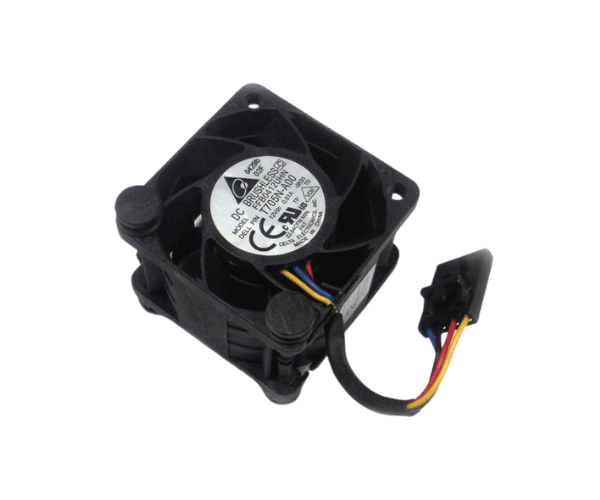
Introduction of Dell N229R Fan for PowerEdge R210
The Dell N229R Fan for PowerEdge R210 plays a vital role in keeping your server cool. Servers produce substantial heat while running. Effective cooling is crucial to avoid overheating and maintain dependable performance. This fan fits the PowerEdge R210 perfectly. It provides effective airflow, helping to extend the life of your server. Whether you run a small business or manage a large data center, the Dell N229R Fan is a smart investment. It ensures your systems operate seamlessly and efficiently.
Why Choose Dell N229R Fan for PowerEdge R210?
Choosing the
Dell N229R Fan means investing in a reliable cooling solution tailored to your server's specific needs. This fan offers high airflow, which is essential for effective heat dissipation. Its low noise level ensures a quiet operating environment, making it ideal for office spaces or server rooms where sound levels are crucial. Moreover, the fan is designed for easy installation, allowing you to replace or upgrade without hassle. With the Dell N229R Fan, you can enhance your server's performance while maintaining a comfortable environment.
User Experience
Users appreciate the
Dell N229R Fan for its efficient cooling capabilities and quiet operation. Many have reported noticeable improvements in their server's performance and stability after installation. The fan fits perfectly into the PowerEdge R210, making the installation process straightforward. Additionally, users value the durability of the Dell N229R Fan, as it withstands continuous use without degradation. Overall, customers find this fan to be a dependable choice for maintaining optimal server performance.
Detailed Breakdown of Features
- High Airflow: The Dell N229R Fan delivers powerful airflow, which is critical for effective heat management in the PowerEdge R210.
- Low Noise Operation: With its design focused on minimizing sound, this fan operates quietly, making it suitable for environments where noise levels matter.
- Easy Installation: Designed for quick and easy setup, the Dell N229R Fan can be installed without professional assistance, saving time and effort.
- Durable Construction: Built with high-quality materials, this fan can endure prolonged use, ensuring longevity and reliable performance.
- Perfect Fit: The fan is specifically designed for the PowerEdge R210, guaranteeing optimal compatibility and functionality.
- Efficient Cooling: It effectively prevents overheating, enhancing the overall performance and stability of the server.
Installation Steps
- Power Down the Server: Before beginning the installation, ensure that the PowerEdge R210 is turned off and unplugged to avoid any electrical hazards.
- Access the Fan Compartment: Open the server chassis to reach the fan compartment where the Dell N229R Fan will be installed.
- Remove the Old Fan: Disconnect the existing fan by gently unplugging the connector from the motherboard and removing any screws holding it in place.
- Install the New Fan: Position the Dell N229R Fan in the designated slot, ensuring the airflow direction aligns with the server's airflow design. Fasten it securely using screws if necessary.
- Connect the Fan: Plug the fan’s connector into the appropriate 4-pin slot on the motherboard.
- Close the Chassis: Once the fan is securely installed and connected, close the server chassis and ensure it is properly sealed.
- Power Up the Server: Plug the server back in and power it on, monitoring the fan's operation to ensure it runs smoothly.
Where It Can Be Used?
The
Dell N229R Fan is ideal for various environments, including:
- Data Centers: It helps maintain the optimal temperature for servers under heavy workloads.
- Corporate IT Departments: It ensures reliable operation in server rooms where equipment runs continuously.
- Small Business Networks: It provides necessary cooling for PowerEdge R210 servers used in everyday business operations.
- Home Office Setups: It is perfect for users running server-related tasks from home, ensuring a quiet and efficient cooling solution.