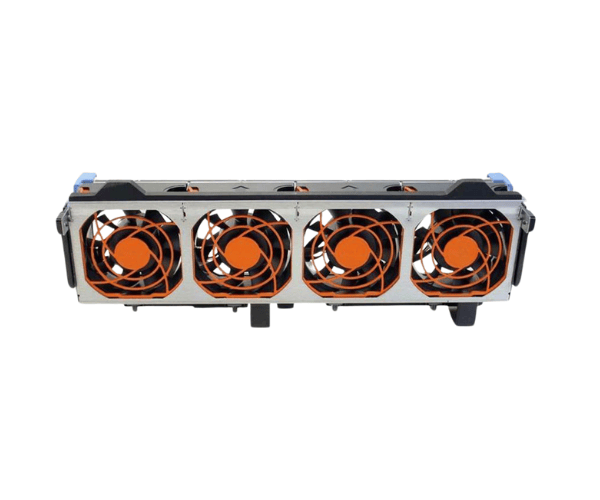
Introduction of Dell 8G79K Fan 12v 92x92 for PowerEdge T620
The
Dell 8G79K Fan 12v 92x92 for PowerEdge T620 is an essential cooling component designed specifically for the PowerEdge T620 server. With its reliable performance, this fan helps maintain optimal operating temperatures, ensuring that your server runs smoothly and efficiently. By effectively managing airflow, the Dell 8G79K fan prevents overheating, which is crucial for maintaining system reliability and longevity. Investing in the Dell 8G79K fan not only enhances your server's performance but also extends its lifespan, making it a smart choice for data centers and businesses that demand high reliability.
Why Choose the Dell 8G79K Fan 12v 92x92 for PowerEdge T620?
Choosing the
Dell 8G79K Fan 92x92 for your PowerEdge T620 means opting for quality and reliability. This fan is engineered to deliver optimal airflow and cooling performance, which is essential for preventing overheating during intensive operations. By maintaining appropriate temperature levels, the Dell 8G79K fan ensures that your server operates efficiently, reducing the risk of hardware failure. Additionally, its design facilitates easy installation, making it a hassle-free upgrade for your server cooling system.
User Experience
Users report a significant improvement in their server's performance after installing the
Dell 8G79K Fan. Many have noticed quieter operations and better thermal management, which has allowed them to run demanding applications without concerns about overheating. Customers appreciate the easy installation process and the compatibility of the fan with the PowerEdge T620, enhancing their overall experience with the server.
Detailed Breakdown of Features
- High Performance: The Dell 8G79K fan delivers superior airflow, effectively cooling your server under heavy loads.
- Quiet Operation: This fan runs quietly, minimizing noise in sensitive environments like offices and data centers.
- Durable Construction: The Dell 8G79K fan features high-quality materials, allowing it to withstand continuous use and last longer.
- Easy Installation: You can install the fan quickly and easily without any special tools or expertise.
- Energy Efficient: The fan operates at 12V, ensuring efficient energy consumption while providing reliable cooling.
- PWM Control: The 4-pin PWM connector allows precise speed control, optimizing cooling performance as needed.
- Versatile Application: This fan suits various server configurations, ensuring compatibility with multiple setups.
- Enhanced Airflow Design: The fan maximizes airflow while maintaining low noise levels.
- Extended Lifespan: It boasts a lifespan of up to 50,000 hours, ensuring long-term performance and reliability.
- Temperature Range: The fan operates effectively across a wide temperature range, making it ideal for various environments.
Installation Steps
- Power Down the Server: Before starting the installation, turn off the PowerEdge T620 and disconnect it from the power source.
- Open the Server Chassis: Carefully remove the chassis cover to access the internal components of the server.
- Locate the Fan Slot: Identify the designated slot for the fan on the server's motherboard.
- Insert the Dell 8G79K Fan: Align the fan with the slot and gently push it into place until it is securely seated.
- Reconnect the Fan Connector: Plug the fan connector into the appropriate header on the motherboard to ensure proper functionality.
- Close the Chassis: Replace the server cover securely to protect the internal components.
- Power Up the Server: Reconnect the power source and turn on the server to test the fan operation.
Where It Can Be Used?
The
Dell 8G79K Fan 12V 92x92 is ideal for use in data centers, server rooms, and any environment where PowerEdge T620 servers are deployed. Its efficient cooling capabilities make it perfect for situations requiring high-performance computing, including virtualization, database management, and cloud applications.