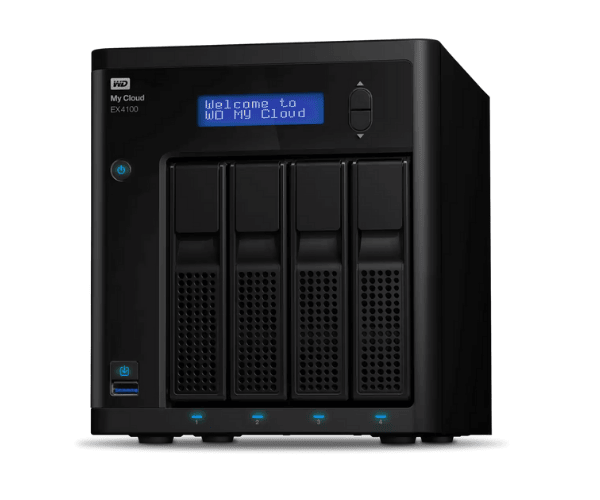
About The WD WDBWZE0400KBK-EESN My Cloud Expert EX4100 40TB
The WD WDBWZE0400KBK-EESN My Cloud Expert EX4100 40TB is a business-class NAS (Network Attached Storage) for enterprises and heavy users at home. With 40TB of huge storage, it's ideal for those with enormous storage requirements. With cloud access, data protection, and easy expansion, it offers hassle-free and secure data management.
Description
WD WDBWZE0400KBK-EESN My Cloud Expert EX4100 40TB in BD
The WD WDBWZE0400KBK-EESN My Cloud Expert EX4100 40TB is available to purchase in Bangladesh from different electronic shops, online shops, and official stores. It's a great choice for an individual who needs a large storage device that is flexible and secure. Whether you're an enterprise or an extreme home user, it's the best gadget to keep and organize your valuable data.
User Experience of WD WDBWZE0400KBK-EESN My Cloud Expert EX4100 40TB
Consumers love WD WDBWZE0400KBK-EESN My Cloud EX4100 40TB for its performance and simple installation. The huge storage capacity is suitable for professionals handling big media files, databases, or storage backups. The dual-core processor and 4GB RAM enable smooth file transfer and access. Consumers highly appreciate secure data protection through AES 256-bit encryption, which gives them a sense of security. The remote access feature also gets high praise, as it allows users to access files remotely, a wonderful feature for companies with remote workers.
Why Choose The WD WDBWZE0400KBK-EESN My Cloud Expert EX4100 40TB?
WD WDBWZE0400KBK-EESN My Expert EX4100 40TB is perfect for businesses or individuals with very high storage needs. Given its enormous storage, cloud backup, and secure management of data, the product best fits business entities that need to store and access data remotely. It has been complemented by features like encryption of data and auto-backup, which makes it a reliable and secure device to store data on. The USB expansion ports are also an effortless way of enhancing storage in the future when necessary, offering ease of future upgrades.
Key Features
- Massive 40TB Storage: Ample 40TB of storage space to accommodate big data needs, including high-definition multimedia files, business files, and backups.
- High-Performance Processor: Powered by Marvell ARMADA 388 Dual-Core 1.6 GHz processor to process data rapidly and effectively.
- Cloud and Remote Access: Provides easy remote access to data through My Cloud OS 3 from anywhere, making it suitable for remote employees in organizations or home users on the go.
- Enhanced Security: 256-bit AES encryption and password protection secure your data.
- Storage Capacity Expansion: Storage capacity expansion with ease through the two USB 3.0 ports and a USB 2.0 port.
- Auto Backup: Automatic backup to prevent loss of data, with cloud integration for enhanced protection.
How to Maintain WD WDBWZE0400KBK-EESN My Cloud Expert EX4100 40TB?
- Software Updates: Update software and firmware on a regular basis to keep the device at its optimal performance.
- Prevention of Overheating: Place the device in a well-ventilated area to avoid overheating.
- Backup on a Regular Basis: In addition to automatic backup, manual backup of important data at regular intervals is also suggested.
- Health Monitoring: Check storage health on a regular basis using the My Cloud OS dashboard to ensure drives are running at their best.
- Physical Cleaning: Clean the device physically from time to time to avoid dust buildup and possible slowing of performance.
Installation Steps
- Unbox the Device: Unpack WD WDBWZE0400KBK-EESN My Expert EX4100 40TB from the packaging and place it on a firm, flat surface.
- Connect to Power and Network: Plug in the power cord to a power source and plug the device into your network using the Ethernet cable provided.
- Power On the Device: Turn on the device and allow it to boot.
- Access Web Interface: Open a browser and type in the IP address of the device to open the setup page.
- Create or Log into My Cloud Account: Sign in or sign up to use your storage.
- Configure Storage: Configure the storage following the instructions and install any additional drives if needed.
- Set Up Backup Options: Select the automatic or manual backup settings to back up your data.
- Install My Cloud App: Download and install My Cloud software for remotely accessing your data through mobile devices.
Where It Can Be Used?
WD WDBWZE0400KBK-EESN My Cloud EX4100 40TB is environment-friendly and can be used in the following environments:
- Home Use: Ideal for backing up large collections of media files, personal data, and secure remote access.
- Small to Medium-Sized Business: Ideal for corporate data backup, team file sharing, and remote data access.
- Large Enterprise: Ideal for businesses with massive storage requirements for the management of large files and collaborative work.
- Remote Access: Ideal for remote employees or multi-location teams requiring access to data across locations.