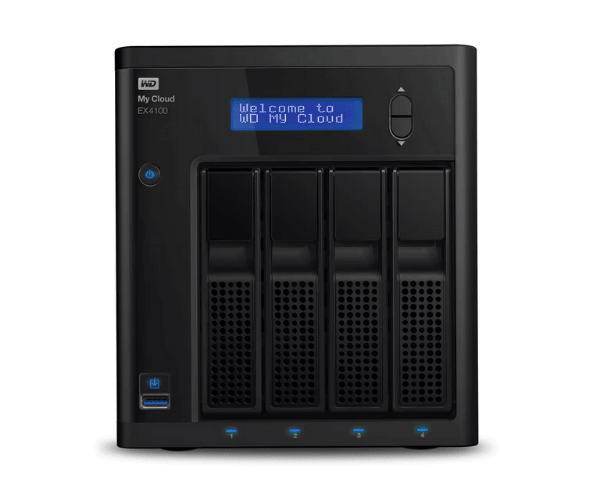
About WD WDBWZE0160KBK-EESN My Cloud Expert EX4100 16TB Storage
The WD WDBWZE0160KBK-EESN My Cloud Expert EX4100 16TB Storage is an extremely secure and expandable NAS home and office solution. Featuring 16TB of pre-configured storage, the system provides easy remote access, top-rated security, and scheduled backups, safely storing your data and making it simple to access anywhere.
Description
WD WDBWZE0160KBK-EESN My Cloud EX4100 16TB Storage in BD
The WD WDBWZE0160KBK-EESN My Cloud Expert EX4100 16TB Storage can be found in Bangladesh from different electronics stores, online stores, and official dealers. It is an ideal choice for consumers, business users, and professionals who need high-storage capacity, secure, and easy-to-integrate cloud storage with remote data management and protection access.
User Experience of WD WDBWZE0160KBK-EESN My Cloud EX4100 16TB Storage
The WD WDBWZE0160KBK-EESN My Cloud Expert EX4100 is always a favorite among customers due to its intuitive interface, easy setup, and high-quality level of performance. The device's 16TB capacity provides an excellent location to store monolithic files like media collections, databases, and corporate files. The security options like AES 256-bit encryption are of utmost value in the matter of protecting data.
Why Choose WD WDBWZE0160KBK-EESN My Cloud Expert EX4100 16TB Storage?
WD WDBWZE0160KBK-EESN My Cloud Expert EX4100 16TB Storage is ready to address the heavy use of home and small business consumers who have heavy storage needs for data. Its internal capacity of 16TB, cloud backup, and remote access make it an easy and secure data management unit. Its expandability is also enhanced by the fact that its storage can be expanded via USB ports, thereby making it a viable choice for users who anticipate growing storage needs. As a home or business solution,
Key Features
- High-Performance Processor: Powered by the Marvell ARMADA 388 1.6 GHz Dual-Core processor to ensure effective data processing and quick access to data.
- Massive 16TB Storage: With 16TB of storage capacity to accommodate huge amounts of data and file backups.
- Flexible Expansion: Easily expand with two USB 3.0 ports and a single USB 2.0 port for external drive transfers.
- Cloud and Remote Access: Store your files and access them from anywhere using My Cloud OS 3 for maximum mobility.
- Data Protection: AES 256-bit encryption and password protection for secure data storage.
- Automated Backup: Make use of cloud backup and automated backup for protection of your data and to ensure that it stays in sync all the time.
How to Maintain WD WDBWZE0160KBK-EESN My Expert EX4100 16TB Storage?
- Scheduled Software Updates: Regularly update the firmware and software updates for improved performance and security.
- Proper Ventilation: Place the product in a well-ventilated place to avoid it from heat damage and slowdown.
- Schedule Regular Manual Backups: Even though the drive does support automatic backup, scheduling regular manual backup can also provide valuable information safety.
- Check Storage Health: Check the storage and drive plugged in for its health via the My Cloud OS dashboard.
- Clean Periodically: Wipe clean ports and the device's exterior using a dry cloth to prevent dust buildup that might slow down the performance.
Installation Steps
- Remove Packaging: Remove the WD WDBWZE0160KBK-EESN My Cloud Expert EX4100 16TB Storage from its packaging and place it on a flat surface.
- Power and Network Connection: Power on the device and connect it to your network using an Ethernet cable.
- Power On the Device: Power the device on and let it boot up.
- Access Web Interface: Open a web browser and enter the device's IP address (located in the manual) to reach the setup page.
- My Cloud Account: Log in or sign up to begin the device setup process.
- Set Up Backup: Configure automatic backup or cloud backup for easy data backup.
- Install My Cloud App: Install the My Cloud app on your phone, if required, for easy remote streaming of your files.
Where It Can Be Used?
WD WDBWZE0160KBK-EESN My Cloud Expert EX4100 16TB Storage is applied in numerous situations:
- Home: Store personal files, media collections, and stream content while benefiting from data security with automatic backup.
- Small Business: Ideal for protecting valuable business documents, collaboration among teams, and protecting client information.
- Large Enterprises: Ideal for large teams with massive storage needs and remote access to data.
- Remote Access: Most ideal for remote employees or companies with branches that need information accessed from where they are.