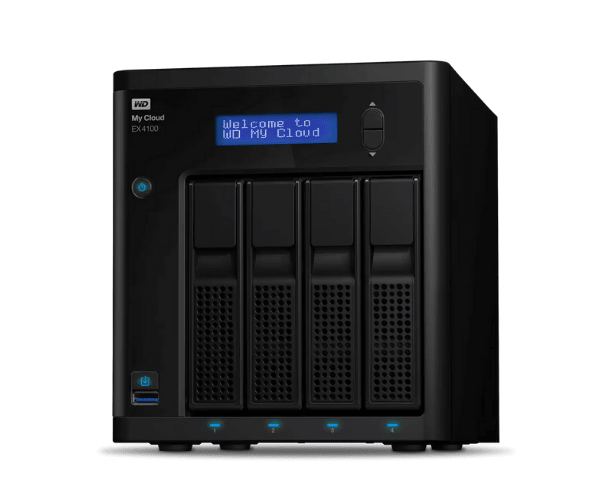
About the WD WDBWZE0000NBK-EESN My Cloud Expert EX4100 0TB Storage
The WD WDBWZE0000NBK-EESN My Cloud Expert EX4100 is a scalable, reliable, and high-performance storage device supporting both home and business use. With flexible storage management, the product ensures the smooth storage of data, secure backup, and remote access. The product features advanced functionalities to manage the maximum amount of storage and secure data.
Description
WD WDBWZE0000NBK-EESN My Cloud EX4100 0TB Storage in BD
The WD WDBWZE0000NBK-EESN My Cloud Expert EX4100 is easily accessible in Bangladesh. It can be purchased from leading electronics retailers, approved resellers, and online retailers. Being a reliable storage device, it is a top choice among individuals, professionals, and small businesses requiring high-capacity, secure, and easy-to-access storage.
User Experience of WD WDBWZE0000NBK-EESN My Expert EX4100 0TB Storage
The majority of users praise the WD WDBWZE0000NBK-EESN My Cloud Expert EX4100 for its intuitive interface and easy installation. With its 2GB of RAM and Marvell ARMADA 388 dual-core processor, the machine offers quick data transfer and availability. The majority have found it beneficial in the backup of large files and protecting sensitive data due to its security features. The remote access of data via My Cloud OS 3 is highly appreciated among customers who need to enjoy flexibility in managing their storage devices.
Why Choose The WD WDBWZE0000NBK-EESN My Cloud Expert EX4100?
WD WDBWZE0000NBK-EESN My Cloud Expert EX4100 stands out in the competitive NAS market due to its performance, security, and flexibility. Whatever personal or business requirements you have to access a secure solution, the device is an appropriate solution that suits your numerous demands. With its capability of handling rapid data transfer, automated backup, and remote access, it becomes a reliable partner in your professional as well as individual storage needs. Moreover, the device is external drive expandable using USB, meaning you can store a lot more as you expand your demands.
Key Features
- High-Performance Processor: Fitted with the Marvell ARMADA 388 Dual-Core processor (1.6 GHz) for better data processing.
- Customizable Storage: 0TB version provides storage addition according to your requirement.
- Cloud Access: Access data from remote locations using My Cloud OS 3.
- Security: AES 256-bit Encryption and password lock for data protection.
- Backup Support: Auto backup support and cloud integration for data protection.
- Expandable Storage: Two USB 3.0 and USB 2.0 ports to easily expand it.
How to maintain WD WDBWZE0000NBK-EESN My Expert EX4100 0TB Storage?
- Regular Software Updates: Update firmware and software for the device regularly to keep it in top order.
- Check for Overheating: Provide sufficient ventilation to avoid overheating that can slow its performance.
- Backup Data at Regular Intervals: Although the device is set to automatically backup, manually backup vital data at regular intervals.
- Monitor Health: Pay attention to storage health via the My Cloud OS dashboard in order to establish whether there are issues with drives attached.
- Physical Cleaning: Clean the outer surface and ports of the device using a dry cloth in order to prevent dust buildup.
Installation Steps
- Unbox and Place the Device: Remove the WD WDBWZE0000NBK-EESN My Cloud Expert EX4100 from the box and place it on a level surface.
- Plug into Power and Network: Plug the device into a power outlet and the network using an Ethernet cable.
- Power On: Power on the device and allow it to boot.
- Access the Web Interface: Open a web browser and enter the device's IP address (most likely found in the manual) to reach the setup page.
- Create a My Cloud Account: Log in or create a new account to access your device.
- Set Up Storage: Add hard drives (if not previously installed) and set up the storage settings.
- Configure Backup Settings: Configure automatic backups according to your choice.
- My Cloud App Install: Optionally, install the My Cloud app to access remotely from your phone.
Where It Can Be Used?
The WD WDBWZE0000NBK-EESN My Cloud Expert EX4100 is an easy-to-use device for use in a variety of environments:
- Home Use: Storage of personal data, file sharing, and streaming of media.
- Small Business: Ideal for data backup, file sharing, and storing confidential information.
- Big Companies: Scalable to meet large volume storage requirements of departments and teams.
- Remote Access: Access data everywhere, making it suitable for remote workers or those requiring cloud backup alternatives.