ALL Categories
Your Cart
Share:

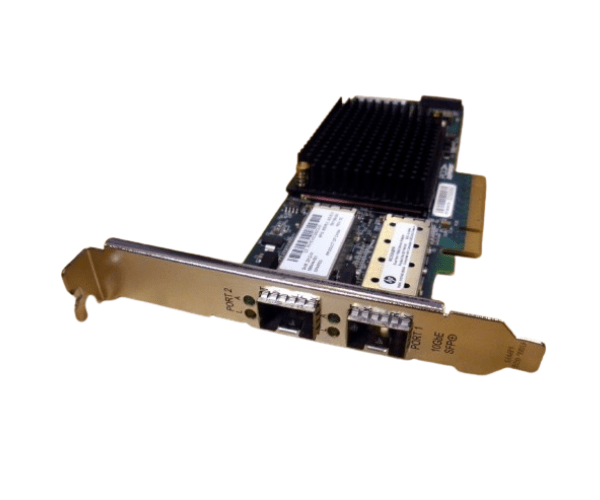
HP 581201-B21 581199-001 NC550SFP 2-Port 10Gb Ethernet Adapter

  • Product id:  4202
  • Stock: In Stock
  • Brand: HP
  • Model: 581201-B21 581199-001 NC550SFP
WhatsApp Inquiry

Key Features

    • Ports: 2
    • Speed: 10Gb Ethernet
    • Interface: PCIe
    • Form Factor: Low Profile

Please confirm availability before completing your purchase by calling us.

The actual product may vary in size, color, and layout compared to the website display images. Claims will not be accepted for image discrepancies.

We reserve the right to change the price of any product at any time due to the volatile nature of technology prices.

We cannot guarantee that the information on this page is 100% accurate. Crystal Vision Solutions not responsible for any results obtained from using this information.

Main Features
Connector Type 2 × SFP+ cages (supports both DAC & fiber modules)
Data Rate 10 Gb/s per port, full-duplex (20 Gb total bi‑direction)
Port Type 2 × 10 Gb Ethernet (dual SFP+)
Bus Interface PCI Express 2.0 ×8 (compatible with ×4/×8)
Power Consumption 12 V @ 1.5 A max → ~18 W peak
Network Source
PXE Boot Support Yes – PXE supported
Basic Information
SR-IOV Support Yes
Physical Specification
Offload Features TCP/IP offloading, QoS, Jumbo Frames, overlay offloads
Weight 1.10 lb (≈0.5 kg
Form Factor Plug‑in card (full-profile bracket, includes low-profile)

HP 581201-B21 581199-001 NC550SFP 2-Port 10Gb Ethernet Adapter

The HP 581201-B21 581199-001 NC550SFP 2-Port 10Gb Ethernet Adapter PCIe is designed to deliver high performance and reliability for enterprise networks. This dual-port 10Gb Ethernet adapter ensures seamless data transfer, reduced latency, and enhanced connectivity, making it an ideal choice for data-intensive applications and virtualized environments.

User Experience

Users of the HP NC550SFP 2-Port 10Gb Adapter PCIe appreciate its robust performance and reliability. It provides excellent data transfer speeds and significantly reduces latency, which is crucial for high-demand applications such as large-scale virtualization, big data analysis, and cloud computing. The adapter's compatibility with various operating systems and HP ProLiant servers adds to its appeal, making it a versatile solution for diverse IT environments.

Why Choose the HP NC550SFP 2-Port 10Gb Adapter  PCIe?

Choosing the HP NC550SFP 2-Port 10Gb Adapter PCIe means opting for high-speed connectivity and reliable performance. This adapter is designed to meet the demands of modern data centers, offering dual-port capabilities that enhance network bandwidth and efficiency. The HP 581201-B21 581199-001 NC550SFP adapter is built with advanced features that ensure smooth and uninterrupted data flow, making it a valuable addition to any enterprise network. Its compatibility with HP ProLiant servers ensures seamless integration, providing a hassle-free upgrade to your existing infrastructure.

Key Features

  • Dual-Port 10Gb Ethernet: Offers two 10Gb ports for enhanced data transfer speeds.
  • PCIe Interface: Ensures high-speed connectivity and compatibility with modern servers.
  • Low Profile Form Factor: Fits easily into a variety of server configurations.
  • FCoE Support: Enables Fibre Channel over Ethernet for flexible networking.
  • HP ProLiant Compatibility: Seamlessly integrates with HP ProLiant servers.
  • Reduced Latency: Provides low-latency network performance for data-intensive applications.
  • Wide OS Support: Compatible with both Windows and Linux operating systems.

Installation Steps

  1. Power Down the Server: Turn off the server and disconnect it from the power source.
  2. Open the Server Case: Remove the screws or latches to open the server case.
  3. Locate the PCIe Slot: Identify an available PCIe slot on the server motherboard.
  4. Insert the Adapter: Carefully insert the HP NC550SFP 2-Port 10Gb Adapter into the PCIe slot.
  5. Secure the Adapter: Fasten the adapter to the server chassis using the provided screws or latches.
  6. Connect the Cables: Attach the necessary network cables to the adapter's ports.
  7. Close the Server Case: Replace the server case cover and secure it with screws or latches.
  8. Power Up the Server: Reconnect the power source and turn on the server.
  9. Install Drivers: Install the appropriate drivers and software for the adapter from the HP support website.
  10. Configure the Adapter: Use the operating system's network configuration tools to set up the adapter.

Review

Get specific details about this product from customers who own it.

Questions

Have question about this product? Get specific details about this product from expert.

No questions have been asked about this product.

What is the HP 581201-B21 581199-001 NC550SFP 2-Port 10Gb Ethernet Adapter price in Bangladesh 2026?

The latest price of HP 581201-B21 581199-001 NC550SFP 2-Port 10Gb Ethernet Adapter in Bangladesh depends on availability, specifications, and current market conditions. For quick pricing updates and stock details, reach out to us via WhatsApp or email.