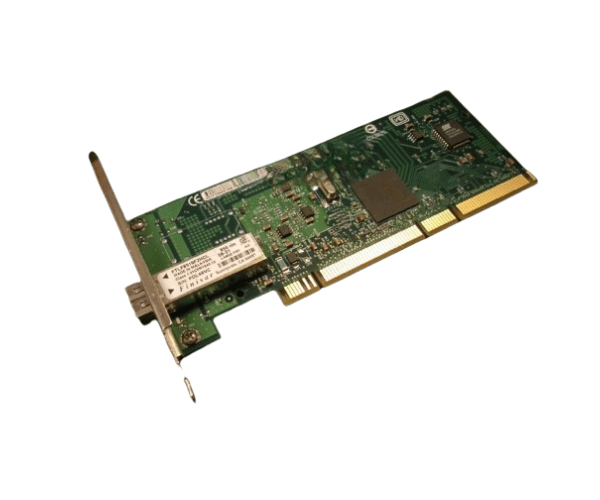
AD332A HP Integrity PCI-X Single Port 1000BaseSX Gigabit Adapter
The AD332A HP Integrity PCI-X Single Port 1000BaseSX Gigabit Adapter delivers reliable and high-speed network connectivity for your server. Designed for PCI-X slots, this adapter provides a single Gigabit Ethernet port with 1000BaseSX support, ideal for enhancing network performance and ensuring efficient data transfer in demanding environments.
User Experience
Users of the AD332A HP Integrity PCI-X One Port 1000BaseSX Gigabit Adapter frequently commend its robust performance and ease of installation. The adapter’s single Gigabit port ensures stable and high-speed network connections, making it suitable for both standard and high-demand network environments. The reliable 1000BaseSX support helps in achieving efficient data transfer and network reliability.
Why Choose AD332A HP Integrity PCI-X 1 Port 1000BaseSX Gigabit Adapter?
The AD332A
HP Integrity PCI-X 1-Port 1000BaseSX Gigabit Adapter stands out for its superior network performance and reliability. Offering up to 1 Gbps data transfer rate through a single port, it enhances connectivity and ensures seamless data flow in PCI-X enabled systems. This adapter is an excellent choice for improving network efficiency and supporting high-speed applications.
Key Features
- Gigabit Ethernet Connectivity: Supports up to 1 Gbps data transfer rate for high-speed network performance.
- Single Port Design: Provides a single 1000BaseSX port, suitable for most network setups.
- PCI-X Compatibility: Easily integrates into PCI-X slots, ensuring straightforward installation.
- 1000BaseSX Support: Utilizes LC connectors for reliable and efficient data transmission over short distances.
- Reliable Performance: Delivers consistent network connectivity and stability in demanding environments.
Installation Steps
- Power Down the System: Turn off your server or computer and unplug it from the power source.
- Open the Case: Remove the cover or side panel of your computer or server case.
- Locate the PCI-X Slot: Find an available PCI-X slot on the motherboard.
- Insert the Adapter: Align and insert the AD332A HP Integrity PCI-X One Port 1000BaseSX Gigabit Adapter into the PCI-X slot.
- Secure the Adapter: Use screws or clips to secure the adapter in place.
- Close the Case: Replace and secure the cover or side panel.
- Reconnect and Power On: Reconnect the power supply and turn on the system.
- Install Drivers: Follow the instructions provided to install any necessary drivers for the adapter.
- Verify Connectivity: Ensure the Gigabit Ethernet port is functioning correctly and connected devices are recognized.