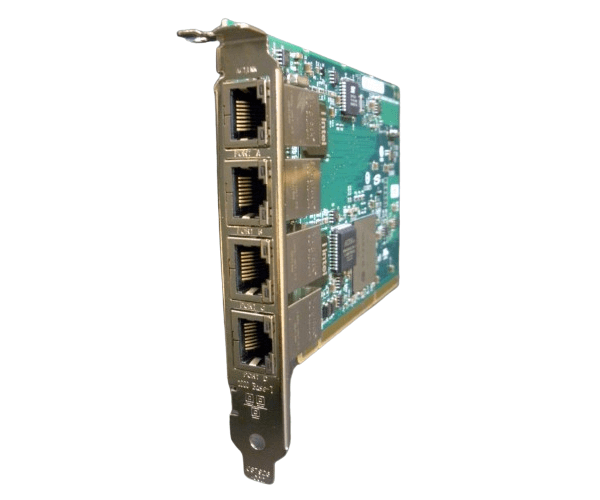
AB545A HP Intregrity PCI-X 4-port 1000 BaseT Ethernet Adapter
The AB545A HP Intregrity PCI-X 4-port 1000 BaseT Ethernet Adapter is a robust networking solution designed for HP Integrity servers. Featuring four Gigabit Ethernet ports, this adapter delivers high-speed network connectivity and reliable performance, making it ideal for enhancing server network capabilities.
User Experience
The AB545A HP Integrity PCI-X 4-port 1000 BaseT Ethernet Adapter is praised for its high-speed performance and reliability. Users report significant improvements in network efficiency and server connectivity. The adapter’s multiple Gigabit ports support demanding applications, ensuring smooth data transfer and minimal downtime. Installation is straightforward, and the adapter integrates seamlessly with HP Integrity servers, enhancing overall network performance.
Why Choose the AB545A HP Integrity PCI-X 4-port 1000 BaseT Ethernet Adapter?
The AB545A
HP Integrity PCI-X 4-port 1000 BaseT Ethernet Adapter stands out for its high performance and versatility. With four Gigabit Ethernet ports, it provides ample bandwidth for network-intensive tasks, making it a valuable addition to HP Integrity servers. This adapter ensures stable and fast network connections, which are crucial for optimizing server operations. The AB545A HP Integrity PCI-X 4-port 1000 BaseT Ethernet Adapter is designed to deliver exceptional network performance, reliability, and ease of use, making it a top choice for server upgrades.
Key Features
- Four Gigabit Ports: Offers four 1000Base-T Ethernet connections to enhance network capacity and speed.
- PCI-X Interface: Compatible with HP Integrity servers and other PCI-X devices.
- High-Speed Connectivity: Supports a data transfer rate of 1 Gbps per port for efficient performance.
- Reliable Performance: Ensures stable network connectivity and efficient data handling for high-demand applications.
- Easy Installation: Designed for straightforward setup and integration with HP Integrity servers.
Installation Steps
- Power Down: Shut down your HP Integrity server and disconnect it from the power source.
- Open the Case: Remove the server case to access the PCI-X slots.
- Insert the Adapter: Carefully slide the AB545A HP Integrity PCI-X 4-port 1000 BaseT Ethernet Adapter into an available PCI-X slot.
- Secure the Adapter: Fasten the adapter to the chassis using the provided screws.
- Reconnect Power: Close the server case, reconnect the power, and power on the server.
- Install Drivers: Install the appropriate drivers and software for the AB545A HP Integrity PCI-X 4-port 1000 BaseT Ethernet Adapter.
- Connect Cables: Attach Ethernet cables to the adapter’s ports and configure the network settings.