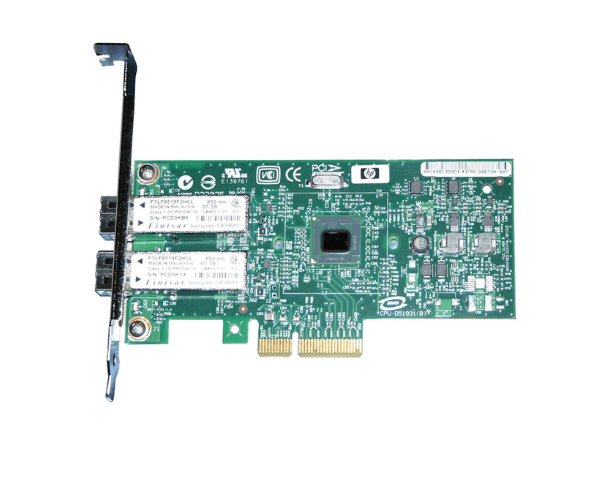
AD338A HP Integrity PCIe 2 port 1000BaseSX Ethernet Adapter
The AD338A HP Integrity PCIe 2-port 1000BaseSX Ethernet Adapter is designed to enhance network performance with its dual-port capability and 1000BaseSX support. Ideal for high-speed networking in enterprise environments, this adapter ensures reliable connectivity and efficient data transfer, making it a crucial addition to HP Integrity servers.
User Experience
Users of the HP AD338A 2-port 1000BaseSX Adapter often highlight its robust performance and ease of installation. The adapter’s dual-port configuration allows for efficient network traffic management, while the 1000BaseSX support ensures high-speed connections. Users appreciate the reliability and stability it brings to their network, leading to improved overall server performance.
Why Choose the HP AD338A 2-port 1000BaseSX Adapter?
The
HP AD338A 2-port 1000BaseSX Adapter is an excellent choice for businesses looking to upgrade their network infrastructure. Its dual ports and 1000BaseSX support provide high-speed connectivity and reliable network performance. By choosing the HP AD338A 2-port 1000BaseSX Adapter, enterprises can ensure enhanced data transfer rates and a more efficient network setup, making it a valuable addition to HP Integrity servers.
Key Features
- Dual-Port Configuration: Two ports for effective network traffic management.
- High-Speed Connectivity: 1000BaseSX (1Gbps) for fast data transfer.
- PCIe Interface: Seamless integration with HP Integrity servers.
- Low-Profile Design: Space-saving form factor suitable for server racks.
- Fiber Connectivity: LC fiber connectors for reliable network connections.
Installation Steps
- Power Down the Server: Ensure the HP Integrity server is completely powered off before starting the installation process.
- Open the Server Chassis: Carefully open the server chassis to access the PCIe slots.
- Insert the Adapter: Locate an available PCIe slot and insert the HP AD338A 2-port 1000BaseSX Adapter.
- Secure the Adapter: Ensure the adapter is firmly seated and securely attached in the slot.
- Close the Chassis: Reattach the server chassis cover and reconnect any cables that were disconnected.
- Power Up and Configure: Power up the server and configure the network settings to enable the new adapter.
- Verify Installation: Check that the HP AD338A 2-port 1000BaseSX Adapter is recognized and functioning correctly in the server management interface.