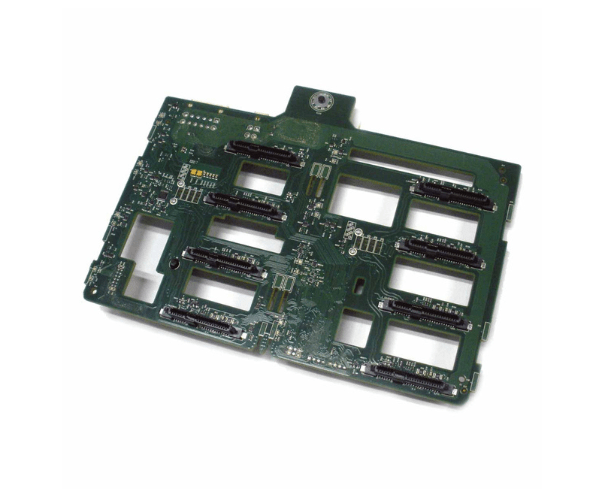
Introduction of Dell 70YDP Backplane 3.5in x8 Bay HDD w/Cable for PowerEdge T330 T430 T630
The Dell 70YDP Backplane 3.5in x8 Bay HDD w/Cable for T330 T430 T630 with Cable significantly enhances storage capabilities for Dell PowerEdge T330, T430, and T630 servers. This backplane efficiently manages multiple hard drives, ensuring both performance and reliability in data-intensive environments. With its advanced design, it seamlessly integrates into your server setup, offering a reliable solution for your storage needs.
Why Choose the Dell 70YDP Backplane 3.5in x8 HDD w/Cable for T330 T430 T630?
The Dell 70YDP
Backplane 3.5in Bay HDD with Cable is a perfect choice for expanding the storage capacity of Dell PowerEdge T330, T430, and T630 servers. Its robust design ensures reliable performance and seamless integration with your server, making it ideal for data centers and enterprise environments. The included cable simplifies installation, saving you time and effort.
User Experience
Users appreciate the Dell 70YDP for its straightforward installation and dependable performance. The backplane’s robust build quality and efficient cooling system help maintain optimal server operation. The inclusion of a cable makes setup easier, allowing users to quickly integrate additional storage without hassle.
Key Features
- High Capacity: Accommodates up to 8 x 3.5in HDDs for increased storage.
- Compatibility: Designed for seamless integration with Dell PowerEdge T330, T430, and T630 servers.
- Efficient Cooling: Includes airflow management to keep drives cool.
- Durable Construction: Built with high-quality materials for long-lasting performance.
- Included Cable: Comes with a cable for straightforward installation.
Installation Steps
- Power Down the Server: Ensure that the server is turned off and unplugged from the power source.
- Remove Existing Components: If applicable, remove any existing drive bays or backplane components.
- Install the Backplane: Slide the Dell 70YDP Backplane into the designated slot in the server chassis.
- Connect the Cable: Attach the included cable to the appropriate connectors on the backplane and the server.
- Secure the Backplane: Fasten the backplane in place using the provided screws or mounting hardware.
- Reinstall Other Components: Reinstall any removed components and secure all connections.
- Power On the Server: Plug the server back in and turn it on. Next, verify that the new backplane and drives are recognized by the system.
Where It Can Be Used?
The
Dell 70YDP Backplane is ideal for use in data centers, enterprise environments, and any application requiring substantial storage capacity. It excels in high-performance computing tasks, large-scale data processing, and virtualized environments. With its reliable and efficient design, the Dell 70YDP ensures optimal performance and reliability in demanding scenarios.