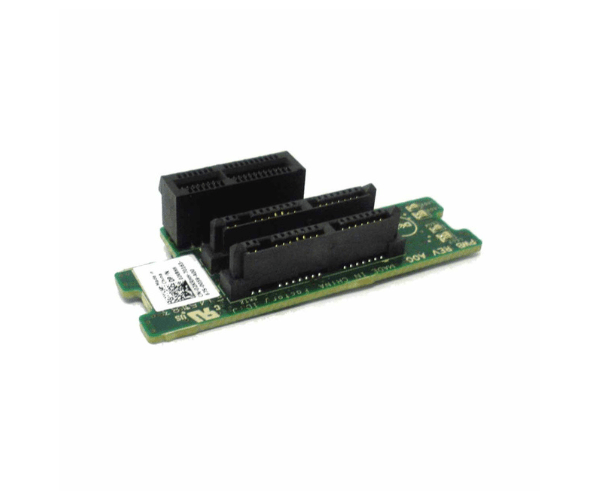
Introduction of Dell 2KRHH Backplane 2x 1.8in SSD for M420
The Dell 2KRHH Backplane 2x 1.8in SSD for M420 is a compact and efficient storage solution designed to enhance the performance and reliability of Dell PowerEdge M420 servers. This high-quality backplane supports two 1.8-inch SSDs, allowing for improved data handling and faster access speeds. Ideal for data-intensive applications, the Dell 2KRHH Backplane ensures that your server operates at its full potential.
Why Choose Dell 2KRHH Backplane 2x 1.8in SSD for M420?
Choosing the Dell 2KRHH Backplane 1.8vin SSD for M420 offers several advantages. This backplane specifically fits the Dell PowerEdge M420, ensuring optimal performance and a perfect fit. By supporting two 1.8-inch SSDs, it provides a significant boost in data access speeds and storage efficiency. The robust construction of the Dell 2KRHH Backplane ensures durability and reliability, making it an excellent choice for high-performance computing environments.
User Experience
Users frequently commend the Dell 2KRHH Backplane for its straightforward installation and dependable operation. The Dell 2KRHH Backplane integrates seamlessly with Dell PowerEdge M420 servers, simplifying setup. Its efficient SSD support boosts overall system performance. The design of the Dell 2KRHH Backplane ensures excellent cooling and stability, which enhances the user experience.
Key Features
- Supports Two 1.8in SSDs: Offers flexibility and increased storage capacity.
- Designed for PowerEdge M420: Ensures compatibility and optimal performance.
- Robust Construction: Provides durability and reliable performance.
- Efficient Cooling: Helps maintain optimal operating temperatures.
- Easy Installation: Simplifies the setup process with straightforward integration.
Installation Steps
- Power Down the Server: Ensure the server is completely powered off before installation.
- Remove the Existing Backplane: Detach the old backplane if one is present.
- Install the Dell 2KRHH Backplane: Align the new backplane with the mounting points and secure it in place.
- Connect the SSDs: Insert the SSDs into the designated slots on the backplane.
- Reconnect Cables: Ensure all necessary cables are properly connected.
- Power On the Server: Turn on the server and check that the system recognizes the new backplane and SSDs.
Where It Can Be Used?
The
Dell 2KRHH
Backplane 2x 1.8in SSD is perfect for use in data centers, enterprise environments, and other settings where high-speed data access and reliability are crucial. It suits applications that require substantial storage capacity and fast data processing, such as databases, virtualization, and high-performance computing tasks.