The
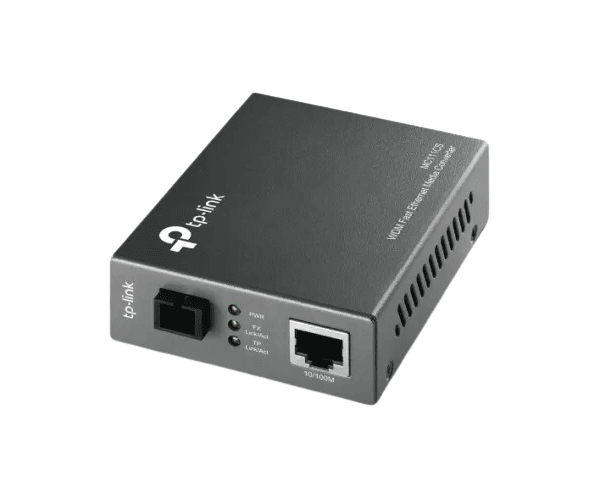
TP-Link MC111CS 10/100Mbps WDM Media Converter ensures reliable and efficient connectivity between fiber and Ethernet networks. This device ensures high-speed and reliable data transfer, ideal for extending networks over single-mode fiber up to 20 km with minimal effort.
Specification
| Feature |
Details |
| Brand |
TP-Link |
| Model |
MC111CS |
| Converter Type |
WDM (Wave Division Multiplexing) Media Converter |
| Data Rate |
10/100 Mbps |
| Fiber Connector |
SC-Type |
| Ethernet Port |
RJ45 (10/100 Mbps) |
| Transmission Distance |
Up to 20 km (Single-mode fiber) |
| Wavelength |
TX: 1310 nm, RX: 1550 nm |
| Power Supply |
External Power Adapter |
| Standards |
IEEE 802.3, 802.3u, 802.3x |
Description
TP-Link M-111CS 10/100Mbps WDM Media Converter in BD
The
TP-Link MC111CS 10/100Mbps Media Converter is designed to enable efficient and seamless communication between fiber and Ethernet networks. Supporting WDM technology, it transmits and receives data over a single fiber cable, offering a cost-effective solution for expanding networks with ease.
User Experience
The
TP-Link MC111CS 10/ 100Mbps WDM Media Converter is well-received for its simple setup and reliable performance. With its plug-and-play design, it eliminates installation hassles, making it accessible even for non-technical users. The device ensures stable connectivity over long distances without compromising data transfer rates. Whether for small businesses or large-scale networks, this converter offers a perfect balance of functionality and efficiency, with minimal downtime during operation.
Why Choose the TP-Link MC111CS WDM Media Converter?
- Cost-Effective Solution: Reduces infrastructure costs with WDM technology.
- High-Speed Connectivity: Supports up to 100 Mbps over long distances.
-
Dependable Performance: Ensures consistent and efficient data transfer over single-mode fiber for reliable connectivity.
- Simple Installation: Features a plug-and-play setup for hassle-free configuration.
- Streamlined Design: Integrates effortlessly into any network infrastructure.
- Unbox the Device: Verify the package contents.
- Connect Fiber Cable: Insert the SC connector into the fiber port.
- Attach Ethernet Cable: Connect the RJ45 cable to the Ethernet port.
- Power Up: Plug in the external power adapter and turn on the converter.
- Check LEDs: Ensure that the indicator lights signal proper operation.
- Test Network: Conduct a network test to confirm connectivity.
What is the Price of the TP-Link MC111CS 10/100Mbps WDM Media Converter in Bangladesh?
TP-Link for Set prices in Bangladesh vary by features and models. Crystal Vision Solutions offers high-quality options like the TP-Link MC111CS 10/100Mbps WDM Media Converter at the latest price, ensuring top performance, reliability, competitive pricing, and professional service to meet diverse business needs efficiently.