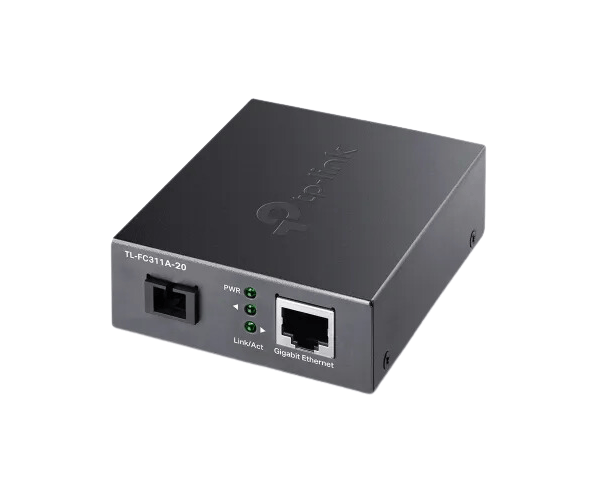
About of TP-Link TL-FC311B-20 Gigabit WDM Media Converter
The
TP-Link TL-FC311B-20 Gigabit WDM Media Converter is a powerful and efficient solution for converting optical signals into electrical Ethernet signals. Its WDM technology ensures bidirectional transmission over a single fiber cable, ideal for long-distance networking requirements.
Specification
| Feature |
Details |
| Brand |
TP-Link |
| Model |
TL-FC311B-20 |
| Type |
Gigabit WDM Media Converter |
| Transmission Distance |
Up to 20 km |
| Data Rate |
1 Gbps |
| Connector Type |
SC Fiber Connector |
| Fiber Type |
Single-Mode |
| Wavelength |
TX: 1550 nm, RX: 1310 nm |
| Power Supply |
External adapter |
| Dimensions |
94.5 × 73.0 × 27.0 mm |
| Material |
Durable metal casing |
Description
TP-Link TL-FC311B-20 Media Converter in BD
The
TP-Link TL-FC311B-20 Giga-bit Media Converter enables seamless conversion between optical and Ethernet signals for long-distance networking. Utilizing WDM technology, it minimizes fiber usage while delivering high-speed data transmission over distances up to 20 km.
User Experience
The
TP-Link TL-FC311B-20 WDM Media Converter enhances networking efficiency with its advanced WDM technology, supporting bidirectional data transmission over a single fiber cable. Its plug-and-play design ensures easy setup, while the robust metal casing provides long-term durability. With a transmission distance of up to 20 km and gigabit speeds, this converter is ideal for business and industrial environments. Users benefit from a reliable and cost-effective solution for extending network connectivity without compromising performance or quality.
Why Choose the TP-Link TL-FC311B-20 Media Converter?
- Advanced WDM technology for efficient single-fiber communication.
- Supports gigabit speeds for high-performance networking.
- Covers long transmission distances of up to 20 km.
- Durable and compact metal casing for reliability and space-saving.
- Easy plug-and-play installation for quick deployment.
- Perfect for commercial and industrial network setups.
Installation Step
- Connect the Fiber Cable: Attach the single-mode fiber cable to the SC connector on the converter.
- Connect the Ethernet Cable: Insert the Ethernet cable into the RJ45 port of the converter.
- Power On the Device: Use the included power adapter to connect the converter to a power source.
- Check Indicator Lights: Confirm that the LED indicators display proper power and signal status.
- Test the Network: Ensure smooth data transmission over the network for optimal functionality.
What is the Price of the TP-Link TL-FC311B-20 Gigabit WDM Media Converter in Bangladesh?
The latest price of
TP-Link TL-FC311B-20 WDM Media Converter in Bangladesh depends on quantity.
Crystal Vision Solutions ensure This product has the best market price in Bangladesh. Our product is 100% original and lowest price in Bangladesh. All kinds of services are the best in Bangladesh, and contact us for any information and latest price.