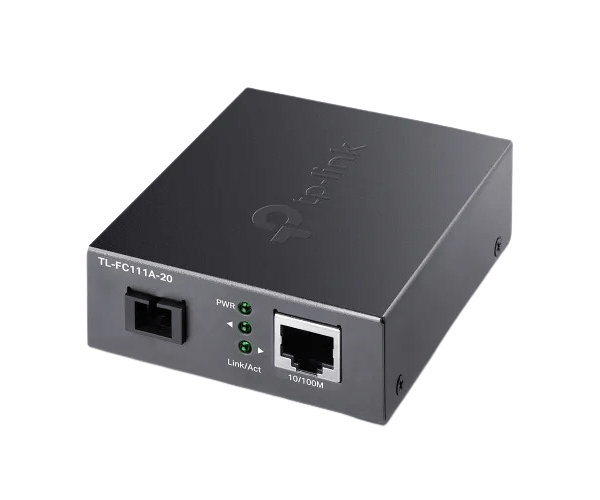
The
TP-Link TL-FC111A-20 10/100 Mbps WDM Media Converter provides reliable fiber-to-Ethernet connectivity, supporting up to 100 Mbps data transfer over long distances. With WDM technology, this converter offers efficient network extension, making it ideal for business and industrial use.
Specification
| Feature |
Details |
| Brand |
TP-Link |
| Model |
TL-FC111A-20 |
| Converter Type |
WDM (Wave Division Multiplexing) Media Converter |
| Data Rate |
10/100 Mbps |
| Fiber Connector |
SC-Type |
| Ethernet Port |
RJ45 (10/100 Mbps) |
| Transmission Distance |
Up to 20 km (Single-mode fiber) |
| Wavelength |
TX: 1310 nm, RX: 1550 nm |
| Power Supply |
External Power Adapter |
| Standards |
IEEE 802.3, IEEE 802.3u, IEEE 802.3x |
Description
TP-Link TL-FC111A-20 WDM Media Converter in BD
The
TP-Link TL-FC111A-20 s Media Converter extends Ethernet networks over fiber, offering high-speed, reliable connectivity. Ideal for large-scale installations, it efficiently bridges copper to fiber connections while minimizing infrastructure costs through the use of WDM technology.
User Experience
Users have praised the
TP-Link TL-FC111A-20 10/100 Mbps WDM Media Converter for its ease of use and performance. Its plug-and-play functionality allows for quick setup with minimal technical knowledge required. It ensures stable, high-speed data transmission over long distances, making it perfect for businesses needing reliable fiber optic solutions. The media converter’s efficient design enables seamless network extension with reduced downtime and maintenance.
Why Choose the TP-Link TL-FC111A-20 10/ 100 Mbps WDM Media Converter?
- Cost-Effective Networking: Utilizes WDM technology to minimize fiber requirements and reduce infrastructure costs.
- Reliable Performance: Maintains high-speed 100 Mbps data transfer over long distances.
- Easy Installation: Plug-and-play setup with no complex configurations needed.
- Long-Distance Capability: Supports distances up to 20 km with single-mode fiber.
- Durable Design: Built for continuous performance in industrial and business environments.
Installation Steps
- Unbox the Converter: Ensure that the package is complete and undamaged.
- Connect Fiber Cable: Insert the SC connector into the fiber port of the converter.
- Attach Ethernet Cable: Connect an RJ45 cable to the Ethernet port.
- Power On: Plug in the power adapter and switch on the device.
- Monitor LED Indicators: Ensure the LEDs show normal operation, indicating correct setup.
- Test the Connection: Perform network tests to confirm that the media converter is functioning correctly.
What is the Price of the TP-Link TL-FC111A-20 10/100 Mbps WDM Media Converter in Bangladesh?
TP-Link for Set prices in Bangladesh vary by features and models. Crystal Vision Solutions offers high-quality options like the TP-Link TL-FC111A-20 WDM Media Converter at the latest price, ensuring top performance, reliability, competitive pricing, and professional service to meet diverse business needs efficiently.