ALL Categories
Your Cart
Share:

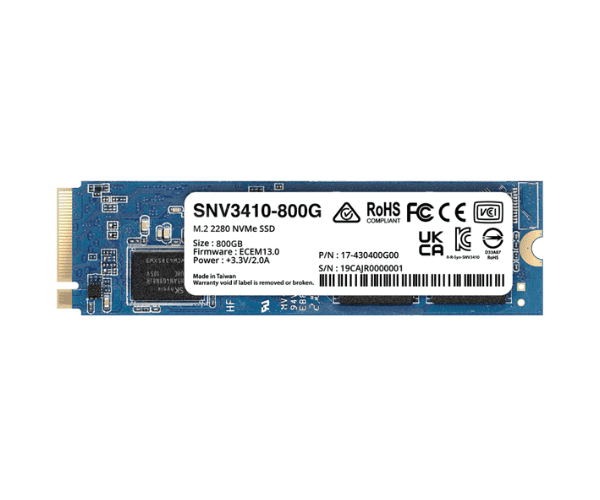
Synology SNV3410 NAS 800GB M.2 NVMe SSD

  • Product id:  3963
  • Stock: In Stock
  • Brand: Synology
  • Model: SNV3410
WhatsApp Inquiry

Key Features

    • Capacity: 800GB
    • Form Factor: M.2 2280
    • Interface: NVMe
    • Type: SSD (Solid State Drive) for NAS (Network Attached Storage)

Please confirm availability before completing your purchase by calling us.

The actual product may vary in size, color, and layout compared to the website display images. Claims will not be accepted for image discrepancies.

We reserve the right to change the price of any product at any time due to the volatile nature of technology prices.

We cannot guarantee that the information on this page is 100% accurate. Crystal Vision Solutions not responsible for any results obtained from using this information.

Main Features
Capacity 800GB
Power Consumption ~5.5 W (Active)
Drive Type NVMe SSD
Interface PCIe Gen3 x4 NVMe
Performance
Read Speed Up to 3,100 MB/s
Write Speed Up to 1,000 MB/s
Physical Specification
Dimensions 80 x 22 x 3.5mm
Weight Approx. 7 g
Form Factor M.2 2280
Temperature
Operating Temperature 0°C to 70°C

About the Synology SNV3410 NAS 800GB M.2 NVMe SSD

The Synology SNV3410 NAS 800GB M.2 NVMe SSD is engineered for superior performance and reliability in NAS environments. This SSD provides fast data access and excellent endurance, making it ideal for demanding storage needs.
The Synology SNV3410 NAS 800GB M.2 NVMe SSD is designed to elevate your NAS performance with its impressive speed and durability. Featuring a capacity of 800GB and an NVMe PCIe 3.0 x4 interface, this SSD delivers exceptional read speeds of up to 3,100 MB/s and write speeds up to 1,000 MB/s. With an endurance rating of 1,000 TBW, it ensures long-lasting reliability for intensive workloads. This SSD seamlessly integrates with your NAS, enhancing overall system responsiveness and efficiency.

User Experience

Users highly regard the Synology SNV3410 NAS 800GB M.2 SSD for its remarkable speed and dependability. It significantly boosts NAS performance, ensuring smooth operation even under heavy workloads.

Installation Steps

  1. Power Down the NAS: Ensure the NAS system is turned off.
  2. Open the NAS Case: Remove the case panel to access internal components.
  3. Locate the M.2 Slot: Find the available M.2 slot on the motherboard.
  4. Install the SSD: Insert the Synology SNV3410 NAS 800GB M.2 SSD into the M.2 slot and secure it with a screw.
  5. Close the Case: Reattach the NAS case and power it on.

Review

Get specific details about this product from customers who own it.

Questions

Have question about this product? Get specific details about this product from expert.

No questions have been asked about this product.

What is the Synology SNV3410 NAS 800GB M.2 NVMe SSD price in Bangladesh 2026?

The latest price of Synology SNV3410 NAS 800GB M.2 NVMe SSD in Bangladesh depends on availability, specifications, and current market conditions. For quick pricing updates and stock details, reach out to us via WhatsApp or email.