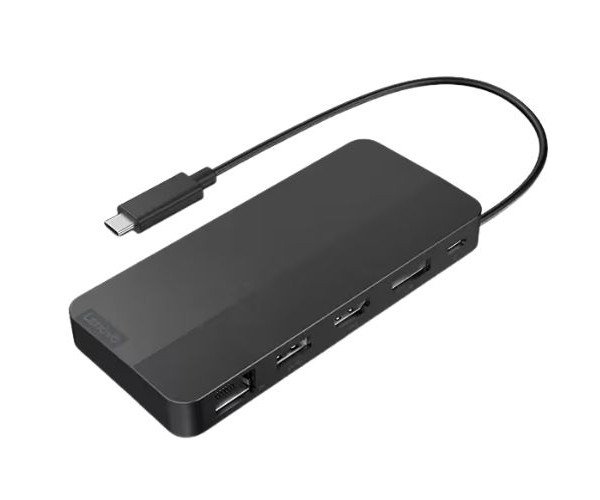
About the Lenovo USB-C 40B90000US Dual Display Travel Docking Station without Adapter
The Lenovo USB-C 40B90000US Dual Display Travel Dock without Adapter is a compact and reliable solution for professionals on the move. It supports dual display output and multiple ports, turning any USB-C laptop into a versatile workstation anywhere you go.
Lenovo USB-C 40B90000US Dual Display Travel Dock without Adapter in BD
Lenovo USB-C 40B90000US Dual Display Travel Docking without Adapter is a travel companion designed for professionals who require connectivity on the go. The configuration allows for dual display support, high-speed data transfer, and power pass-through in a sleek portable design.
User Experience
The Lenovo USB-C 40B90000US Dual Display Dock without Adapter is an easy and convenient piece of equipment to use. Users love that setup is near instant for their laptops with the docking station adding ports in almost no time. Wherever users are—be it the hotel room, client's office, or coworking space—this dock enables smooth multitasking on two monitors. Reliable Ethernet gets users connected to the internet while USB ports keep all their accessories attached. The ultra-lightweight design fits easily into a laptop bag. No drivers required: just plug and play. The ease this dock brings to productivity helps make this a favorite among mobile professionals without weighing them down.
Why Choose the Lenovo USB-C 40B90000US Dual Display Dock without Adapter?
Choosing the Lenovo USB-C 40B90000US Dual Display Travel Dock without Adapter gives a thumbs-up for all the right reasons: portability, performance, and just plain easy to use. It's a real gift for the business traveler, student, or remote worker requiring extra ports without heavy load. Unlike regular travel docks, it offers dual display output via HDMI and VGA—so you can choose between monitor types; charge while using the dock thanks to power pass-through. This travel dock by Lenovo—an already-trusted brand the world over—is built to go the distance and provide the support you need to get your daily work done. Convenience, power, and quality—all in one.
Installation Steps
- The setup for the Lenovo USB-C 40B90000US Dual Display Dock without Adapter is a fast and easy one:
- Open the package and take out the dock.
- Connect the integrated USB-C cable to your laptop's USB-C port.
- Hook up the external displays through HDMI or VGA.
- Connect your USB device, Ethernet cable, and audio accessories.
- If needed, connect the USB-C power adapter to the dock USB-C input for charging.
- The dock is plug-and-play and requires no drivers. You are good to go!