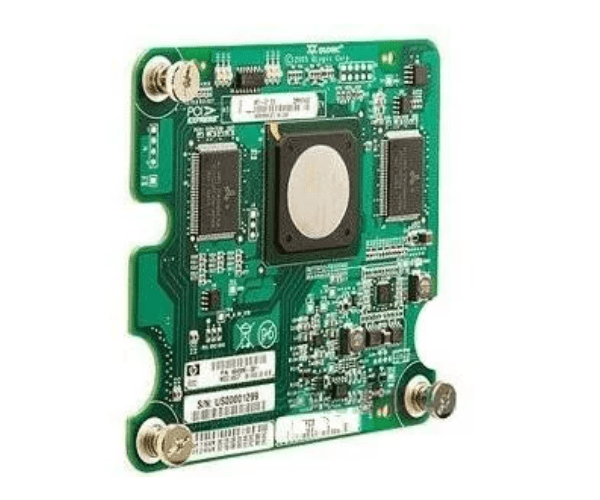
HP 404986-001 403619-B21 Qlogic QMH2462 4Gb FC Mezzanine Board - Lot of 4 Adapter.
The HP 404986-001 403619-B21 Qlogic QMH2462 4Gb FC Mezzanine Board - Lot of 4 offers high-speed Fibre Channel connectivity for HP server environments. This set of four mezzanine boards ensures reliable, fast data transfer and is essential for enhancing server performance and storage capabilities in demanding data center applications.
User Experience
Users of the HP 403619-B21 Qlogic QMH2462 4Gb FC Mezzanine Board report enhanced performance and reliability in their HP server environments. The dual-port design allows for high-speed, stable connections with external Fibre Channel storage, significantly boosting data transfer rates and server efficiency. The installation process is straightforward, and the boards are compatible with various operating systems, making them a versatile choice for enterprise-level deployments.
Why Choose the HP 403619-B21 Qlogic QMH2462 4Gb FC Mezzanine Adapter?
The
HP Qlogic QMH2462 4Gb FC Mezzanine Board is designed for high-speed Fibre Channel connectivity, crucial for modern data centers. This lot of four boards ensures you have multiple connections for optimal performance and redundancy. With a 4Gb/s data transfer rate, these mezzanine boards enhance your server's capability to handle large volumes of data efficiently. For businesses needing reliable, high-performance storage solutions, the HP Qlogic QMH2462 4Gb FC Mezzanine Board is a strategic investment.
Key Features
- High-Speed Connectivity: Offers up to 4Gb/s Fibre Channel data transfer rates, ensuring fast and reliable data movement.
- Dual-Port Design: Provides enhanced connectivity and redundancy, allowing for multiple storage connections.
- Versatile Compatibility: Works seamlessly with HP BladeSystem c-Class and supports various operating systems like Windows, Linux, and VMware.
- Efficient Performance: Ideal for high-demand environments, improving overall server performance and storage efficiency.
- Lot of 4: Ensures ample connectivity options and is cost-effective for scaling server infrastructure.
Installation Steps
- Power Down: Ensure the server is turned off and disconnected from any power source before beginning the installation.
- Open Server Chassis: Remove the cover of the server to access the mezzanine slots.
- Insert Mezzanine Boards: Carefully insert each HP Qlogic QMH2462 4Gb FC Mezzanine Board into the appropriate mezzanine slots.
- Secure Boards: Ensure each board is firmly seated and fasten any necessary screws or locks.
- Close Chassis: Replace and secure the server cover.
- Power On: Reconnect the server to power and turn it on.
- Install Drivers: Download and install the latest drivers for the Fibre Channel mezzanine boards from the HP support site.
- Configure Settings: Use system management tools to configure the Fibre Channel settings for optimal performance.
- Verify Operation: Check the server management interface to confirm that the mezzanine boards are recognized and functioning properly.