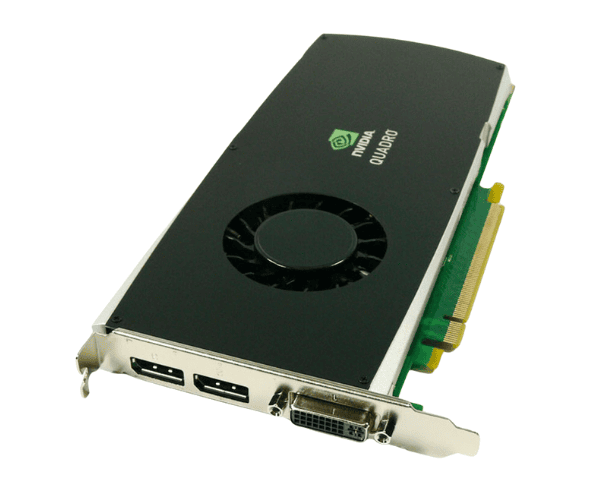
Overview of Dell X9YDW NVIDIA Quadro FX 3800 1GB GDDR3 PCI Express 2.0 x16 Graphics Card
The
Dell X9YDW NVIDIA Quadro FX 3800 1GB GDDR3 PCI Express 2.0 x16 Graphics Card delivers high-performance graphics tailored for professional applications. Its powerful architecture and advanced capabilities allow it to excel in 3D rendering, complex modeling, and graphical visualization. This card serves as an ideal choice for professionals in fields such as animation, CAD, and graphic design. By providing stunning visuals and enhancing performance, the
Dell X9YDW effectively meets the demands of modern creative tasks.
Why Choose the Dell X9YDW NVIDIA Quadro FX 3800 1GB GDDR3 PCI Express 2.0 x16 Graphics Card?
Choosing the
Dell X9YDW NVIDIA Quadro FX 3800 means investing in a graphics card that significantly boosts your productivity and visual quality. This card is engineered specifically for professional use, ensuring stability and reliability under heavy workloads. With its advanced features and compatibility with various software applications, the
Dell X9YDW enhances your workflow and allows you to focus on your creative tasks without interruptions.
User Experience
Users of the
Dell NVIDIA Quadro FX 3800 have reported remarkable improvements in their workflow. Many professionals have praised its capability to handle intensive graphical tasks smoothly, allowing for faster rendering and improved frame rates. The ease of installation and reliable operation of the card provide peace of mind for those working on critical projects. Overall, users appreciate how the card elevates their computing experience, making it a valuable addition to any professional setup.
Detailed Breakdown of Features
- High Performance: The Dell X9YDW provides impressive performance, making it suitable for demanding applications like CAD and 3D modeling.
- 1GB GDDR3 Memory: This graphics card features 1GB of GDDR3 memory, which enhances its ability to process large data sets efficiently.
- 256-bit Memory Interface: This broad memory interface facilitates quicker data transfer rates, enhancing the overall performance of the graphics card.
- CUDA Support: With 96 CUDA cores, the card can accelerate complex computations, making it ideal for simulations and rendering tasks.
- Multi-Monitor Support: The Dell X9YDW supports multiple displays, enabling professionals to extend their workspace for better productivity.
- Advanced Visualization: It supports high resolutions, ensuring that graphics are rendered with clarity and detail.
- Energy Efficient: Designed for low power consumption, the card helps reduce operational costs while maintaining performance.
- Robust Software Compatibility: The graphics card optimizes for various professional software applications, ensuring seamless operation.
- Reliable Cooling Solution: Built with an effective cooling system, it minimizes overheating and maintains optimal performance during extended use.
- Low-Profile Design: Its compact form factor allows for easy integration into various system builds, making it a versatile choice.
Installation Steps
- Gather Your Tools: Prepare a screwdriver and ensure you have a clean workspace.
- Open the Computer Case: Use the screwdriver to remove the screws securing the side panel and slide it off.
- Locate the PCI Express Slot: Identify an available PCI Express 2.0 x16 slot on your motherboard.
- Insert the Graphics Card: Insert the graphics card by positioning the Dell X9YDW over the PCI Express slot and pressing down firmly until it securely seats.
- Secure the Card: Use screws to secure the card to the case.
- Close the Case: Reattach the side panel securely.
- Reconnect Power Supply: Plug in the power cables and connect your computer back to the power source.
- Turn On Your Computer: Power on your computer and ensure the card is detected by the system.
Where It Can Be Used?
The
Dell NVIDIA Quadro FX 3800 is perfect for various professional environments, including:
- 3D Modeling: Ideal for architects and designers using software like AutoCAD and SketchUp.
- Graphic Design: Excellent for graphic designers working with Adobe Creative Suite.
- Video Editing: Suitable for video editors using programs like Adobe Premiere Pro and Final Cut Pro.
- Simulation Software: Effective for engineers and scientists running complex simulations.