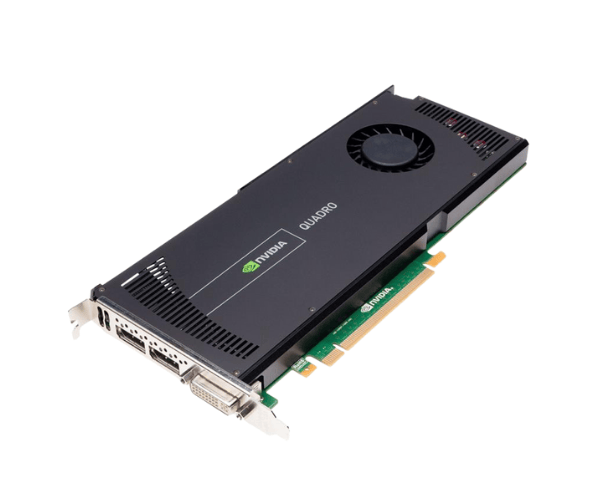
Introduction of Dell 731Y3 NVIDIA QUADRO 4000 2GB 3D GDDR5 PCI-E Graphics Card
The Dell 731Y3 NVIDIA QUADRO 4000 2GB 3D GDDR5 PCI-E Graphics Card enhances visual performance and supports demanding graphical applications. Tailored for professionals in fields like 3D modeling, animation, and graphic design, this graphics card delivers impressive power and stability. With advanced GPU architecture, it ensures seamless rendering of complex visuals, making it an essential tool for creators and designers.
Why Choose the Dell 731Y3 NVIDIA QUADRO 4000 2GB 3D GDDR5 PCI-E Graphics Card?
Choosing the
Dell 731Y3 NVIDIA 4000 2GB 3D GDDR5 PCI-E Graphics Card means investing in high-quality graphics performance. This card is optimized for professional applications, ensuring you can handle complex tasks efficiently. Its reliable performance and robust features make it a perfect choice for architects, designers, and engineers. With NVIDIA’s Quadro technology, you can expect exceptional precision and accuracy in your work.
User Experience
Users rave about the performance of the
Dell 731Y3 NVIDIA QUADRO 4000. Many report significant improvements in rendering speeds and the ability to handle larger datasets. The stability of the graphics card minimizes crashes during intensive tasks, allowing for a smoother workflow. Whether you're working on 3D animations or complex simulations, this card ensures that your experience remains hassle-free.
Detailed Breakdown of Features
- Advanced Graphics Performance: The Dell 731Y3 NVIDIA QUADRO 4000 features GDDR5 memory for rapid data processing and superior frame rates.
- Efficient Cooling System: With an active cooling design, this graphics card prevents overheating during extended use, maintaining optimal performance levels.
- Versatile Compatibility: The PCI-E interface allows easy integration into various systems, making it a flexible choice for different setups.
- Support for Multiple Displays: It supports up to four displays simultaneously, enhancing multitasking capabilities for professionals.
- Robust Driver Support: Regular updates from NVIDIA ensure the Dell 731Y3 NVIDIA QUADRO 4000 remains compatible with the latest software applications.
- CUDA Cores for Parallel Processing: With 256 CUDA cores, the card excels at handling parallel processing tasks, ideal for rendering and simulations.
- High-Performance OpenGL Support: The card’s compatibility with OpenGL 4.4 allows for advanced graphical effects and smooth visuals in professional applications.
- Energy Efficient: Despite its high performance, the card’s energy consumption is relatively low, making it eco-friendly without compromising power.
Installation Steps
- Prepare Your System: Power off your computer and unplug it from the electrical outlet to avoid any electrical damage.
- Open the Case: Remove the screws securing the side panel and slide it off to access the internal components.
- Locate the PCI-E Slot: Identify an available PCI-E slot on your motherboard for the Dell 731Y3 NVIDIA QUADRO 4000.
- Insert the Graphics Card: Align the card with the PCI-E slot and press down firmly until it is securely in place.
- Secure the Card: Use screws to fasten the graphics card to the case for stability during operation.
- Connect Power Cables: Connect the necessary power cables from the power supply if the card requires additional power.
- Close the Case: Replace the side panel and secure it with screws to ensure everything is properly enclosed.
- Power On the System: Plug your computer back in and turn it on.
- Install Drivers: After booting up, install the necessary drivers for optimal performance and compatibility with your operating system.
Where It Can Be Used?
The
Dell NVIDIA QUADRO 3D PCI-E Graphics Card is perfect for various professional environments. It's widely used in:
- 3D Modeling and Animation: Ideal for software like Autodesk Maya and Blender.
- Video Editing: Enhances performance in applications like Adobe Premiere Pro and DaVinci Resolve.
- CAD Applications: Perfect for AutoCAD and SolidWorks, delivering precise rendering.
- Scientific Simulations: Supports complex calculations in fields such as engineering and physics.