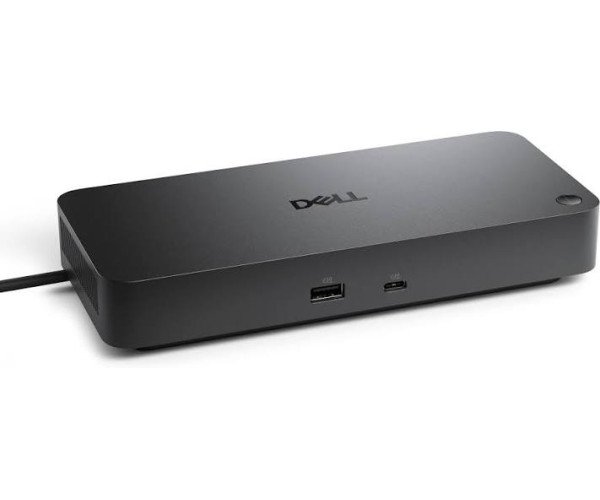
Overview of the Dell Pro Dock WD25Z USB-C Universal Docking Station
The Dell Pro Dock WD25Z USB-C Universal Docking Station is a versatile solution for enhancing your workspace. Priced competitively in Bangladesh, this docking station is designed to meet the needs of professionals who require multiple connections and high-speed data transfer. With its USB-C interface, it seamlessly integrates with a variety of devices, making it an essential tool for business and office workstations.
In the Bangladeshi market, the demand for efficient docking solutions has surged as remote work and hybrid office setups become more common. The Dell WD25Z stands out due to its ability to support up to four external displays, allowing users to multitask effectively. This feature is particularly beneficial for professionals in fields such as graphic design, finance, and data analysis, where screen real estate is crucial.
Dell Pro Dock WD25Z in Bangladesh
In Bangladesh, the Dell Pro Dock WD25Z is an ideal choice for tech-savvy users looking to enhance their productivity. The local market has seen a growing trend towards high-performance accessories that complement laptops and desktops. With its robust connectivity options, including multiple USB ports and HDMI support, this docking station caters to the diverse needs of users.
Moreover, the ability to power both Dell and non-Dell systems with up to 130W and 96W respectively makes it a versatile addition to any setup. This flexibility is particularly advantageous for users who may switch between different devices. The compact design also ensures that it fits neatly into any workspace, making it a practical choice for both home and office environments.
Dell Pro Dock WD25Z Performance and Power
The performance of the Dell Pro Dock WD25Z is impressive, especially when considering its specifications. With USB-C data speeds reaching up to 10Gbps, users can transfer large files quickly and efficiently. This is particularly useful for professionals who work with high-resolution images or large datasets.
Additionally, the docking station supports dual and triple display setups, enabling users to expand their workspace significantly. The maximum resolution of up to 6K at 60Hz ensures that visuals are sharp and clear, which is essential for design and media work. The inclusion of a 2.5 Gigabit Ethernet port also guarantees a stable internet connection, crucial for online meetings and collaborative work.
Dell Pro Dock WD25Z Best for
This docking station is best suited for professionals who require a multi-display setup, such as graphic designers, video editors, and data analysts. Its extensive connectivity options make it ideal for users who rely on multiple peripherals. However, casual users who only need basic connectivity may find it more than they require.
Detailed Analysis of Dell Pro Dock WD25Z
- USB-C Data Port: Supports data transfer speeds up to 10Gbps + Ideal for quick file transfers and efficient workflow.
- External Display Support: Up to 4 displays + Enhances multitasking capabilities for professionals.
- Power Delivery: Up to 130W for Dell systems + Ensures devices stay charged during use.
- Ethernet Port: 2.5 Gigabit Ethernet + Provides a reliable internet connection for seamless online activities.
- Compact Design: Dimensions of 205 × 90 × 35.25 mm + Fits easily into any workspace without clutter.
- Warranty: 3-Year Limited Hardware Warranty + Offers peace of mind for users investing in quality hardware.
User Experience of the Dell Pro Dock WD25Z
Using the Dell Pro Dock WD25Z on a daily basis is a straightforward experience. The setup process is simple, requiring just a USB-C connection to your laptop. Users have reported minimal heat generation, even during extended use, which is a plus for maintaining a comfortable workspace. Noise levels are also low, making it suitable for quiet office environments.
One notable feature is the ability to power USB devices even when the dock is not connected to a PC, which adds to its versatility. Some users may experience initial software quirks, but these can typically be resolved with Dell's firmware management tools. Overall, the user experience is designed to be efficient and user-friendly.
Benefits of the Dell Pro Dock WD25Z
Owning the Dell Pro Dock WD25Z brings several practical benefits. First, its ability to connect multiple displays enhances productivity, allowing users to work on several tasks simultaneously. The high-speed data transfer capabilities mean less waiting time for file uploads and downloads, which is crucial for time-sensitive projects.
Additionally, the power delivery feature eliminates the need for multiple chargers, streamlining your workspace. The compact design makes it easy to transport, which is beneficial for professionals who travel frequently. With a three-year warranty, users can trust in the durability and reliability of this docking station.
Key Features of Dell Pro Dock WD25Z
- USB-A Ports: 4 × USB 3.2 Gen 2 = Connect multiple devices simultaneously.
- HDMI Support: 1 × HDMI 2.1 = Supports high-resolution displays for enhanced visuals.
- Firmware Management: Dell Firmware Utility = Keeps the dock updated for optimal performance.
- Security Slots: Kensington + Wedge-shaped Lock Slot = Provides added security for the device.
- Wake-on-LAN: Supported = Allows remote wake-up of connected devices.
Best Practices for Maintaining the Dell Pro Dock WD25Z
To maintain the Dell Pro Dock WD25Z, keep it clean and free from dust, especially in humid environments like Bangladesh. Regularly check the connections and ports for any debris that could affect performance. It’s also advisable to use a surge protector to safeguard against voltage fluctuations common in the region. Keeping the firmware updated ensures that the dock operates smoothly and efficiently.
Where I Can Find Dell Pro Dock WD25Z In Bangladesh
You can purchase the Dell Pro Dock WD25Z at Crystal Computers, located in Dhaka. They offer a reliable shopping experience, and you can also buy online at crystalcomputers.com.bd. With a three-year warranty, you can trust in the quality and support provided by Crystal Vision Solutions. Their team is dedicated to assisting with any warranty claims or technical issues, ensuring you have a hassle-free experience.