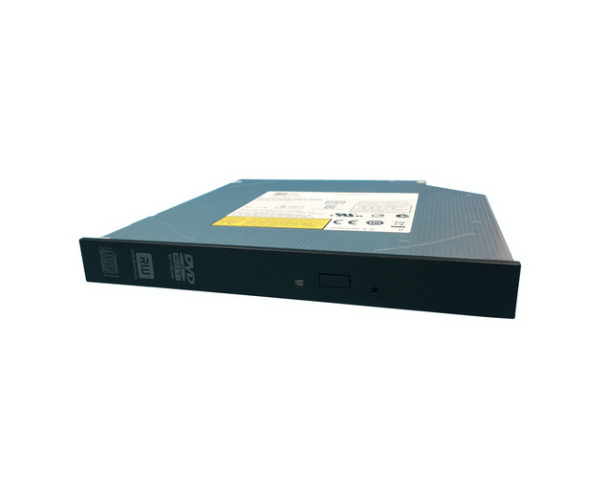
Introduction of Dell 9JTVT Slimline SATA DVD-RW Optical Drive
The Dell 9JTVT Slimline SATA DVD-RW Optical Drive is a compact and efficient storage solution. It is designed to handle various media needs. This drive can read and write both DVDs and CDs. It is perfect for users who need reliable performance for data storage and media playback. The slimline design fits seamlessly into any computer setup. This makes it a practical choice for home and office environments.
Why Opt the Dell 9JTVT Slimline SATA DVD-RW Optical Drive?
Choosing the Dell 9JTVT Slimline Serial Advanced Technology Attachment DVD-RW Optical Drive ensures you have a versatile tool for managing your media files. Its ability to read and write various disc formats makes it suitable for data backup, software installation, and multimedia playback. Whether you're creating DVDs of your favorite movies or archiving important documents, this optical drive offers the reliability and performance you need.
User Experience
Users appreciate the Dell 9JTVT for its ease of installation and consistent performance. The slim design allows it to fit easily in a variety of setups, making it a favorite among those with limited space. Additionally, the speed at which it reads and writes data impresses users, saving them time during data transfers and media creation.
Detailed Breakdown of Features
The Dell 9JTVT Slimline SATA DVD-RW Drive boasts a variety of features that enhance its usability. First, the SATA interface allows for fast data transfer rates, ensuring that users experience minimal delays when accessing or writing data. The drive supports multiple disc formats, making it versatile enough for any task, from reading DVDs to burning data onto CDs. Its robust build quality ensures longevity, allowing users to rely on this drive for years. Furthermore, the drive operates quietly, providing a pleasant experience while using your computer.
Installation Steps
- Power Off Your Computer: Ensure that your computer is completely shut down and unplugged from the power source.
- Open the Computer Case: Carefully remove the side panel to gain access to the internal components.
- Identify the Drive Bay: Locate the appropriate bay designed for the Dell DVD-RW Optical Drive.
- Insert the Drive: Slide the optical drive into the designated bay, making sure it fits securely.
- Connect the SATA Cable: Attach the SATA cable from the drive to the motherboard for data transfer.
- Attach the Power Cable: Connect the power cable to the drive to ensure it receives the necessary power for operation.
- Reattach the Computer Case Cover: Securely put back the side panel of your computer case to enclose the internal components.
- Power On Your Computer: Turn on the computer and install any necessary drivers for the optical drive to function properly.
Where It Can Be Used?
The
Dell 9JTVT Slimline Serial Advanced Technology Attachment DVD-RW Optical Drive is suitable for various environments. It can be used in personal computers, laptops, or workstations, making it ideal for home entertainment, office data management, or educational purposes. Its versatility allows it to cater to users who need to watch movies, install software, or back up important files.