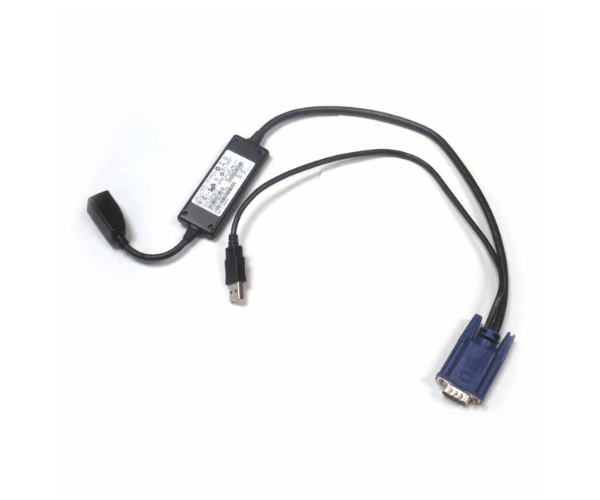
Introduction of Dell 9CKJ5 USB IP KVM Adapter
The Dell 9CKJ5 USB IP KVM Adapter offers a versatile solution that significantly enhances the remote management of your IT infrastructure. This advanced adapter enables users to effortlessly access and control multiple servers or computers from any remote location via a network connection. Thanks to its robust features and intuitive design, the Dell 9CKJ5 streamlines operations, making it a vital tool for IT administrators and network managers. Consequently, it simplifies complex tasks and improves overall efficiency in managing IT resources.
Why Choose Dell 9CKJ5?
Choosing the Dell 9CKJ5 USB IP KVM Adapter ensures efficient and seamless remote management of multiple devices. This adapter stands out due to its IP-based connectivity, which allows IT professionals to control servers and computers from anywhere on the network. With support for full HD resolution and broad compatibility with various operating systems, the Dell 9CKJ5 delivers excellent performance and flexibility. Furthermore, its compact design and USB-powered operation make it a convenient addition to any IT setup. Therefore, the Dell 9CKJ5 is a highly recommended choice for effective remote management.
User Experience
Users frequently commend the Dell 9CKJ5 USB IP KVM Adapter for its outstanding ease of use and reliable performance. Initially, the setup process is remarkably straightforward, largely due to its intuitive plug-and-play functionality. Moreover, the IP-based access feature significantly enhances convenience by allowing users to manage systems remotely, thereby eliminating the need for physical access. In addition to these benefits, the adapter’s high resolution and consistent performance contribute to a superior user experience. Consequently, the Dell 9CKJ5 stands out as a preferred choice among IT professionals, who value its efficiency and ease of integration.
Key Features
- IP-Based Remote Access: Provides the ability to manage multiple computers or servers from a remote location over a network.
- Full HD Resolution Support: Allows clear and detailed video output up to 1920 x 1080 pixels.
- Broad Platform Compatibility: Works with Windows, Linux, and Mac OS, ensuring versatility.
- Compact Form Factor: Small and lightweight, making it easy to integrate into various setups.
- USB-Powered: Operates via USB power, simplifying installation and reducing cable clutter.
- KVM Functionality: Supports full Keyboard, Video, and Mouse control for efficient management.
- Easy Setup: Plug-and-play design facilitates quick and hassle-free installation.
- Robust Performance: Delivers reliable connectivity and control for IT tasks.
- Versatile Port Configuration: Includes 1 x USB Type-B and 1 x VGA port for flexible connections.
- Wide Operating Temperature Range: Functions effectively in temperatures ranging from 0°C to 50°C.
Installation Steps
- Prepare Your Equipment: Ensure that your server or computer and the Dell 9CKJ5 adapter are ready for installation.
- Connect the Adapter: Plug the USB Type-B connector of the Dell 9CKJ5 into the USB port on the server or computer.
- Attach the Video Cable: Connect the VGA cable from the Dell 9CKJ5 to the VGA port on the monitor.
- Power the Adapter: Ensure the adapter is powered via the USB connection.
- Network Configuration: Configure network settings to enable IP-based access according to your network requirements.
- Install Drivers: Follow the manufacturer’s instructions to install any necessary drivers and software.
- Test the Connection: Verify that the remote access functionality is working by testing control from a remote location.
- Adjust Settings: Fine-tune any settings as needed to optimize performance and usability.
Where It Can Be Used?
The
Dell 9CKJ5 USB IP KVM
Adapter excels in data centers, server rooms, and IT departments where managing multiple devices remotely is crucial. It proves particularly effective in environments where physical access to servers or computers is either limited or impractical. Furthermore, IT professionals rely on this adapter for remote troubleshooting, system maintenance, and efficient server management. By streamlining these tasks, the Dell 9CKJ5 enhances operational efficiency, making it an indispensable tool for modern IT infrastructure.