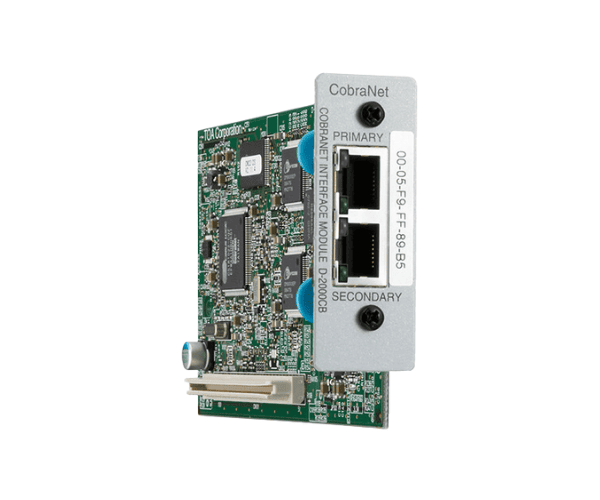
About of Toa D-2000CB CobraNet Module
The CobraNet Interface Module Toa D-2000CB seamlessly interfaces CobraNet audio networks with the TOA's digital audio system for high-quality sound transmission and connectivity. It provides dependable performance and is perfectly suitable for large-scale audio installations.
Specification
| Feature |
Details |
| Product Type |
CobraNet Interface Module |
| Audio Input/Output |
16 Inputs, 16 Outputs |
| Interface |
CobraNet |
| Frequency Response |
20 Hz - 20 kHz |
| Power Supply |
DC 24 V |
| Dimensions (WxHxD) |
482 x 44 x 221 mm |
| Weight |
1.7 kg |
| Mounting Type |
Rack Mountable |
| Compatibility |
TOA Digital Audio System |
| Network Interface |
100BASE-TX Ethernet |
Description
Toa D-2000CB CobraNet Interface Module in BD
The Toa D-2000CB CobraNet Module easily incorporates CobraNet technology within an advanced digital audio system provided by TOA. This provides high-quality 16 channels each of inputs and outputs that will go well for large network setups. The product helps professional sound installations at any big-size venues.
User Experience
The Toa D-2000CB Interface Module has been appreciated for its good, sturdy build and the ease of integrating with other TOA installed digital audio systems. CobraNet-compatible, the module assures very small latency and high-quality audio. A rack-mounting form factor ensures easy installation within professional audio, while the network interface offers flexible configuration and reliability. From live concerts to press conferences and even other events, this module gives seamless operation--a guarantee of peacefulness for excellent performance in great demands of the audio world.
Why Buy The Toa D-2000CB Interface Module?
- Seamless Integration with TOA Digital Audio Systems
- Excellent Audio Transmission: 16 Inputs and 16 Outputs
- Compatibility with CobraNet: Highly Reliable on Big Audio Networks
- Installation Is Easy: By design, this is rack-mountable.
- Very low latency with great sound fidelity.
- Professional audio solutions for venues of any size.
Installation Steps
- Unpack the Toa D-2000CB Interface Module and check contents.
- Ensure that the power supply to the module (DC 24V) is suitable for your system.
- Mount the module into a standard 19-inch rack with the provided rack ears.
- Connect the module to your network using a standard 100BASE-TX Ethernet cable.
- Configure the module using the TOA digital audio system interface and confirm correct network settings.
- Connect the audio devices to the module and test the input/output of audio.
- Switch on the system and check that the signal is being transmitted over the network.