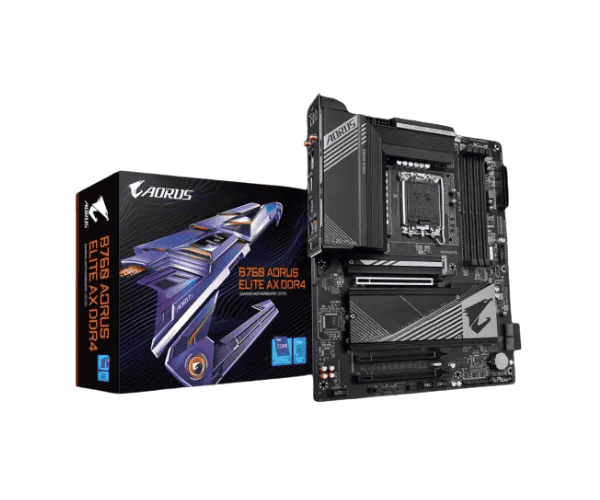
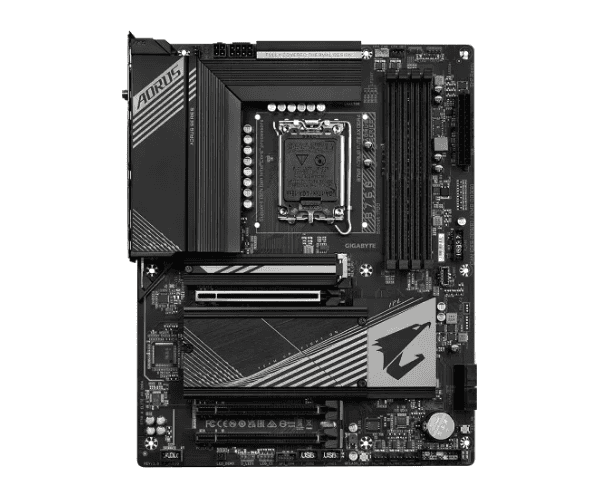
About the GIGABYTE B760 AORUS ELITE AX DDR4 ATX Motherboard
The
GIGABYTE B760 AORUS ELITE AX DDR4 ATX Motherboard being characterized by performance, durability, and connectivity, this motherboard is a great combination to be as both really powerful a board and durable in different respects, for gaming enthusiasts, content creators, and PC builders, this motherboard supports Intel's 12th Gen Core processors. Top-tier features include Wi-Fi 6, PCIe 4.0 support, and advanced thermal solutions.
Specification
| Feature |
Specification |
| Brand |
GIGABYTE |
| Model |
B760 AORUS ELITE AX DDR4 |
| Socket |
LGA 1700 |
| Chipset |
Intel B760 |
| CPU Support |
Intel Core i9/i7/i5 (12th Gen) |
| Form Factor |
ATX (30.5 x 24.4 cm) |
| Memory Support |
4 x DDR4 DIMM slots |
| Max Memory Capacity |
Up to 128GB |
| Memory Speeds Supported |
Up to 5333 MHz (OC) |
| Graphics Output |
1 x HDMI, 1 x DisplayPort, 1 x DVI |
| Storage |
4 x M.2 slots, 6 x SATA 6Gb/s connectors |
| Expansion Slots |
1 x PCIe 5.0 x16, 1 x PCIe 4.0 x16, 1 x PCIe 4.0 x1 |
| LAN |
Intel 2.5GbE LAN |
| Wireless |
Wi-Fi 6 (802.11ax), Bluetooth 5.2 |
| Audio |
Realtek ALC897, 7.1-channel high-definition audio |
| USB Ports |
USB 3.2 Gen 2, USB 3.2 Gen 1, USB 2.0 |
| Other Features |
RGB Fusion, Smart Fan 6, BIOS FlashBack |
Description
B760 AORUS ELITE AX DDR4 ATX Motherboard in Bangladesh
The
GIGABYTE B760 AORUS ELITE AX DDR4 ATX Motherboard-the most powerful mainstream desktop computer processor with which one can play most modern games with great settings or edit professional-level content-would be present in Bangladesh, and all other applications of a gaming and content-creating setup are at ease. Such a quality unit comes with affordable pricing and therefore has no scope for compromise from the user.
User Experience of GIGABYTE B760 AORUS ELITE AX DDR4 ATX Motherboard
The happy comments of the users about this motherboard, the
GIGABYTE B760 AORUS ELITE AX DDR4 ATX, basically state that this board does deliver great performance, especially in gaming and heavy multitasking applications. Among these, quick connectivity options also won praise from users-like Wi-Fi 6 and the 2.5GbE LAN for an online gaming experience that is stutter-free and even smooth content streaming. The BIOS interface is user-friendly, whereby one can easily perform overclocking and setting up the system.
Why the GIGABYTE B760 AORUS ELITE AX DDR4 ATX Motherboard?
The
GIGABYTE B760 AORUS ELITE AX DDR4 ATX Motherboard is a real showstopper, with an incredible blend of performance, connectivity, and reliability. With support for Intel's 12th Gen processors and DDR4 memory, PCIe 4.0 support, and cutting-edge networking features like Wi-Fi 6, this motherboard is ideal for gamers, streamers, and those looking to build a future-proof PC. The user-friendly BIOS, advanced cooling solutions, and robust audio make it a solid choice for any high-performance build.
Key Features
- Intel B760 Chipset: Completely supports Intel 12th Generation Core processors for a performance boost.
- DDR4 Memory Support: Supports up to 128 GB of DDR4 memory, clocking at 5333 MHz (OC)
- PCIe 4.0 and PCIe 5.0 support: High-bandwidth expansion slots to fit your graphics cards, storage, and more.
- Wireless Wi-Fi 6: Supporting high-speed internet for flawless gaming, streaming, and browsing.
- Intel 2.5GbE LAN: Providing software-defined networking for faster and more stable internet, the ultimate combination for lag-free gaming and efficient work.
- RGB Fusion: Customize light effects with integrated RGB headers and make your build unique.
- Smart Fan 6: Advanced fan control and system cooling for a cool, quiet PC.
- High-Quality Audio: Realtek ALC897 codec for crystal-clear audio with 7.1-channel support.
Installation Steps of GIGABYTE B760 AORUS ELITE AX DDR4 ATX Motherboard
- Open up the case, then carefully insert the GIGABYTE B760 AORUS ELITE AX DDR4 ATX Motherboard
- CPU: Put your Intel Core processor into the LGA 1700 socket by aligning it properly.
- Install Memory: Attach your DDR4 RAM in all four DIMM slots on your motherboard, secure them.
- Install Storage Devices: Install your M.2 SSDs into the M.2 slots and SATA drives into the SATA connectors.
- Install GPU: Install your graphics card into the PCIe x16 slot.
- Power Supply: Connect 24-pin and 8-pin power connectors to the motherboard for power.
- Connect Peripherals: Connect front panel connectors, USB, and audio cables to corresponding headers.
- Power On: The machine powers on, boots into BIOS, and configures the memory speed or settings of the CPU.
Why Buy From Crystal Vision Solution?
Crystal Vision Solution offers the
GIGABYTE H410M H V2 10th Gen Micro ATX Motherboard at competitive prices with excellent customer service and expert support. We ensure timely delivery, secure payments, and hassle-free returns, making it easy to purchase with confidence from a trusted supplier for your PC build.
What is the Price of the GIGABYTE H410M H V2 10th Gen Micro ATX Motherboard in Bangladesh?
The latest price of
Gigabyte H410M H V2 10th Gen Micro ATX Motherboard in Bangladesh depends on quantity.
Crystal Vision Solution ensures this motherboard has the best market price in Bangladesh. Our product is 100% original and lowest price in Bangladesh. All kinds of services are the best in Bangladesh, and contact us for any information and latest price.