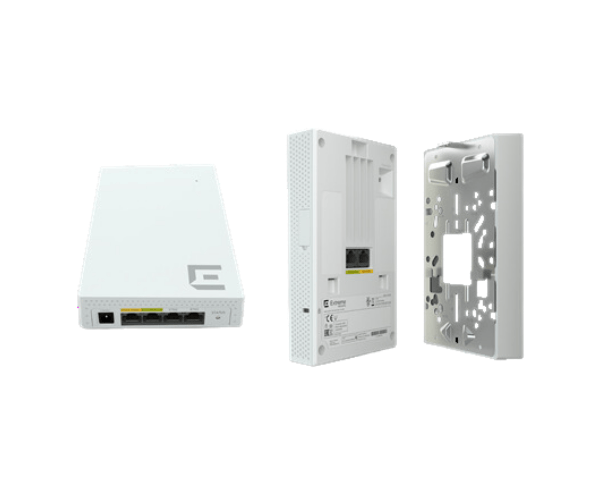
The
Extreme Universal AP302W APs Indoor Access Point offers high-performance wireless connectivity for businesses and homes. It supports seamless coverage with advanced features, providing reliable, fast, and secure Wi-Fi connections.
Specification
| Feature |
Specification |
| Brand |
Extreme Universal |
| Model |
AP302W APs |
| Wi-Fi Standard |
IEEE 802.11a/b/g/n/ac |
| Frequency Bands |
2.4 GHz, 5 GHz |
| Max Data Rate |
1.75 Gbps |
| Ethernet Ports |
1 x 10/100/1000 Ethernet Port |
| Security |
WPA2, WPA3 |
| Dimensions (L x W x H) |
7.1 x 7.1 x 1.3 inches |
| Power over Ethernet (PoE) |
Yes |
| Mounting Type |
Ceiling or Wall Mount |
| Operating Temperature |
32°F to 104°F (0°C to 40°C) |
Extreme Universal AP302W APs Indoor Access Point in BD
The
Extreme Universal AP302W APs Access Point is a high-performance, versatile wireless solution for both home and business environments. With dual-band support and advanced security features, it provides reliable connectivity, ensuring smooth browsing, streaming, and gaming experiences. The AP302W is easy to install and configure, delivering stable Wi-Fi coverage.
User Experience
The
Extreme Universal AP302W APs Indoor Access Point offers an exceptional user experience with its reliable and high-speed Wi-Fi performance. Users can expect fast connection speeds for all devices, whether it's for work, streaming, or gaming. The device's seamless roaming capabilities ensure no interruptions when moving around the coverage area. With minimal interference from other devices, the AP302W delivers consistent performance across its dual-band frequencies. The simple setup process and easy-to-use management features allow users to quickly get their wireless network up and running, enhancing productivity and overall user satisfaction.
Why Choose the Extreme Universal AP-302W APs Indoor Access Point?
Choosing the
Universal AP302W APs Indoor Access Point ensures top-tier wireless connectivity with support for the latest Wi-Fi standards. Its advanced features like dual-band support, fast data rates, and superior security protocols guarantee a smooth, uninterrupted experience. Whether you're setting up a small home network or a larger office, the AP302W provides reliable coverage and high speeds. Additionally, it’s designed for easy installation, making it the perfect solution for those seeking high-performance Wi-Fi with minimal hassle.
Installation Steps
- Unbox and Inspect: Unbox the Extreme AP302W Indoor Access Point and check all the components, including the power adapter and Ethernet cable.
- Choose a Mounting Location: Find a location with optimal coverage, ideally on a ceiling or wall.
- Mount the Device: Attach the access point to the ceiling or wall mount using the provided screws.
- Connect to Power: Plug in the power adapter to the AP302W and connect it to a power outlet.
- Connect Ethernet Cable: Connect the Ethernet cable to the AP302W and plug the other end into your network router or switch.
- Configure the Device: Access the device’s management interface via your web browser or mobile app and follow the setup instructions.
- Test Connection: After configuration, test the Wi-Fi connection by connecting a device to the network.