The
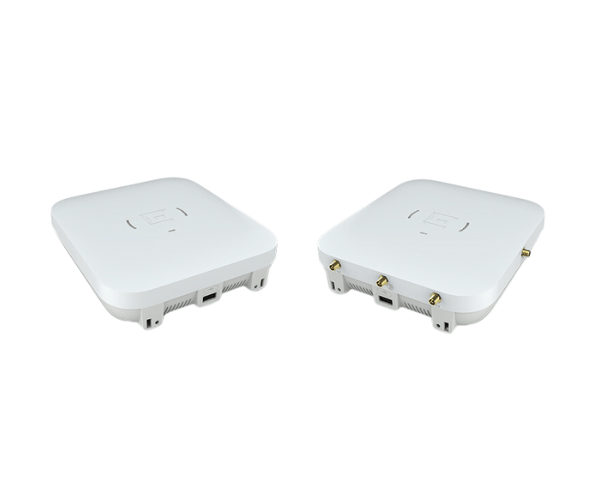
Extreme Networks AP410i/e Access Point provides high-performance Wi-Fi connectivity for both indoor and outdoor environments. With advanced features, it ensures reliable, fast, and secure wireless coverage, making it ideal for business and educational settings where seamless connectivity is crucial.
Specification
| Feature |
Specification |
| Brand |
Extreme Networks |
| Model |
AP410i/e Access Point |
| Wi-Fi Standard |
IEEE 802.11a/b/g/n/ac/ax |
| Frequency Bands |
2.4 GHz, 5 GHz |
| Max Data Rate |
4.8 Gbps |
| Ethernet Ports |
1 x 10/100/1000 Ethernet Port |
| Security |
WPA2, WPA3 |
| Dimensions (L x W x H) |
7.3 x 7.3 x 1.5 inches |
| Power over Ethernet (PoE) |
Yes |
| Mounting Type |
Ceiling or Wall Mount |
| Operating Temperature |
32°F to 104°F (0°C to 40°C) |
Extreme Networks AP410i/e Access Point in BD
The
Extreme Networks AP410i/e Access Point is a cutting-edge wireless solution designed to deliver fast, reliable, and secure Wi-Fi connectivity for both indoor and outdoor environments. With support for the latest Wi-Fi 6 standards, it provides superior performance, ideal for high-density areas such as offices, classrooms, and public spaces. It offers seamless roaming, exceptional throughput, and robust security protocols to ensure a top-tier user experience.
User Experience
The
Extreme Networks AP410i/e Access Point offers an excellent user experience with fast and consistent Wi-Fi performance. Whether in a conference room, classroom, or public venue, users will benefit from high-speed connections for various devices, ensuring seamless communication, video conferencing, and browsing. The access point’s support for Wi-Fi 6 guarantees more efficient performance in dense environments with multiple devices. Its easy-to-install design and intuitive management interface make setup straightforward. With advanced security features, users can trust the AP410i/e to protect their network from potential threats while delivering smooth and reliable connectivity.
Why Choose the Extreme Networks AP410i/e Access Point?
Choosing the
Extreme Networks AP-410i/e Access Point ensures high-performance connectivity in both indoor and outdoor spaces. Its advanced features, including Wi-Fi 6, provide faster speeds, better coverage, and greater capacity for modern network demands. Whether for a high-traffic office, a school campus, or a large event venue, the AP410i/e delivers reliable, secure, and scalable wireless performance. The AP410i/e is also equipped with robust security protocols, ensuring your network stays protected while delivering exceptional user experiences. With easy installation and management, it’s the perfect solution for businesses looking to upgrade their Wi-Fi infrastructure.
Installation Steps
- Unbox and Inspect: Unbox the Extreme AP410i/e Access Point and check all components, including the power adapter and Ethernet cable.
- Choose a Mounting Location: Select an optimal location for coverage, typically on a ceiling or wall.
- Mount the Device: Attach the access point to the ceiling or wall mount using the provided screws.
- Connect to Power: Plug in the power adapter or use Power over Ethernet (PoE) to power the AP410i/e.
- Connect Ethernet Cable: Use the Ethernet cable to connect the AP410i/e to your router or switch for network connectivity.
- Configure the Device: Access the device’s management interface via your web browser or mobile app and follow the configuration steps.
- Test Connection: Once setup is complete, test the Wi-Fi by connecting a device to the network.



-70x60h.png "Samsung Galaxy Tab Active 5 Pro")
-70x60h.png "Samsung Galaxy Tab S10 Plus")