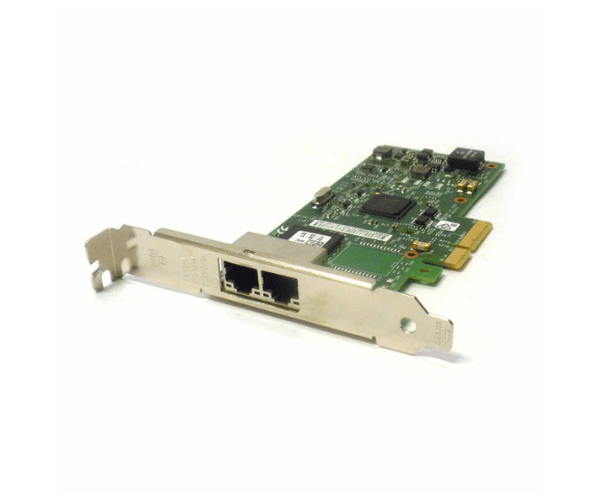
Introduction of Dell V5XVT Intel I350-T2 PCIe x4 2-Port Ethernet Adapter
The Dell V5XVT Intel I350-T2 PCIe x4 2-Port Ethernet Adapter is engineered to deliver reliable and high-speed network connectivity. Designed for modern computing environments, this adapter offers exceptional performance with dual 1GbE ports. Its robust features make it an ideal choice for enterprises looking to enhance their network infrastructure and ensure seamless communication.
Why Choose the Dell V5XVT Intel I350-T2 PCIe x4 2-Port Ethernet Adapter?
The Dell V5XVT Intel I350-T2 Ethernet Adapter is your go-to solution for dependable and high-speed network connectivity. With dual 1GbE ports, it ensures stable and efficient data transfer, crucial for maintaining smooth operations in a network-intensive environment. By selecting the Dell V5XVT Intel I350-T2 Ethernet Adapter, you benefit from its robust performance and easy integration into existing systems. Its advanced features and high reliability make it a top choice for upgrading network capabilities.
User Experience
Users consistently appreciate the Dell V5XVT Intel I350-T2 Ethernet Adapter for its straightforward installation and reliable network performance. The dual 1GbE ports offer efficient data handling, which is particularly beneficial in high-traffic network scenarios. Installation is user-friendly, and the adapter integrates seamlessly with various operating systems, including Windows, Linux, and VMware. The Dell V5XVT Intel I350-T2 Ethernet Adapter consistently delivers stable and high-speed connectivity, meeting the demands of both small and large IT infrastructures.
Key Features
- High-Speed Connectivity: Dual 1GbE ports for rapid data transfer.
- Efficient Power Usage: Low power consumption at just 8W.
- Versatile Compatibility: Works with Windows, Linux, and VMware.
- Reliable Performance: Ensures stable and consistent network access.
- Easy Installation: User-friendly setup process.
- Compact Design: Low profile for compatibility with various systems.
- Robust Build: Designed to handle demanding network environments.
- Advanced Features: Supports various network protocols and standards.
- Seamless Integration: Fits into existing network infrastructures effortlessly.
- Enhanced Connectivity: Ideal for both enterprise and SMB networks.
Installation Steps
- Power Down System: Turn off the computer and disconnect from the power source.
- Open Computer Case: Remove the case cover to access internal components.
- Locate PCIe Slot: Find an available PCIe x4 slot on the motherboard.
- Insert Adapter: Carefully insert the Dell V5XVT Intel I350-T2 Ethernet Adapter into the PCIe slot.
- Secure Adapter: Fasten the adapter using screws or clips to secure it in place.
- Connect Cables: Attach network cables to the RJ45 connectors.
- Close Computer Case: Replace and secure the case cover.
- Reconnect Power: Plug the computer back into the power source and turn it on.
- Install Drivers: Download and install the latest drivers from the Intel website.
- Configure Network: Adjust network settings using the system utilities.
Where It Can Be Used?
The
Dell V5XVT Intel I350-T2 Ethernet
Adapter is versatile and suited for various network environments. It is ideal for enterprise servers requiring high-speed connectivity and efficient data handling. In data centers, it enhances network performance, ensuring smooth data transfers and reliable communication. This adapter is also suitable for small and medium-sized businesses (SMBs), offering robust network solutions and easy integration with existing infrastructure. Its high-speed and dependable performance make it a valuable addition to any IT setup.