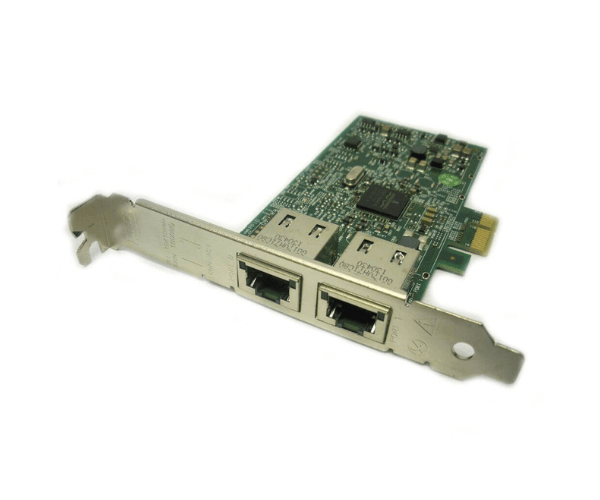
Introduction of Dell 0FCGN Broadcom 5720 2-Port 1GbE PCIe NIC
The Dell 0FCGN Broadcom 5720 2-Port 1GbE PCIe NIC offers an efficient and reliable networking solution for both enterprise and home environments. Designed to enhance network performance, this Network Interface Card (NIC) provides two Gigabit Ethernet ports for high-speed data transfer. Whether you're upgrading an existing system or building a new one, the Dell 0FCGN is engineered to deliver robust connectivity and exceptional performance.
Why Choose the Dell 0FCGN Broadcom 5720 2-Port 1GbE PCIe NIC?
The Dell 0FCGN Broadcom 5720 2-Port 1GbE PCIe Network Interface Card stands out for its reliability and high performance. By choosing this network card, you ensure seamless integration into your system with minimal configuration. It supports efficient data transfer and enhances network stability, making it ideal for a variety of applications. The dual Gigabit Ethernet ports provide redundancy and improved performance, making the Dell 0FCGN a top choice for users who need dependable and fast network connectivity.
User Experience
Users of the Dell 0FCGN Broadcom 5720 2-Port 1GbE PCIe Network Interface Card appreciate its straightforward installation process and reliable operation. Many find that it integrates smoothly with existing network setups, providing a stable connection with minimal setup hassle. The performance of the Dell 0FCGN meets expectations for users requiring efficient network operations, whether in a small office or a larger enterprise environment. Overall, the Dell 0FCGN is valued for its ease of use and effectiveness in delivering consistent network performance.
Key Features
- Dual Gigabit Ethernet Ports: Provides high-speed network connectivity with two independent ports.
- PCIe Interface: Ensures compatibility with a wide range of systems and easy installation.
- Reliable Performance: Delivers stable and efficient network performance for various applications.
- Low Power Consumption: Operates with minimal energy usage, contributing to energy efficiency.
- Flexible Compatibility: Works with both Windows and Linux operating systems.
Installation Steps
- Power Down Your Computer: Turn off the computer and unplug it from the power source.
- Open the Computer Case: Remove the case cover to access the internal components.
- Locate a Free PCIe Slot: Identify an available PCIe slot on the motherboard.
- Insert the NIC: Carefully insert the Dell 0FCGN NIC into the PCIe slot.
- Secure the Card: Fasten the NIC to the case using the provided screws.
- Close the Case: Replace the computer case cover.
- Reconnect Power and Boot Up: Plug the computer back in and power it up.
- Install Drivers: Follow the manufacturer's instructions to install the necessary drivers.
Where It Can Be Used?
The
Dell 0FCGN Broadcom 5720 2-Port 1GbE PCIe Network Interface
Adapter is versatile and suitable for various environments. It is ideal for upgrading older desktop computers and workstations to improve network performance. This NIC is particularly useful in small businesses, educational institutions, and home offices where stable and efficient network connectivity is essential. It enhances data transfer capabilities and provides reliable network access, making it a valuable addition to any network infrastructure.