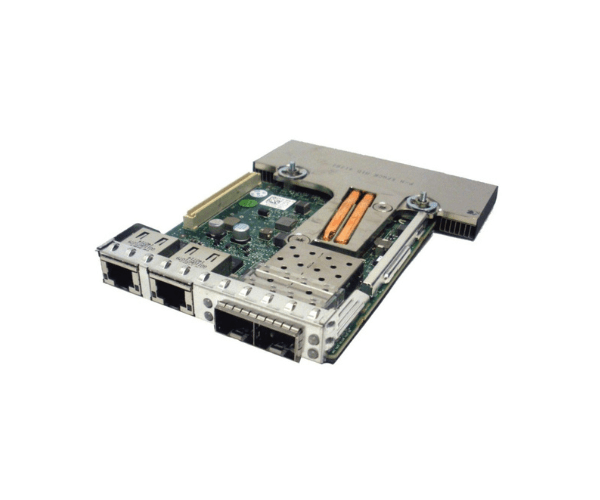
Introduction of Dell 165T0 Broadcom SFP Adapter
The Dell 165T0 Broadcom SFP Adapter is designed to enhance network connectivity with high-speed data transfer capabilities. Ideal for demanding IT environments, this adapter supports seamless integration into various network setups. By offering robust performance and reliability, the Dell 165T0 ensures that your network operations run smoothly and efficiently, making it a valuable addition to your infrastructure.
Why Choose the Dell 165T0 Broadcom SFP Adapter?
Opting for the Dell 165T0 SFP Adapter ensures you select a product engineered for peak network performance. This adapter, known for its high-speed data transfer, plays a crucial role in maintaining efficient network operations. The SFP interface not only guarantees compatibility with a variety of Dell systems but also facilitates a seamless integration process. Furthermore, the straightforward installation allows for a swift and hassle-free setup. Consequently, the Dell 165T0 stands out as an excellent choice for anyone requiring dependable and high-performance network connectivity.
User Experience
Users of the Dell 165T0 Broadcom Adapter often commend its effortless integration and reliable performance. They find the installation process to be straightforward, which simplifies setup. Additionally, this adapter excels in maintaining stable and high-speed connections, crucial for efficient network operations. Its broad compatibility with various Dell systems ensures that users face minimal setup challenges and achieve optimal performance. Overall, the Dell 165T0 consistently enhances network performance and delivers dependable connectivity, making it a highly valued addition to any IT environment.
Key Features
- High-speed Data Transfer: Facilitates rapid data transmission, boosting overall network performance.
- SFP Interface: Guarantees seamless compatibility with a variety of network devices and systems.
- Reliable Connectivity: Delivers stable and consistent network connections, ensuring dependable performance.
- Easy Installation: Features a straightforward setup process, enabling quick and hassle-free integration into existing networks.
- Versatile Compatibility: Adapts effortlessly to a range of Dell systems, providing flexibility and adaptability in various network environments.
Installation Steps
- Power Down the Device: Begin by shutting down the system where the adapter will be installed.
- Open the Device Case: Access the internal components by opening the device case or slot.
- Insert the Adapter: Place the Dell 165T0 Broadcom Adapter into an available SFP slot.
- Secure the Adapter: Ensure the adapter is properly seated and secured in place.
- Close the Device Case: Reassemble the case and reconnect power.
- Verify Installation: Power on the system and check for proper detection and functionality of the adapter.
Where It Can Be Used?
The
Dell 165T0 Broadcom
Adapter excels in various high-performance networking environments. It suits data centers, enterprise networks, and other setups that demand high-speed and reliable connectivity. By providing stable connections and supporting high data transfer rates, this adapter significantly enhances network infrastructure. Whether for small-scale or large-scale IT operations, the Dell 165T0 optimizes performance and ensures robust network reliability, making it an indispensable asset for modern network environments.