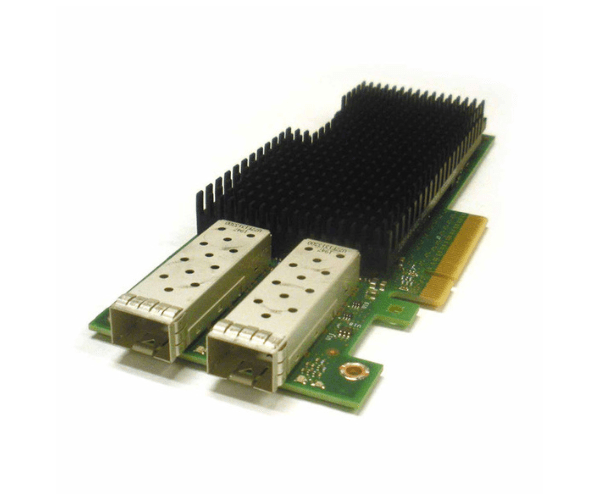
Introduction of Dell 00M95 Intel XXV710-DA2 2-Port 25GB Ethernet Network Adapter
The Dell 00M95 Intel XXV710-DA2 2-Port 25GB Ethernet Network Adapter is designed to provide high-speed, reliable network connectivity for enterprise and data center environments. With dual 25GbE ports, this adapter offers exceptional performance for data-intensive applications and high-bandwidth tasks. It supports advanced network features and is built to handle the demands of modern IT infrastructures, ensuring smooth and efficient network operations.
Why Choose the Dell 00M95 Intel XXV710-DA2 2-Port 25GB Ethernet Network Adapter?
The Dell 00M95 Intel Ethernet Network Adapter excels in speed and reliability. With its dual 25GbE ports, it delivers exceptional bandwidth, crucial for managing high-performance applications and extensive data transfers. The Dell 00M95 Intel XXV710-DA2 seamlessly integrates with your existing infrastructure, ensuring robust connectivity and improved network performance. Its advanced features, combined with an energy-efficient design, make it a top choice for businesses eager to enhance their network capabilities. Moreover, this adapter’s ability to handle demanding tasks makes it indispensable for modern IT environments.
User Experience
Users of the Dell 00M95 Intel 25GB Ethernet Network Adapter frequently highlight its impressive speed and stability. The dual 25GbE ports enable rapid data transfers, which significantly enhances network efficiency. The adapter integrates smoothly with various operating systems, including Windows, Linux, and VMware, making it versatile for different IT environments. The straightforward installation process and reliable performance have made the Dell 00M95 Intel a preferred choice for professionals seeking high-speed network solutions.
Key Features
- High-Speed Connectivity: Dual 25GbE ports for fast data transfer and high bandwidth.
- Low Profile Design: Fits into standard low-profile PCIe slots for easy installation.
- Energy Efficient: Consumes only 25W, helping to reduce operational costs.
- Advanced Network Features: Supports advanced networking technologies and protocols.
- Broad Compatibility: Works with Windows, Linux, and VMware for versatile use.
- Reliable Performance: Ensures stable and efficient network connectivity.
- Durable Build: Designed to handle demanding network tasks with robustness.
- Seamless Integration: Easy to integrate with existing network infrastructure.
- High Bandwidth: Ideal for data-intensive applications and large file transfers.
- Temperature Resilience: Operates effectively in temperatures from 0°C to 55°C.
Installation Steps
- Power Down Computer: Turn off the computer and disconnect it from the power source.
- Open Computer Case: Remove the case cover to access the internal components.
- Locate PCIe Slot: Find an available PCIe 3.0 slot on the motherboard.
- Insert Adapter: Carefully insert the Dell 00M95 Intel into the PCIe slot.
- Secure Adapter: Use screws or clips to secure the adapter in place.
- Connect Cables: Attach the appropriate SFP28 cables to the Ethernet ports.
- Close Computer Case: Replace and secure the case cover.
- Power Up Computer: Reconnect and turn on the computer.
- Install Drivers: Download and install the necessary drivers from Intel’s website.
- Configure Settings: Use system utilities to configure network settings.
Where It Can Be Used?
The
Dell 00M95 Intel Network
Adapter is versatile and suitable for various high-performance network environments. It is perfect for data centers that require high-speed network connectivity to manage large volumes of data efficiently. In enterprise servers, it enhances network performance and reliability for critical applications. It also benefits high-performance computing setups by providing rapid data transfer and robust connectivity. The adapter is designed to support modern IT infrastructure, ensuring seamless and effective network operations.