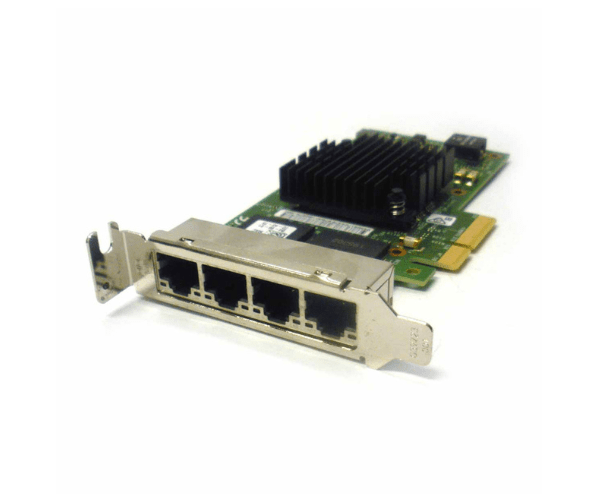
Introduction of Dell T34F4 Intel i350-T4 4-Port LP PCIe Ethernet Adapter
The Dell T34F4 Intel i350-T4 4-Port LP PCIe Ethernet Adapter is designed to provide reliable and high-performance network connectivity. Featuring four 1GbE ports, this adapter is ideal for businesses and data centers that require robust network solutions and efficient data handling. With its low-profile design and seamless integration, the Dell T34F4 Intel i350-T4 offers exceptional speed and reliability to enhance your network infrastructure.
Why Choose the Dell T34F4 Intel i350-T4 4-Port LP PCIe Ethernet Adapter?
The Dell T34F4 Intel i350-T4 Ethernet Adapter is a top choice for those seeking high-speed and reliable network connectivity. With its four 1GbE ports, it efficiently handles multiple data streams, ensuring stable and fast network performance. The low-profile design of the Dell T34F4 Intel i350-T4 allows for easy installation in compact systems, making it ideal for a variety of network setups. Choosing the Dell T34F4 Intel i350-T4 means investing in a high-quality adapter that enhances network efficiency and reliability.
User Experience
Users frequently praise the Dell T34F4 Intel i350-T4 Ethernet Adapter for its straightforward installation and consistent performance. The adapter's four 1GbE ports are highly effective in managing high-volume network traffic, making it a valuable asset in both small and large network environments. The Dell T34F4 Intel i350-T4 integrates smoothly with different operating systems, including Windows, Linux, and VMware. Overall, users find the Dell T34F4 Intel i350-T4 to be a dependable solution for achieving reliable and high-speed network connectivity.
Key Features
- High-Speed Connectivity: Four 1GbE ports ensure fast data transfer rates.
- Efficient Power Usage: Operates with a power consumption of only 9W.
- Versatile Compatibility: Compatible with Windows, Linux, and VMware.
- Reliable Performance: Provides stable and consistent network access.
- Easy Installation: Features a user-friendly installation process.
- Compact Design: Low-profile form factor fits easily in various systems.
- Robust Build: Designed for demanding network environments.
- Advanced Features: Supports a range of network protocols and standards.
- Seamless Integration: Easily integrates into existing network setups.
- Enhanced Connectivity: Suitable for both enterprise and SMB networks.
Installation Steps
- Power Down System: Turn off your computer and disconnect it from the power source.
- Open Computer Case: Remove the case cover to access internal components.
- Locate PCIe Slot: Find an available PCIe x4 slot on your motherboard.
- Insert Adapter: Carefully insert the Dell T34F4 Intel i350-T4 Ethernet Adapter into the PCIe slot.
- Secure Adapter: Fasten the adapter using screws or clips to ensure it is secure.
- Connect Cables: Attach network cables to the RJ45 connectors on the adapter.
- Close Computer Case: Replace and secure the case cover.
- Reconnect Power: Plug your computer back into the power source and turn it on.
- Install Drivers: Download and install the latest drivers from the Intel website.
- Configure Network: Adjust network settings using your system's network utilities.
Where It Can Be Used?
The
Dell T34F4 Intel i350-T4 Ethernet
Adapter is versatile and suitable for a variety of network environments. It is ideal for enterprise servers requiring multiple high-speed connections and efficient data handling. In data centers, it enhances network performance and ensures reliable communication. The adapter is also well-suited for small and medium-sized businesses (SMBs) looking for robust network solutions with easy integration. Its high-speed and dependable performance make it a valuable component in any IT infrastructure.