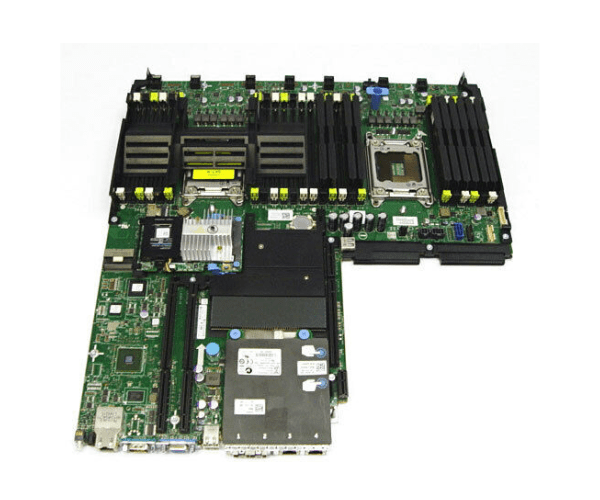
Upgrade Your System with Dell PowerEdge R620 Motherboard
Introduction of Dell PowerEdge R620 Motherboard
The Dell PowerEdge R620 Motherboard is engineered to deliver exceptional performance and reliability in server environments. Designed to support powerful processors and high-density memory configurations, it ensures seamless operation for critical business applications.
Detailed Breakdown of Features
The Dell Motherboard boasts a robust design optimized for server-grade performance. It supports dual Intel Xeon E5-2600 processors, providing up to 24 cores and 48 threads for intensive computational tasks. With support for DDR3 RDIMM and LRDIMM memory modules, it offers scalability and efficiency in data-intensive operations. Integrated RAID controllers enhance data protection and storage performance, making it ideal for demanding enterprise applications.
User Experience
Server administrators and IT professionals value the Dell PowerEdge R620 Motherboard for its reliability and performance consistency. It delivers stable operation under heavy workloads, ensuring minimal downtime and efficient resource utilization. The motherboard's compatibility with various server management tools further enhances user convenience and operational efficiency.
Why Choose Dell PowerEdge R620 Motherboard?
Choose the Motherboard for its robust construction and scalability, catering to the needs of modern server environments. Its ability to support dual processors and high-density memory configurations makes it a reliable choice for businesses seeking optimal performance and data handling capabilities.
Key Features
- Processor Support: Dual Intel Xeon E5-2600 processors for up to 24 cores and 48 threads
- Memory Support: DDR3 RDIMM and LRDIMM modules for scalable memory configurations
- RAID Controllers: Integrated RAID controllers for enhanced data protection and storage performance
- Expansion Slots: PCI Express slots for additional connectivity and expansion
- Network Connectivity: Gigabit Ethernet and optional 10GbE adapters for high-speed networking
- Management: Compatible with Dell OpenManage and other server management tools for streamlined operations
Installation Steps
Installing the Motherboard:
- Ensure compatibility with the chassis and other components.
- Align the motherboard with the mounting points in the server chassis.
- Secure the motherboard using appropriate screws.
- Install processors and memory modules according to manufacturer guidelines.
- Connect power and data cables to the motherboard.
- Power on the server and configure BIOS settings as needed.
Where It Can Be Used?
The
Server Motherboard is suitable for:
- Data centers requiring high-performance computing and reliable data storage.
- Enterprise server environments for critical applications and virtualization.
- Cloud computing infrastructure for scalable and efficient resource management.