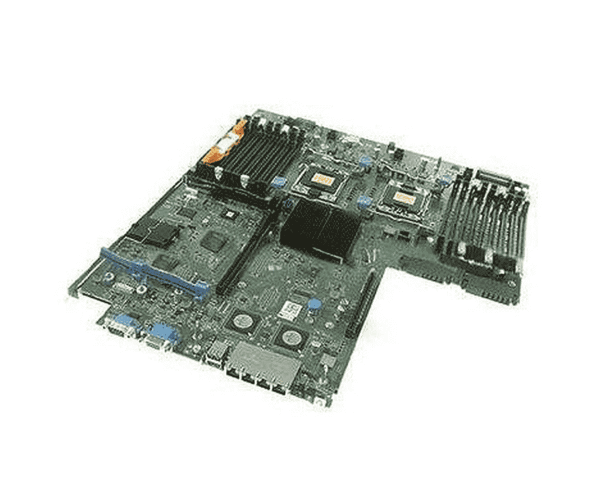
The
Dell 0NH4P V2 System Board for PowerEdge R710 is designed to optimize server performance and reliability. Featuring compatibility with Intel Xeon processors, it supports efficient multitasking and offers multiple expansion options. Ideal for businesses seeking to enhance their server capabilities, this motherboard is built for longevity and stability.
Dell 0NH4P V2 System Board for PowerEdge R710 in BD
The
Dell 0NH4P System Board for PowerEdge R710 is available in Bangladesh, making it accessible for local businesses and IT professionals looking to upgrade their server systems.
Why Choose the Dell 0NH4P V2 System Board for PowerEdge R710?
Opting for the
Dell 0NH4P V2 System Board ensures you receive a high-quality motherboard that significantly enhances your server's performance. Its robust design, exceptional compatibility with various components, and reliable connectivity options make it an excellent choice for IT infrastructure.
User Experience
Users appreciate the
Dell 0NH4P System Board for its seamless installation and dependable operation. Many report improved server response times and stability, contributing to better productivity and efficiency in their organizations.
Detailed Breakdown of Features
- Performance: Delivers high performance for demanding applications.
- Compatibility: Works seamlessly with Intel Xeon processors.
- Memory Support: Accommodates up to 192GB of DDR3 RAM for optimal multitasking.
- Expansion Options: Multiple PCIe slots allow for adding graphics cards or additional components.
- Networking: Dual Gigabit Ethernet ports provide fast and reliable connectivity.
- USB Ports: Four USB 2.0 ports for connecting peripherals easily.
- Storage: Six SATA 3Gb/s ports support various storage devices.
- Power Connector: 24-pin power connector for stable power supply.
- Design: Built with durable materials to ensure long-lasting performance.
- Ease of Installation: The user-friendly design makes the installation process straightforward.
Installation Steps for Dell 0NH4P V2 System Board
- Power Off the Server: Ensure that the server is completely powered down and unplugged.
- Remove the Existing Motherboard: Disconnect all attached components and remove the old motherboard.
- Install the New Motherboard: Position the Dell 0NH4P System Board in the chassis and secure it.
- Reconnect Components: Reinstall the CPU, RAM, and any additional components.
- Connect Power: Reattach all power cables and peripherals.
- Power On the Server: Turn on the server to verify proper functionality.
Where Dell 0NH4P V2 System Board Can Be Used?
The
Dell 0NH4P V2 System Board is ideal for a variety of applications, including data centers, small to medium-sized businesses, and enterprise environments. It is suitable for tasks that require high reliability and performance, such as virtualization, database management, and application hosting.