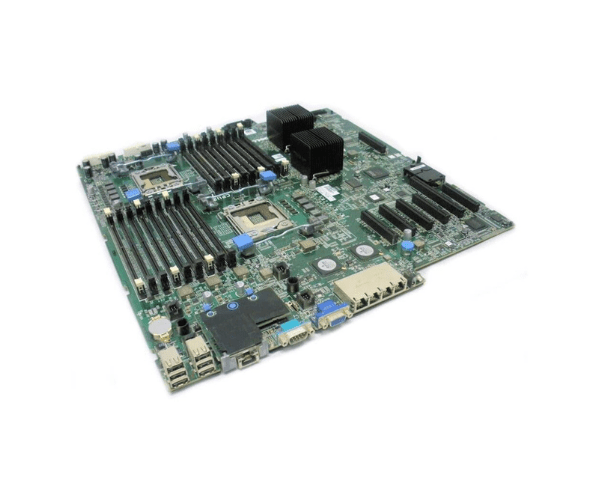
Introduction of Dell 1CTXG V2 System Motherboard
The
Dell 1CTXG V2 System Motherboard serves as a critical component for Dell servers, delivering exceptional performance and reliability. This motherboard is designed to enhance the capabilities of your server, ensuring it operates efficiently under demanding workloads. Built with advanced technology, the Dell 1CTXG V2 supports a wide range of applications, making it ideal for businesses looking to boost their IT infrastructure.
Why Choose the Dell 1CTXG V2 System Motherboard?
Choosing the
Dell 1CTXG System Motherboard ensures your server achieves optimal performance and reliability. This motherboard supports modern workloads, making it an excellent choice for virtualization, data processing, and cloud computing. By selecting this motherboard, you gain access to advanced features that enhance server capabilities, ensuring your business runs smoothly and efficiently.
User Experience
Users have praised the
Dell 1CTXG System Motherboard for its robust performance and ease of installation. Many report seamless integration with existing Dell server systems and appreciate the motherboard’s ability to handle demanding tasks. The solid construction and thoughtful design contribute to a user-friendly experience, allowing both new and experienced technicians to install and configure the system without complications.
Detailed Breakdown of Features
- High Capacity Memory Support: Supports up to 1TB of DDR4 memory, allowing for extensive multitasking and performance.
- Flexible Expansion Options: Features 6 PCIe 3.0 slots for added flexibility in upgrading your server’s capabilities.
- Advanced Networking: Dual 10GbE ports ensure fast and reliable network connectivity, crucial for data-intensive applications.
- Ample USB Connectivity: Includes 6 USB 3.0 ports for fast data transfer and easy peripheral connection.
- Robust Power Delivery: Equipped with both 24-pin and 8-pin power connectors to ensure stable and efficient power supply.
- ATX Form Factor: Fits easily into most server cases, providing versatile installation options.
- User-Friendly Design: Thoughtfully arranged layout simplifies installation and improves airflow for better thermal management.
- Comprehensive BIOS Support: Offers a user-friendly BIOS interface for easy system configuration and management.
- High Performance: Built to support advanced server applications, ensuring your workloads are handled efficiently.
- Reliability: Constructed with high-quality components for enhanced durability and long service life.
Installation Steps
- Power Off: Ensure that the server is powered down completely.
- Disconnect: Disconnect all power cables and unplug peripheral devices.
- Open the Case: Remove the server's side panel to access internal components.
- Remove the Old Motherboard: Carefully detach the existing motherboard by removing screws and disconnecting cables.
- Install the Dell System Motherboard: Align the new motherboard within the chassis and secure it using the screws.
- Reconnect Components: Reattach all power cables, memory modules, storage drives, and any additional expansion cards.
- Close the Case: Replace the side panel of the server.
- Power On: Reconnect all peripherals and power cables, then start the server to verify installation.
Where It Can Be Used?
The
Dell V2 System Motherboard is ideal for a variety of applications, including:
- Virtualization and cloud services
- Database management
- High-performance computing tasks
- Data analytics and processing
- Web hosting and server management