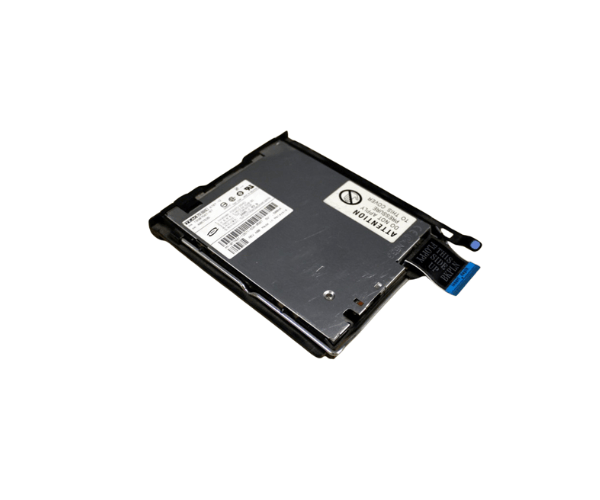
Introduction of Dell PE2850 T7421 Floppy Drive
The
Dell PE2850 T7421 Floppy Drive is a reliable and essential storage solution for users needing to access and manage data on 3.5-inch floppy disks. Despite the rise of modern storage devices, many industries still rely on floppy disks for data retrieval and archiving, making this drive a valuable asset. The
Dell T7421 Floppy Drive ensures seamless compatibility with older systems, offering a simple yet effective method to read and write data from floppy disks.
Why Choose the Dell PE2850 T7421 Floppy Drive?
Choosing the
Dell PE2850 Floppy Drive is an excellent decision for those needing to access legacy data. This drive offers exceptional reliability and compatibility with older Dell systems, making it perfect for businesses and individuals who frequently work with floppy disks. Its user-friendly design ensures hassle-free installation and operation, allowing users to efficiently retrieve important files from older media. With the
Dell PE2850 Floppy Drive, you can maintain access to vital data without having to upgrade your entire system.
User Experience
Users of the
Dell Floppy Drive report a positive experience, highlighting its straightforward installation and dependable performance. Many users appreciate its ability to seamlessly integrate with legacy systems, making data retrieval from floppy disks easy and efficient. The drive is designed to be user-friendly, ensuring that even those with minimal technical expertise can operate it without issues. Overall, customers find the
Dell T7421 Floppy Drive to be a practical and valuable addition to their technology setup.
Detailed Breakdown of Features
- Brand Name: Dell – Renowned for high-quality hardware solutions.
- Model: PE2850 T7421 – Specifically designed for the Dell PE2850 system.
- Drive Type: 3.5-inch floppy drive – Compatible with standard floppy disks.
- Capacity: 1.44 MB – Ideal for storing small files and data.
- Interface: IDE/ATAPI – Ensures a reliable connection to older systems.
- Form Factor: Internal – Fits securely in a standard 3.5-inch drive bay.
- Power Supply: 5V DC – Efficient power consumption for optimal performance.
- Dimensions: Compact size – 4.00 x 5.75 x 1.00 inches for easy integration.
- Weight: Lightweight – Only 0.8 lbs, making installation easier.
- Compatibility: Designed specifically for Dell PE2850 systems, ensuring perfect fit and function.
Installation Steps
- Turn off the computer: Make sure your system is completely powered down and unplugged.
- Open the computer case: Remove the screws from the side panel and slide it off carefully.
- Identify the 3.5-inch bay: Locate an available slot in the drive bays for the floppy drive.
- Insert the floppy drive: Gently slide the Dell Floppy Drive into the identified bay.
- Secure the drive: Use screws to fasten the drive securely in place.
- Connect the cables: Attach the IDE ribbon cable and power cable to the drive.
- Close the computer case: Replace the side panel and tighten the screws.
- Reconnect power: Plug in the computer and turn it on.
- Install necessary drivers: If prompted, install any drivers needed for the floppy drive.
- Test the drive: Insert a floppy disk to ensure the drive is functioning properly.
Where It Can Be Used?
The
Dell T7421 Floppy Drive is ideal for environments where legacy data access is essential. This includes businesses that maintain older systems for data archiving, educational institutions that use historical materials, and IT professionals needing to retrieve information from floppy disks. It is especially useful in fields like healthcare, engineering, and any sector that relies on legacy data stored on floppy media.