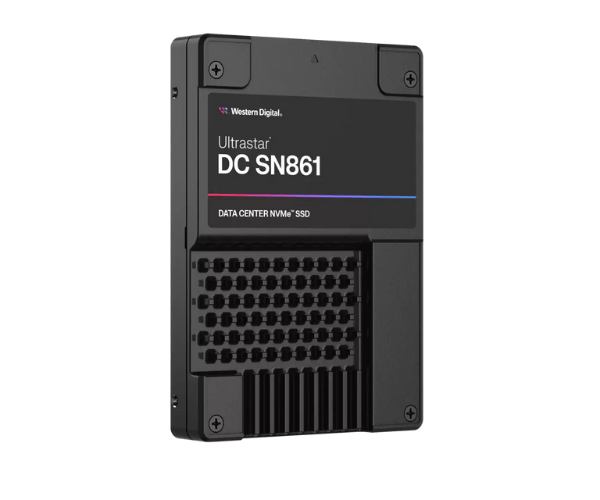
About the Western Digital 0TS2537 1.6TB Ultrastar DC SN861 U.2 Server SSD
The Western Digital 0TS2537 1.6TB Ultrastar DC SN861 U.2 Server SSD is particularly designed for enterprise workloads that have high demands. Having a humongous storage capacity of 1.6TB, this U.2 form factor SSD provides up to maximum sequential read/write speeds of 3200 MB/s. This SSD provides high reliability, endurance, and security for high-demand workloads.
Western Digital 0TS2537 1.6TB Ultrastar DC SN861 U.2 Server SSD in BD
The Western Digital 0TS2537 1.6TB Ultrastar DC SN861 U.2 Server SSD is procurable in Bangladesh from different authorized resellers and online shopping websites. Western Digital 0TS2537 1.6TB Ultrastar DC SN861 U.2 Server SSD is suitable for data centers, high-end servers, and cloud. You can buy the product from reliable resellers offering enterprise-level storage solutions in the country.
User Experience of Western Digital 0TS2537 1.6TB DC SN861 U.2 Server SSD?
Western Digital 0TS2537 1.6TB DC SN861 U.2 Server SSD offers the user a market-leading experience, especially for enterprise purposes. It is greatly recommended for its astounding read and write speeds, delivering gigantic performance gains in high-traffic server environments. The users also appreciate the added security and reliability features such as the Integrated Security Engine (ISE) and AES 256-bit Encryption, which lock the confidential data. Its extended lifespan, within a 3 DWPD endurance warranty that extends to five years, causes the SSD to live longer and provide consistent performance even when used at its maximum capacity.
Why Buy the Western Digital 0TS2537 1.6TB Ultrastar DC SN861 U.2 Server SSD
Western Digital 0TS2537 1.6TB Ultrastar DC U.2 Server SSD is a perfect choice for enterprise due to its extremely high read and write speeds of 3200 MB/s and 2500 MB/s, respectively. Its extremely high capacity of 1.6TB is perfectly suited for the storage and processing of large amounts of data with minimal latency. In addition, the SSD is AES 256-bit Encryption and ISE (Integrated Security Engine) supported, making it highly secure to use with sensitive information. The 3 DWPD for 5 years endurance and shock and vibration resistance features ensure that the SSD is durable to operate with demanding applications. Whether virtualized data environments, databases, or high-performance computing.
Key Features
- 1.6TB Capacity to efficiently hold big amounts of data.
- U.2 Interface (PCIe Gen 3 x4) for efficient data transfer and easy deployment into modern server infrastructures.
- Sequential Read Speed of 3200 MB/s and Write Speed of 2500 MB/s for business-critical applications.
- 3 DWPD for 5 Years endurance, best suited for enterprise workloads and high I/O workloads.
- AES 256-bit Encryption and ISE (Integrated Security Engine) for data security and protection in storage.
- Shock Resistance of 1500 G for 0.5 ms, which guards data even in harsh physical environments.
- Vibration Resistance of up to 20 G in operation, which allows it to be appropriate for use in data centers.
- 920 TBW (Terabytes Written) endurance rating for enterprise-class storage usage.
- Low power consumption, with optimal use of resources without compromising on performance.
Maintenance of Western Digital 0TS2537 Ultrastar DC SN861 U.2 Server SSD?
- Monitor Performance: Check the health of the SSD periodically using Western Digital's management software.
- Firmware Updates: Ensure that the SSD has the latest firmware to enhance performance and security.
- Efficient Cooling: Keep the operating temperature within 0°C to 70°C for peak performance and lifespan.
- Data Backup: Periodic backup of vital data to prevent potential loss of data.
- Prevent Physical Damage: Although the SSD is shock and vibration-resistant, mount carefully to prevent physical damage.
- Power Protection: Plug in surge protectors and a UPS system to protect the SSD from power outages and electrical spikes.
Installation Steps
- Power down the server and remove it from power.
- Find the U.2 compatible bay in your server's chassis.
- Mount the Western Digital 0TS2537 1.6TB DC SN861 U.2 Server SSD into the bay.
- Plug in the U.2 cables (PCIe Gen 3 x4) for data and power connections.
- Close the server case and restore the power.
- Boot the server and format the SSD with your operating system's disk management tool.
- Once you've formatted it, the SSD is ready for use and you can begin saving your data securely and efficiently.
Where to Use It?
- Enterprise Data Centers for applications requiring high-speed storage.
- Cloud Service Providers that require scalable and dependable storage for their infrastructure.
- Virtualization Environments where speedy data storage is critical for virtual machines.
- High-Performance Computing (HPC) initiatives that require instant access to bulk data.
- Database Servers to handle rapid read/write operations in databases.
- Business Intelligence and Big Data Analytics in which huge quantities of data must be processed immediately and securely.
- Industrial and Scientific Applications involving heavy-duty high-performance storage needs.