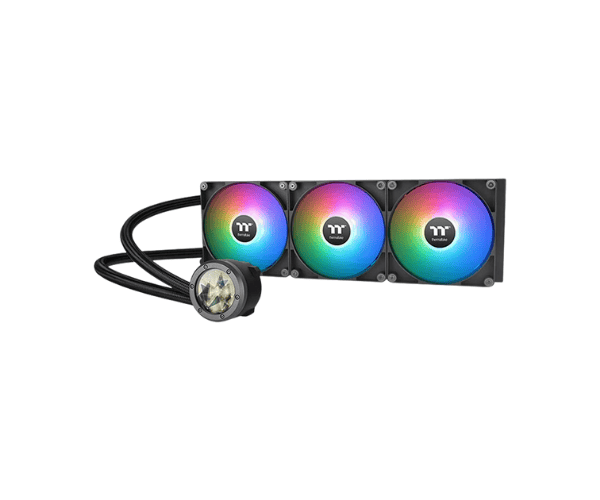
About this Thermaltake TH420 V2 Ultra Sync AIO Black Liquid CPU Cooler
The Thermaltake TH420 V2 Ultra ARGB Sync AIO Black Liquid CPU Cooler is a high-performance cooling solution designed for gaming and overclocking. Featuring a 2.1” LCD display, powerful 420mm radiator, and vibrant ARGB lighting, it delivers efficient cooling with stunning aesthetics.
Specification
| Feature |
Details |
| Brand |
Thermaltake |
| Model |
Thermaltake TH420 V2 Ultra ARGB Sync AIO |
| Cooler Type |
Liquid CPU Cooler |
| Series |
TH |
| Theme Display |
Yes |
| Number of Fans |
3 |
| Fan Size (Height) |
140mm |
| Fan Speed |
1800 RPM |
| Fan Dimensions |
140 x 140 x 25mm |
| Radiator Material |
Aluminum |
| Water Block Material |
Copper |
| Tube Material |
Rubber |
| LED Color |
ARGB |
| Approx. Power Consumption |
15W |
| Supported CPU Socket Brand |
Intel & AMD |
| Body Color |
Black |
Description
Thermaltake TH420 V2 Ultra Sync AIO Black Liquid CPU Cooler in BD
The Thermaltake TH420 V2 Ultra CPU Cooler boasts a superior engineering design for maximum efficiency and optimum performance. For the avid gamer or content creator who enjoys overclocking, the TH420 V2 Ultra CPU Cooler is not only going to ensure that the CPU temperature is kept at a perfect range; it is also going to ensure that you do it with RGB magic in the background. A 420mm radiator combined with 3 high-airflow fans makes it possible to achieve great heat dissipation.
User Experience
Thermaltake has made setting up the TH420 V2 Ultra ARGB CPU cooler a breezy process, while at the same time making a very DIY-friendly system easy to handle installation of the necessary mounting hardware. For those who want, the 2.1" LCD screen serves as customized messaging, graphic, temperature, and system information display; an even more fabulous display by the powerful 140mm fans takes noise out of the equation and maximizes airflow.
It also has amazing ARGB sync with the major brands in the motherboard making it spectacular in the overall presentation in any PC build. It doesn't matter whether you spend 3 hours gaming or are simply benchmarking CPU performance; with this liquid cooler, there will be no overheating while working super-stably. The reinforced tubing and high-quality pump are contributing factors to its extended life and steady cooling performance.
Why Choose Thermaltake TH420 V2 Ultra ARGB Sync AIO Black Liquid CPU Cooler?
- Better Cooling Performance - 420mm radiator and three 140mm fans provide excellent heat dissipation.
- Customizable 2.1" LCD Display - View system stats or add custom images for personalization.
- Sync With ARGB Motherboards - Compatible with all major brands that feature their own ARGB software, including ASUS, MSI, Gigabyte, and ASRock.
- High Quality - Tubing is reinforced to withstand abuse and includes a long-lasting pump for years of reliable service.
- Broad Compatibility - Covers easy Intel and AMD setup for any build.
Installation Steps
- Preparing the Components - Unpack the Thermaltake TH420 V2 Ultra CPU Cooler and check all parts inside it.
- Installing the Backplate - Set up the compatible backplate to their respective socket types like Intel or AMD.
- Install the Radiator - Mount the 420mm radiator inside the case in the top or front configuration.
- Join the Fans - Mount the 3 pieces of 140mm fans onto the radiator.
- Thermal Paste Application - An even thin layer of thermal paste should be applied to the CPU surface.
- Install Pump - Align and latch the pump block onto the CPU.
- Connect Cables - Connect the power cables, PWM connectors, and ARGB headers to the motherboard.
- Sync with Software - Configure the ARGB lighting effects and the LCD with the motherboard software.
- Power Up and Test - Boot the system and observe its performance while cooling.
What is the Price of the Thermaltake TH420 V2 Ultra ARGB Sync AIO Black Liquid CPU Cooler in Bangladesh?
The latest price of
Thermaltake TH420 V2 Ultra ARGB Sync AIO Black Liquid CPU Cooler in Bangladesh depends on quantity.
Crystal Vision Solutions ensure This product has the best market price in Bangladesh. Our product is 100% original and lowest price in Bangladesh. All kinds of services are the best in Bangladesh, and contact us for any information and latest price.