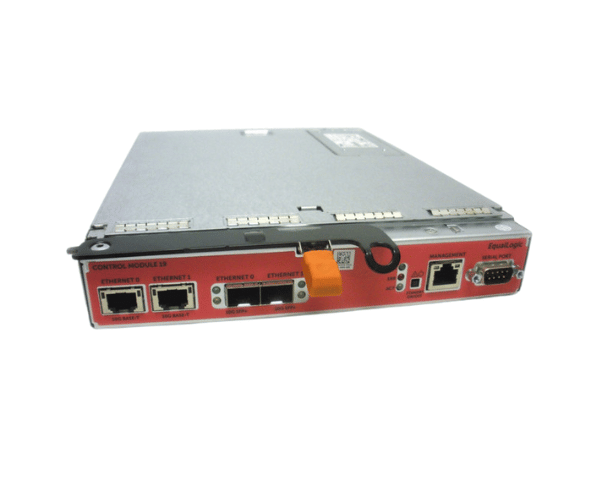
Introduction of Dell W56Y6 EqualLogic Type 19 Controller Module
The
Dell W56Y6 EqualLogic Type 19 Controller Module for PS4210 delivers high performance for storage management in enterprise environments. This controller module integrates seamlessly with the PS4210 storage arrays. It provides businesses with reliable and efficient data management capabilities. With advanced features and a robust design, the Dell W56Y6 ensures optimal performance and data integrity for mission-critical applications.
Why Choose the Dell W56Y6 EqualLogic Type 19 Controller Module?
Choosing the
Dell W56Y6 EqualLogic Controller Module means investing in a reliable and efficient solution for your storage needs. This controller module provides exceptional performance and scalability, enabling businesses to handle large volumes of data with ease. With support for multiple RAID levels, it offers flexibility in data protection and management. The advanced features of the Dell W56Y6 ensure high availability and optimal performance, making it an ideal choice for environments where uptime is critical.
User Experience
Users appreciate the performance and reliability of the
Dell W56Y6 Type 19 Controller Module. Many report significant improvements in data access speeds and overall storage efficiency. The module’s easy integration with existing systems allows for seamless upgrades, and its robust design ensures consistent performance even under heavy workloads. Additionally, users value the advanced features that provide enhanced data protection and recovery options.
Detailed Breakdown of Features
The
Dell W56Y6 EqualLogic Type 19 Controller offers a comprehensive set of features that significantly enhance storage performance. It supports data transfer rates of up to 10Gb/s per port, ensuring rapid data access and transfer. With 1GB of DDR3 cache memory, the controller optimizes read/write operations, reducing latency and improving overall efficiency. This controller module also supports various RAID levels, allowing users to configure storage based on their specific needs for redundancy and performance. Furthermore, the PCIe form factor ensures easy installation and compatibility with existing hardware setups.
Installation Steps
- Power Down the System: Make sure to turn off the server before installation.
- Open the Server Chassis: Remove the server cover to access the internal components.
- Locate the PCIe Slot: Identify an available PCIe slot on the motherboard for the controller module.
- Insert the Controller: Carefully insert the Dell controller into the PCIe slot until it is securely seated.
- Close the Server Chassis: Reattach the server cover, ensuring it is properly secured.
- Reconnect Power: Plug the server back in and power it on to complete the installation.
Where It Can Be Used?
The
Dell EqualLogic Type 19 Controller Module is suitable for various environments, including data centers, enterprise storage solutions, and cloud infrastructures. Its scalability and high performance make it ideal for organizations that manage large volumes of data and require reliable storage solutions.