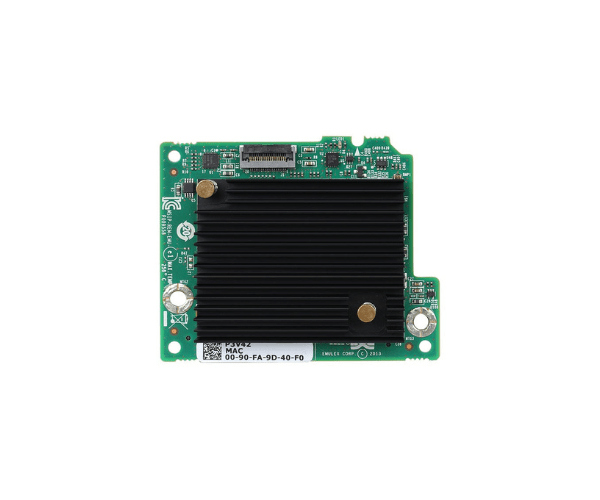
Introduction of Dell P3V42 Emulex 10GB 2-Port Converged Network Adapter
The Dell P3V42 Emulex 10GB 2-Port Converged Network Adapter is a high-performance networking solution designed to enhance server connectivity and data transfer efficiency. This converged network adapter combines Ethernet and Fibre Channel over Ethernet (FCoE) in a single device, offering versatile connectivity options and reducing the need for multiple adapters.
Why Choose the Dell P3V42 Emulex 10GB 2-Port Converged Network Adapter?
Choosing the Dell Converged Network Adapter ensures that your server benefits from enhanced network performance and versatility. This adapter supports both Ethernet and FCoE, making it a highly adaptable choice for various network configurations. With its dual-port design, the Dell P3V42 Emulex 10GB 2-Port Converged Network Adapter offers increased bandwidth and redundancy, ensuring reliable and efficient data transfer. Additionally, its low-profile form factor and energy-efficient design make it an ideal choice for modern data centers and enterprise environments.
User Experience
Users of the Dell Converged Network Adapter report significant improvements in network performance and connectivity. The dual-port configuration allows for simultaneous data transfers, reducing network congestion and improving overall efficiency. Installation is straightforward, and the adapter integrates seamlessly with existing network infrastructure. The support for multiple protocols, including Ethernet and FCoE, provides users with the flexibility to configure their networks according to their specific needs.
Key Features
- High Performance: The Dell Converged Network Adapter offers a 10Gbps data rate per port, ensuring fast and efficient data transfers.
- Dual-Port Design: Provides increased bandwidth and redundancy, enhancing network reliability.
- Versatile Connectivity: Supports both Ethernet and FCoE, making it suitable for various network configurations.
- Low Profile: Compact design allows for easy installation in space-constrained environments.
- Energy Efficient: Low power consumption helps reduce overall energy costs.
- Wide Compatibility: Compatible with multiple operating systems, including Windows, Linux, and VMware.
- Robust Protocol Support: Ensures seamless integration with existing network infrastructure.
- Easy Installation: Designed for straightforward installation and configuration.
- Enhanced Data Security: Supports advanced security features to protect data during transmission.
- Reliable Brand: Dell's reputation for quality and reliability ensures long-term performance and support.
Installation Steps
- Power Down Server: Turn off your server and unplug it from the power source.
- Open Server Case: Remove the server case cover to access the internal components.
- Locate PCIe Slot: Identify an available PCIe 2.0 x8 slot on the server motherboard.
- Insert Network Adapter: Carefully insert the Dell Converged Network Adapter into the PCIe slot.
- Secure Adapter: Use screws or clips to secure the adapter in place.
- Connect Cables: Attach the necessary network cables to the adapter ports.
- Close Server Case: Replace the server case cover and secure it.
- Power Up Server: Plug in and turn on your server.
- Install Drivers: Download and install the latest drivers and firmware from Dell's website.
- Configure Network: Use the included software to configure the desired network settings.
Where It Can Be Used?
The
Dell Emulex 10GB 2-Port Converged Network
Adapter is ideal for use in various server environments, including data centers, enterprise servers, SMB servers, and cloud computing. In data centers, it enhances network performance and connectivity, ensuring efficient and reliable operations. For enterprise servers, this adapter improves data transfer rates and network redundancy, making it suitable for business-critical applications. In SMB servers, it provides versatile connectivity options and robust network performance, catering to the needs of small to medium-sized businesses. Additionally, in cloud computing environments, the Dell 2-Port Converged Network Adapter ensures high-speed data transfer and secure network operations.