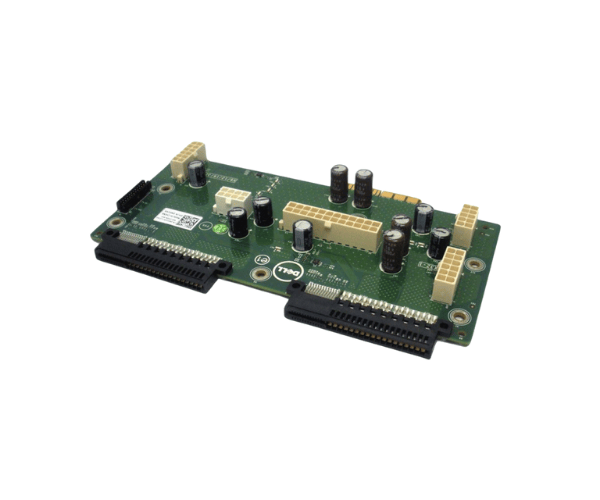
Introduction of Dell MDCVH PowerEdge T620 Power Distribution Board
The
Dell MDCVH PowerEdge T620 Power Distribution Board is a vital component for managing power efficiently in your server setup. This power distribution board ensures stable power delivery to the essential components of the Dell PowerEdge T620 server. With its robust design and high reliability, the Dell MDCVH board enhances the performance and longevity of your server by distributing power effectively.
Why Choose the Dell MDCVH PowerEdge T620 Power Distribution Board?
Choosing the
Dell MDCVH Distribution Board ensures that your server operates with optimal efficiency and reliability. This board effectively manages the distribution of power, thereby reducing the risk of power surges or interruptions that can lead to system failures. The design of this product emphasizes durability and compatibility with the Dell PowerEdge T620 server, making it an excellent choice for businesses that depend on stable server performance.
User Experience
Users report that the
Dell PowerEdge T620 Power Distribution Board significantly improves their server’s power management. Many appreciate the ease of installation and the peace of mind that comes with reliable power distribution. The board's ability to support dual power supplies further enhances the server's resilience, ensuring continuous operation even during power fluctuations.
Detailed Breakdown of Features
- Reliable Power Distribution: Ensures stable and efficient power delivery to all server components.
- Compatibility: Designed specifically for the Dell PowerEdge T620, ensuring a perfect fit.
- Durability: Built to last, providing long-term performance without frequent replacements.
- Plug-and-Play Installation: Easy to install without the need for additional tools.
- Active Cooling Support: Helps maintain optimal temperatures to protect components from overheating.
- Dual Power Supply Support: Increases redundancy and reliability by supporting two power supplies.
- Lightweight Design: Weighs only 2.5 lbs, making it easy to handle and install.
- Regulatory Compliance: Meets UL, CE, and FCC standards for safety and performance.
- Wide Operating Temperature Range: Can operate efficiently in various environments, from 0°C to 50°C.
- User-Friendly: Designed with intuitive connections for quick setup.
Installation Steps
- Power Down the Server: Completely shut down the server and unplug it from the power source.
- Locate the Power Distribution Board Slot: Find the designated slot for the power distribution board within the server chassis.
- Remove Existing Board (if applicable): If there is an old power distribution board, carefully disconnect and remove it.
- Install the New Power Distribution Board: Align the Dell Power Distribution Board with the slot and gently push it into place until it clicks.
- Reconnect Power Supply: Plug in the power cables and ensure they are securely connected.
- Power Up the Server: Turn on the server and check that the power distribution board is functioning correctly.
Where It Can Be Used?
The
Dell PowerEdge T620 Power Distribution Board is primarily used in Dell PowerEdge T620 servers but can also be compatible with other Dell PowerEdge systems that require effective power management solutions. It is suitable for data centers, corporate environments, and any situation where server reliability is crucial.