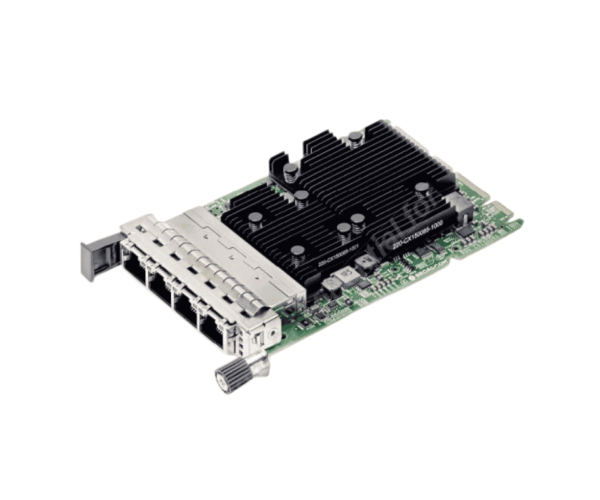
About Dell JJNC9 Broadcom 57454 Quad Port 10GbE Base-T Network Adapter
Dell JJNC9 Broadcom 57454 Quad Port 10GbE Base-T Network Adapter is a high-performance OCP 3.0 network interface card for enterprise-class servers. Featuring four RJ-45 10 Gigabit Ethernet ports supported by the Broadcom BCM57454 chipset, it provides stable, fast, and scalable network connectivity for data centers and virtualized environments.
Dell JJNC9 Broadcom 57454 Quad Port 10GbE Base-T Network Adapter in BD
In Bangladesh, the Dell JJNC9 Broadcom 57454 Quad Port 10GbE Base-T Network Adapter is available from authorized Dell resellers and server hardware vendors. Clients in Dhaka, Chittagong, and other locations can purchase this network card with the assurance of authentic Dell quality and support. Local partners also provide installation and configuration services based on data center requirements.
User Experience of Dell JJNC9 Broadcom 57454 Quad Port 10GbE Base-T Network Adapter
The clients using the Dell JJNC9 Broadcom 57454 Quad Port 10GbE Base-T Network Adapter value its connection reliability, low latency, and high throughput despite heavy network traffic. Quad ports allow for easy network segmentation, redundancy, and load balancing. The card performs impeccably with the newest drivers and firmware on Dell PowerEdge servers and is therefore deployed in mission-critical applications as a preferred choice.
Why Opt for Dell JJNC9 Broadcom 57454 Quad Port 10GbE Base-T Network Adapter?
Choosing the Dell JJNC9 Broadcom 57454 Quad Port 10GbE Base-T Network Adapter guarantees compatibility and maximum performance with Dell servers. It provides enterprise-class network speeds over standard copper cabling (RJ-45), reducing infrastructure costs without sacrificing bandwidth. The OCP 3.0 form factor allows easy installation and supports the latest PCIe standards, providing a future-proof solution for growing network demands.
Key Features
- Four 10GbE Base-T RJ-45 ports for high-speed copper connectivity
- Broadcom BCM57454 chipset for high performance
- OCP NIC 3.0 form factor for compatibility with new servers
- PCIe 3.0 x16 interface for fast data transfer
- Supports jumbo frames, VLAN tagging, and flow control
- PXE boot and Wake-on-LAN supported for remote management
- SR-IOV virtualization support for optimizing resources
- Link aggregation and advanced network protocols supported
How to Mount This Dell JJNC9 Broadcom 57454 Quad Port 10GbE Base-T Network Adapter?
- Mounting the Dell JJNC9 Broadcom 57454 Quad Port 10GbE Base-T Network Adapter is simple:
- Power off the server and unplug it.
- Open the server casing and locate a free PCIe x16 slot.
- Carefully insert the network adapter into the slot and push until it's seated.
- Secure the card using screws or brackets if required.
- Insert your Ethernet cables into the four RJ-45 ports.
- Close the casing and start the server.
- Verify the card is detected in BIOS and the OS.
- Download and install or update the latest drivers and firmware for optimal performance.
Why Buy From Crystal Vision Solution?
Crystal Vision Solutions offers the Dell JJNC9 Broadcom 57454 Quad Port 10GbE Base-T Network Adapter at competitive prices with excellent customer service and expert support. We ensure timely delivery, secure payments, and hassle-free returns, making it easy to purchase with confidence from a trusted supplier.