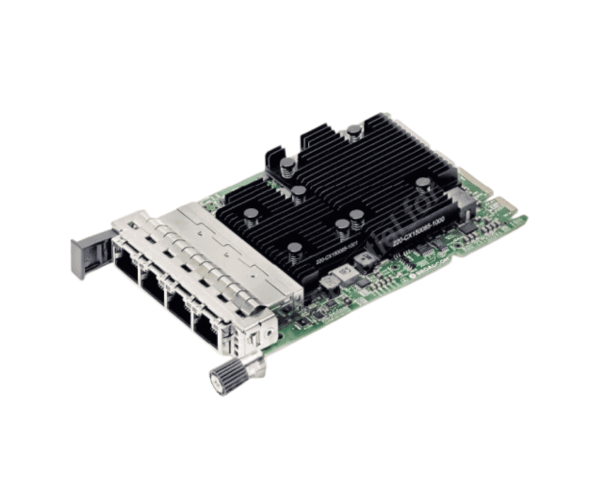
About the Dell Broadcom BCM957454 Quad Port 10GbE Base‑T Adapter
The Dell Broadcom BCM957454 Quad Port 10GbE Base‑T Adapter is a high-speed server network card with four 10 GbE RJ‑45 ports and OCP NIC 3.0 form factor. It supports low-latency, versatile, and dependable connectivity for high-bandwidth data center and enterprise applications.
Dell Broadcom BCM957454 Quad Port 10GbE Base‑T Adapter in Bangladesh
In Bangladesh, the Dell Broadcom BCM957454 Quad Port 10GbE Base‑T Adapter is supplied by server hardware vendors, system integrators, and IT infrastructure providers. As it is an OEM NIC that is specialized, you would need to be sure it is original and supported by warranty. There are some Dhaka-based resellers who even provide installation and compatibility testing for Dell server systems.
User Experience of Dell Broadcom BCM957454 Quad Port 10GbE Base‑T Adapter
Users enjoy strong stability with the Dell Broadcom BCM957454 Quad Port 10GbE Base‑T Adapter in high‑use environments such as virtualization, storage networking, and cloud. The adapter supports Dell server firmware and includes features such as PXE boot, VLANs, jumbo frames, and RoCE for RDMA use. In actual application, most find that the NIC provides consistent throughput with low CPU overhead, and is appropriate for multi‑tenant, east/west traffic.
Why Choose This Dell Broadcom BCM957454 Quad Port 10GbE Base‑T Adapter?
Choose the Dell Broadcom BCM957454 Quad Port 10GbE Base‑T Adapter since it is certified and optimized for Dell server platforms, offers maximum OEM compatibility, and supports high-end features that generic NICs do not. Using this very adapter precludes warnings about potential compatibility issues, ensures stability with high loads, and allows complete use of Dell firmware and management layers.
Key Features
- Four independent 10 GbE RJ‑45 ports (Base‑T)
- OCP NIC 3.0 form factor for new server chassis
- Broadcom BCM57454 chipset
- 1/2.5/5/10 GbE copper speeds support
- Low latency and high throughput design
- Offloads: RoCE, iWARP, TCP/IP offload, RDMA
- PXE boot, VLAN tagging, jumbo frames support
- Dell‑certified for server integration
How to Mount / Install
- To install the Dell Broadcom BCM957454 Quad Port 10GbE Base‑T Adapter:
- Turn off the server and disconnect all power cables.
- Open the server case to access the OCP NIC slot (or mezzanine slot if available).
- Insert the adapter into the OCP NIC 3.0 slot, connector and latch alignment.
- Secure the adapter with a retention screw or clip if required.
- Cable each port with Cat6a / Cat7 Ethernet cables (recommended for 10 GbE).
- Close the chassis and power on.
- In server BIOS / firmware or OS, verify detection of NIC and ports.
- Load or update appropriate drivers/firmware to support full features.
Why Buy From Crystal Vision Solution?
Crystal Vision Solutions offers the Dell Broadcom BCM957454 Quad Port 10GbE Base‑T Adapter at competitive prices with excellent customer service and expert support. We ensure timely delivery, secure payments, and hassle-free returns, making it easy to purchase with confidence from a trusted supplier.