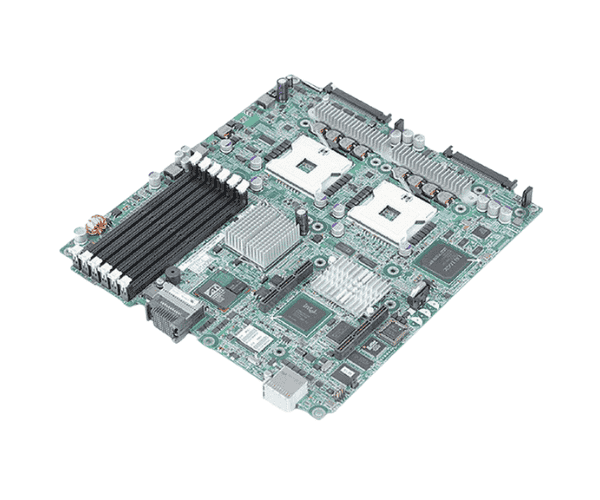
Introduction of Dell JG520 PowerEdge 1855 Blade Server System Motherboard
The
Dell JG520 PowerEdge 1855 Blade Server System Motherboard is engineered to deliver exceptional performance and reliability in a compact design. This motherboard is tailored for the Dell PowerEdge 1855 blade server, making it an ideal choice for businesses seeking to optimize their IT infrastructure. With advanced features and capabilities, it supports a wide range of applications while maximizing power efficiency.
Why Choose the Dell JG520 PowerEdge 1855 Blade Server System Motherboard?
Choosing the
Dell PowerEdge 1855 Blade Server System Motherboard means investing in a robust and scalable solution for your business needs. Its dual Intel Xeon processor support ensures high computational power, allowing you to handle demanding workloads with ease. Additionally, its compact blade design saves space while providing the flexibility needed for future upgrades. With Dell's reputation for quality and performance, this motherboard is a reliable choice for any data center or server environment.
User Experience
Users have reported a highly positive experience with the
Dell JG520 Server System Motherboard. Many have highlighted its ease of installation and configuration, along with its impressive performance in various applications. The redundancy features ensure that the system remains operational even during hardware failures, providing peace of mind. Overall, users appreciate the motherboard's stability, efficiency, and capability to support demanding tasks.
Detailed Breakdown of Features
- Trusted Brand: Dell is synonymous with quality and reliability, providing peace of mind for your investment.
- High-Performance Chipset: The Intel 5000X chipset enhances data handling and processing speeds.
- Dual CPU Support: Compatible with dual Intel Xeon 5100 series processors for optimal performance.
- Ample Memory Capacity: Supports up to 32 GB of DDR2 RAM, ideal for resource-intensive applications.
- Fast Network Connectivity: Equipped with dual Gigabit Ethernet for high-speed data transfers and networking.
- Expansion Possibilities: Features PCI Express slots for additional cards, enhancing system capabilities.
- Redundant Power Supply: Comes with dual 750W power supplies to ensure uninterrupted operation.
- Compact Blade Design: Space-saving architecture allows for efficient use of data center real estate.
- Scalability: Designed to grow with your business needs, accommodating future upgrades seamlessly.
- User-Friendly Interface: Simple setup and management tools make it easy for users to configure and monitor their systems.
Installation Steps
- Prepare Your Workspace: Ensure that your workspace is clean, organized, and free from static electricity.
- Remove the Existing Blade: Disconnect all cables and carefully slide the existing blade server out of the chassis.
- Install the CPUs: Align and securely install the dual Intel Xeon processors in their designated sockets.
- Add Memory Modules: Firmly seat the DDR2 DIMM modules into the memory slots.
- Connect Power Supply: Connect the power supply cables to the motherboard, ensuring a secure fit.
- Slide the Blade into the Chassis: Carefully slide the new motherboard back into the server chassis.
- Reconnect Cables: Attach any necessary cables and peripherals.
- Power On the System: Turn on the server and enter BIOS to verify that all components are recognized.
Where It Can Be Used?
The
Dell PowerEdge 1855 Blade Server System Motherboard offers versatility, making it ideal for various environments, including:
- Data Centers: Efficiently handle large data workloads.
- Virtualization: Support multiple virtual machines for enterprise applications.
- Web Hosting: Deliver reliable performance for hosting websites and web applications.
- Business Applications: Run business-critical software and databases effectively.
- Scientific Computing: Provide the high processing power needed by research institutions.