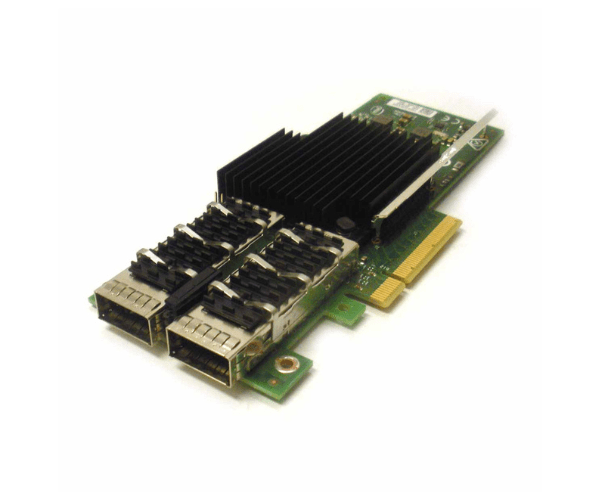
Introduction of Dell 8DKFV Intel XL710 2-Port 40GB QSFP+ Network Card
The Dell 8DKFV Intel XL710 2-Port 40GB QSFP+ Network Card is expertly engineered to provide high-speed, reliable network connectivity for demanding environments. This advanced network card delivers exceptional performance through its 40GB QSFP+ ports, making it indispensable for modern data centers, enterprise networks, and high-performance computing setups. Moreover, its design prioritizes efficiency and scalability, ensuring that data transfers remain seamless and network communication robust. Consequently, the Dell 8DKFV Intel XL710 significantly enhances network performance, meeting the rigorous demands of today’s data-intensive applications.
Why Choose the Dell 8DKFV Intel XL710 2-Port 40GB QSFP+ Network Card?
The Dell 8DKFV Intel XL710 Network Card stands out for its exceptional performance and reliability. With its dual 40GB QSFP+ ports, this network card delivers rapid data transfer, crucial for handling demanding network tasks. By choosing the Dell 8DKFV Intel XL710, you gain access to increased bandwidth and lower latency, both of which are essential for ensuring smooth operations in data-intensive environments. Furthermore, its straightforward integration and advanced features make it a top choice for addressing modern networking needs. As a result, this network card not only meets but exceeds the performance requirements of today’s high-speed networks.
User Experience
Users consistently praise the Dell 8DKFV Intel XL710 Network Card for its exceptional performance and reliability. The card’s high-speed ports enable efficient data handling, making it ideal for both enterprise and data center environments. Additionally, the installation process is straightforward, and it integrates seamlessly with various systems, including Windows, Linux, and VMware. Consequently, users appreciate the Dell 8DKFV Intel XL710 for its stability, speed, and ease of use in demanding network setups. Thus, this network card is favored for delivering consistent performance and simplifying complex network operations.
Key Features
- High-Speed Connectivity: Two 40GB QSFP+ ports for rapid data transfer.
- Advanced Performance: PCIe 3.0 x8 interface ensures high bandwidth and low latency.
- Robust Design: Built for demanding network environments.
- Versatile Compatibility: Supports Windows, Linux, and VMware.
- Easy Installation: User-friendly setup process.
- Reliable Operation: Designed to handle high-speed, high-volume data transfers.
- Efficient Cooling: Operates effectively within a wide temperature range.
Installation Steps
- Power Down System: Ensure the computer is turned off and unplugged.
- Open Computer Case: Remove the case cover to access the internal components.
- Locate PCIe Slot: Identify an available PCIe x8 slot on the motherboard.
- Insert Network Card: Gently insert the Dell 8DKFV Intel XL710 into the PCIe slot.
- Secure the Card: Fasten the card using screws or clips.
- Connect Cables: Attach the appropriate QSFP+ cables to the network card.
- Close Computer Case: Replace and secure the case cover.
- Reconnect Power: Plug the computer back in and turn it on.
- Install Drivers: Download and install the latest drivers from Intel’s website.
- Configure Network Settings: Adjust settings using the system’s network utility.
Where It Can Be Used?
The
Dell 8DKFV Intel XL710
Adapter excels in various high-performance networking scenarios. Specifically, it is exceptionally well-suited for enterprise data centers, large-scale network infrastructures, and high-performance computing environments. Moreover, this network card provides an excellent solution for any organization looking to enhance their network capabilities. By leveraging its advanced features, organizations can effectively manage large volumes of data and ensure seamless, efficient communication across their network. Consequently, whether you are upgrading existing infrastructure or setting up new systems, the Dell 8DKFV Intel XL710 Network Card is a powerful choice that meets demanding networking needs.



-70x60h.png "HP 860474-001 600W 100-240V WorkStation Power Supply")
