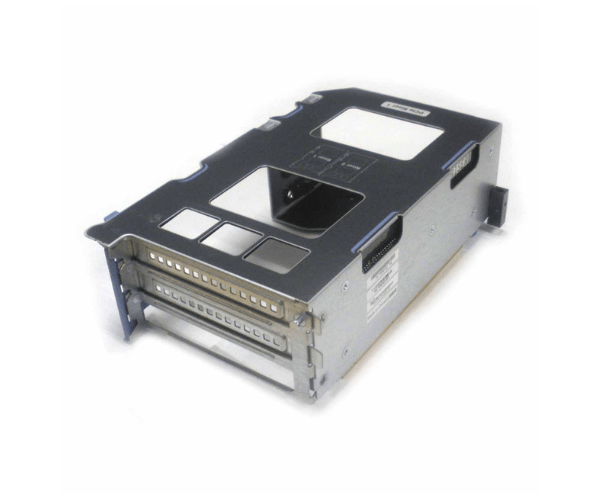
Introduction of Cisco UCSC-PCI-1B-240M4 PCIe Riser 1B for C240-M4
The Cisco UCSC-PCI-1B-240M4 PCIe Riser 1B for C240-M4 is a crucial component designed to enhance the expandability and versatility of your Cisco UCS C240-M4 servers. This PCIe riser card enables the addition of extra PCIe slots, allowing for expanded hardware capabilities. By integrating the Cisco UCSC-PCI-1B-240M4 PCIe Riser 1B, you can optimize your server's performance and adapt it to meet the growing demands of enterprise environments. This riser card seamlessly integrates with the C240-M4, ensuring that you can efficiently scale your server infrastructure while maintaining Cisco's high standards of reliability.
Why Choose Cisco UCSC-PCI-1B-240M4 PCIe Riser 1B?
Choosing the Cisco PCIe Riser 1B for C240-M4 ensures that you enhance your server’s flexibility and scalability. This riser card adds an additional PCIe slot to your Cisco UCS C240-M4 server, which is essential for accommodating new hardware components such as network cards, storage controllers, or GPUs. By opting for this riser card, you benefit from Cisco’s commitment to high performance and reliability. It integrates smoothly with your existing server setup, providing a simple yet effective solution for expanding your server’s capabilities.
User Experience
Users frequently appreciate the Cisco PCIe Riser 1B for its ease of installation and reliable performance. The installation process is straightforward, requiring minimal effort to integrate the riser card into the UCS C240-M4 server. After installation, users find that the additional PCIe slot significantly enhances their server's expandability. The riser card seamlessly integrates with existing hardware, ensuring smooth operation and improved functionality. IT professionals value the Cisco UCSC-PCI-1B-240M4 PCIe Riser 1B for its role in optimizing server performance and accommodating expanding needs.
Key Features
- Additional PCIe Slot: Provides 1 extra PCIe slot for expanding server capabilities.
- Compatibility: Specifically designed for Cisco UCS C240-M4 servers.
- Ease of Installation: Plug-and-play installation simplifies the integration process.
- High Performance: Maintains Cisco’s standards for reliability and performance.
- Flexibility: Enhances server adaptability by allowing the addition of new hardware components.
Installation Step
- Power Down the Server: Ensure the server is completely powered off and disconnected from any power source.
- Open the Server Case: Remove the server case or access panel to reveal the motherboard and available PCIe slots.
- Locate the PCIe Slot: Identify the appropriate slot on the motherboard for the Cisco UCSC-PCI-1B-240M4 PCIe Riser 1B.
- Insert the Riser Card: Align the Cisco PCIe Riser 1B with the PCIe slot and gently insert it until it is securely seated.
- Connect Hardware: Attach any necessary cables or components to the new PCIe slot.
- Close the Server Case: Reattach the server case or access panel securely.
- Power On the Server: Plug in and power on the server. The system should automatically recognize the new PCIe riser card.
Where it Can Be Used?
The
Cisco PCIe Riser 1B is ideal for enterprise data centers, corporate networks, and large-scale IT infrastructures using Cisco UCS C240-M4 servers. It is particularly useful in environments that require expanded PCIe capabilities, such as telecommunications facilities, financial institutions, healthcare centers, and educational institutions. This riser card enhances the server’s ability to handle additional hardware components, ensuring reliable performance and continuous uptime.